> ## Documentation Index
> Fetch the complete documentation index at: https://www.conductor.com/docs/llms.txt
> Use this file to discover all available pages before exploring further.
# Keyword Groups
> Review aggregate performance across the keywords in a group, with filters to focus on specific themes, regions, or business units.
The Keyword Groups report provides an overview of how the keywords in a keyword group are performing.
**Performance** > **Traditional Search** > **More** > [**Keyword** **Groups**](https://app.conductor.com/u/keyword-groups)
## Overview
### Determine the keyword groups you want to focus on
There are a number of ways you can drill down to focus on only those keyword groups you're interested in:
* Select the **web property** from which you want to see data
* Select whether you want to see keywords sorted by **True Rank** or **Standard Rank**.
* Choose the **location** and **device** you want to see results for:
* Choose the date range for which you want to see results:
 ### Review the data in the report
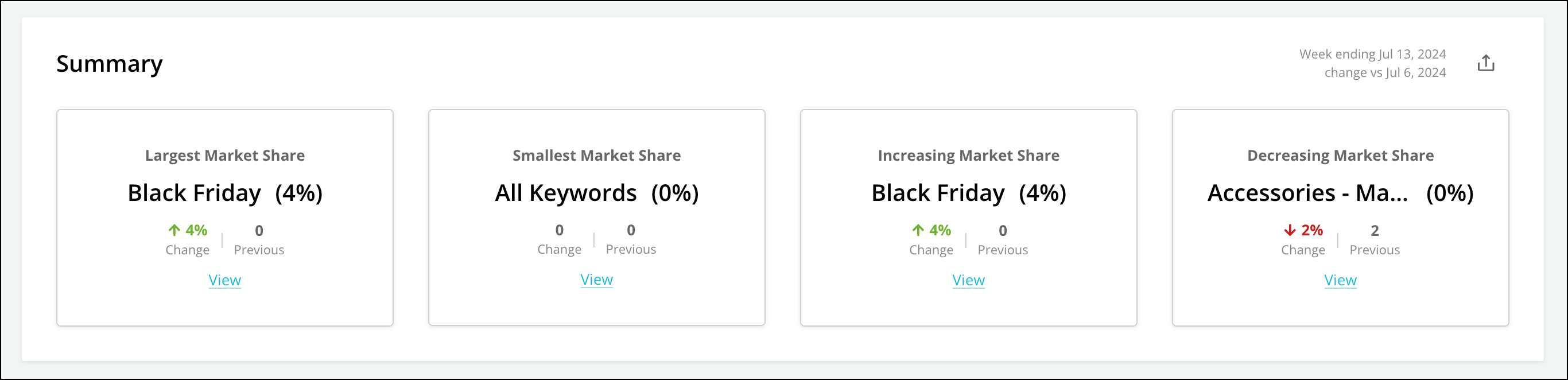
The summary bar reports the keyword group with the largest market share and the keyword group with the best content opportunity.
### Review the data in the report
The summary bar reports the keyword group with the largest market share and the keyword group with the best content opportunity.
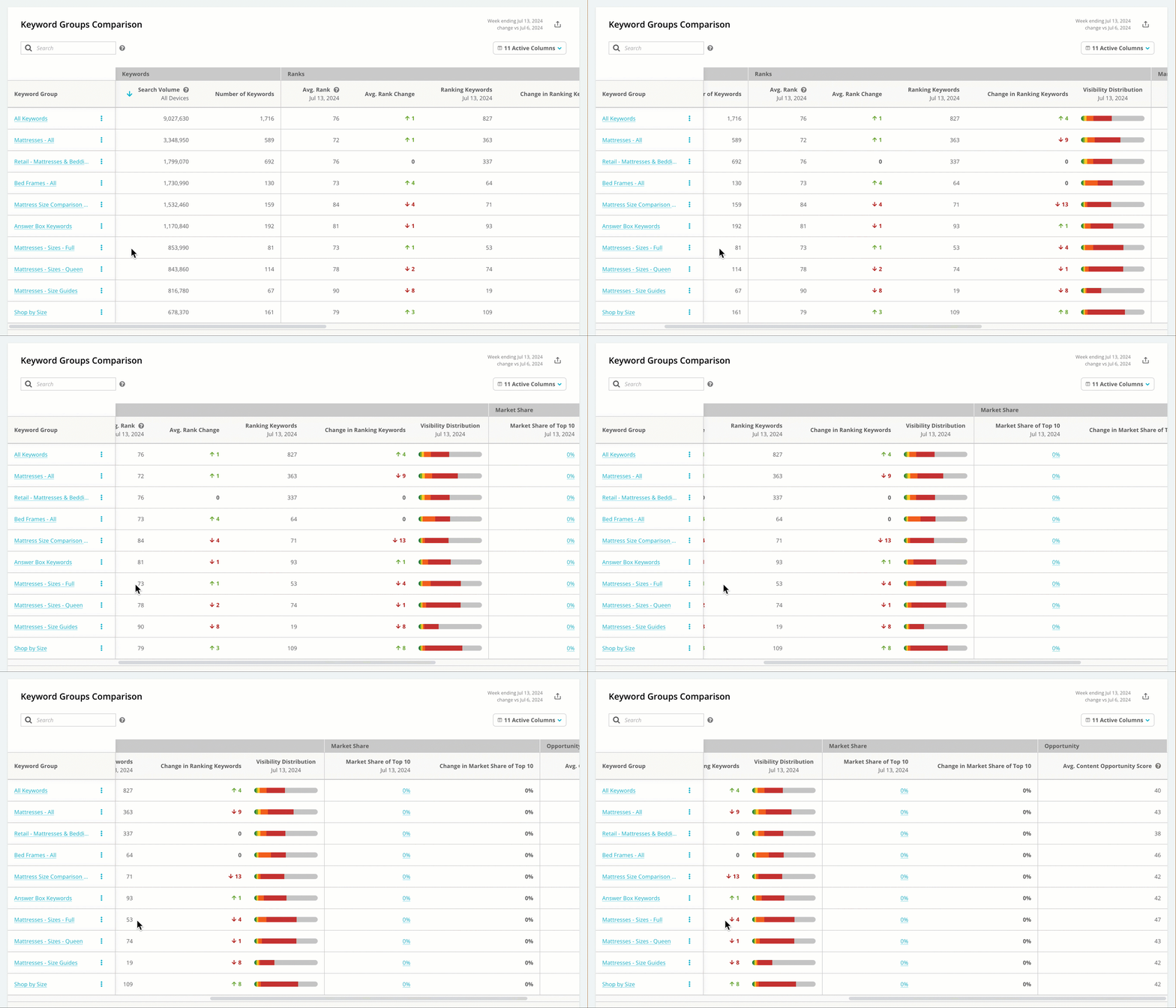
 The table includes the following columns to give you information on each of your keyword groups:
* **Keyword Group** **Name**. Click on a name in this column to jump to the Visibility Performance report, filtered for that keyword group.
* **Number of Searches** in the keyword group
* **Monthly Search Volume**
* **Visibility Distribution**
* **Average Rank**
* **Number of Searches Ranked in Top 100**
* **Market Share of Top 10**. Click on the value in this column to jump to the Market Share report, filtered for that keyword group.
* **Average Content Opportunity Score**. This score, on a scale of 1 to 100, reflects where you can prioritize your SEO efforts. The score is calculated based on search volume and rank.
The table includes the following columns to give you information on each of your keyword groups:
* **Keyword Group** **Name**. Click on a name in this column to jump to the Visibility Performance report, filtered for that keyword group.
* **Number of Searches** in the keyword group
* **Monthly Search Volume**
* **Visibility Distribution**
* **Average Rank**
* **Number of Searches Ranked in Top 100**
* **Market Share of Top 10**. Click on the value in this column to jump to the Market Share report, filtered for that keyword group.
* **Average Content Opportunity Score**. This score, on a scale of 1 to 100, reflects where you can prioritize your SEO efforts. The score is calculated based on search volume and rank.
 ## Using Keyword Groups
* [Use keywords rank to identify opportunities](https://app.conductor.com/u/community?ms_url=%2Fcourses%2Fa02cd5ee-d82e-41e8-b6f5-8bbd04830723%2Fstep%2F60973ca2-5d8e-49d8-8be9-65dbe21468bd)
* [Find content gaps across the customer journey with keyword groups](https://app.conductor.com/u/community?ms_url=%2Fcourses%2Fe658b180-d397-4557-9150-94300a99c78e%2Fstep%2F8d9fd815-0e71-49df-9a0a-498bd8f555de)
## FAQ
[Review this feature's frequently asked questions](/docs/intelligence/keyword-group-faqs/#the-keyword-groups-report)
## Using Keyword Groups
* [Use keywords rank to identify opportunities](https://app.conductor.com/u/community?ms_url=%2Fcourses%2Fa02cd5ee-d82e-41e8-b6f5-8bbd04830723%2Fstep%2F60973ca2-5d8e-49d8-8be9-65dbe21468bd)
* [Find content gaps across the customer journey with keyword groups](https://app.conductor.com/u/community?ms_url=%2Fcourses%2Fe658b180-d397-4557-9150-94300a99c78e%2Fstep%2F8d9fd815-0e71-49df-9a0a-498bd8f555de)
## FAQ
[Review this feature's frequently asked questions](/docs/intelligence/keyword-group-faqs/#the-keyword-groups-report)