> ## Documentation Index
> Fetch the complete documentation index at: https://www.conductor.com/docs/llms.txt
> Use this file to discover all available pages before exploring further.
# Codex
> Set up Conductor's MCP with OpenAI's Codex.
You can connect Conductor to OpenAI's Codex using a custom connector. Codex reads MCP server configuration from its config file, so you provide Conductor's MCP server URL along with an API token you generate in the Conductor platform.
### Available tools
Custom connections will always include the most up-to-date set of tools available, currently including:
* `tracked_configs`
* `ai_brand_insights`
* `ai_citation_insights`
* `keyword_insights`
[Learn more about the data you can access through these tools](/mcp/what-data-is-available-in-conductors-mcp).
## Configure Conductor in Codex
Configuring Conductor's MCP in Codex currently requires you to:
* Create an API token in the Conductor platform. Learn how: [Authenticating Custom Connection](https://www.conductor.com/docs/mcp/custom-connectors/#bearer-token-auth)
* Add Conductor as an MCP server in your Codex configuration.
Please reach out to your Conductor contact if you have questions about this process.
### Configure Your MCP Server in Codex
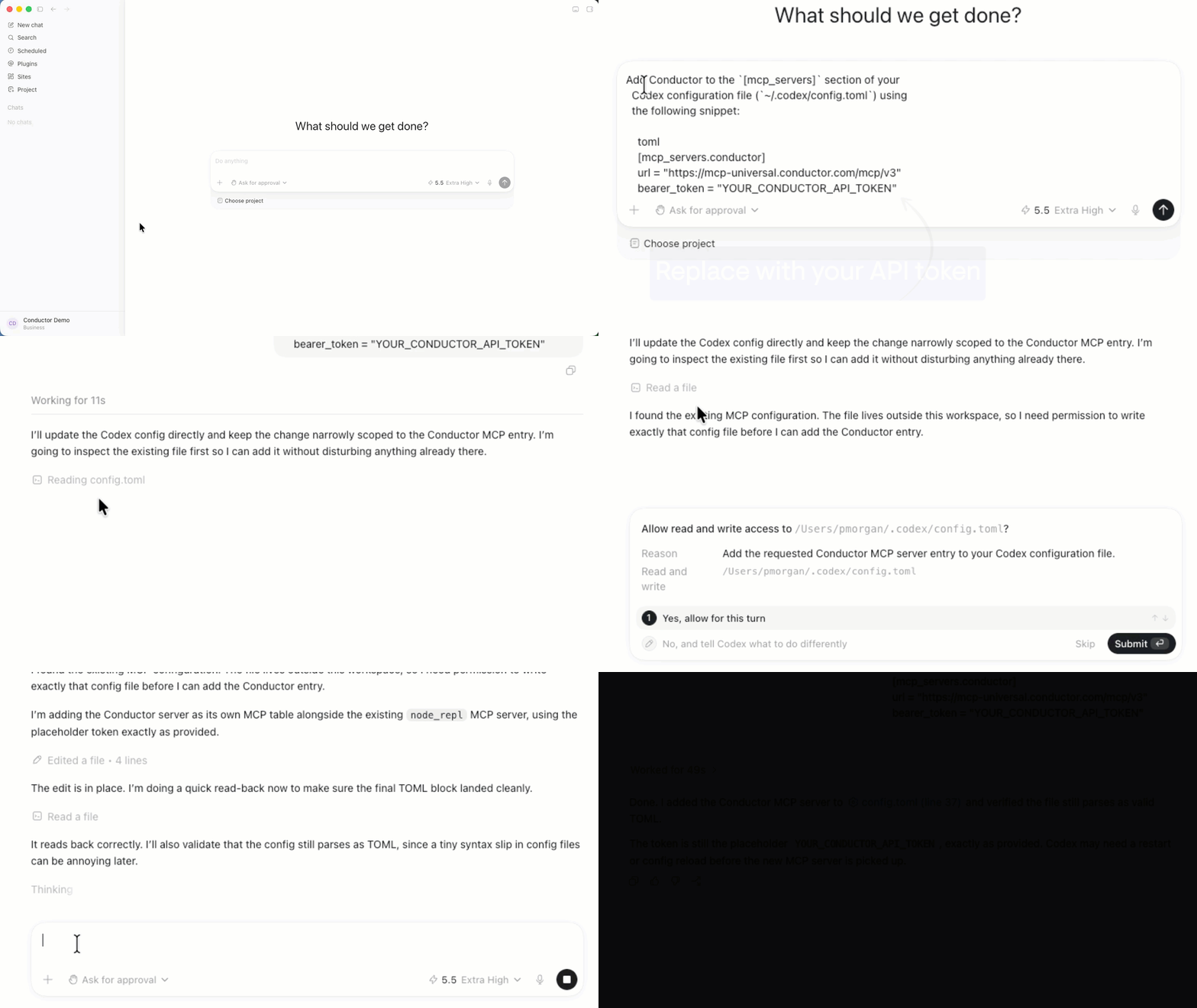
1. Start a new chat in Codex and request the following. Replace `YOUR_CONDUCTOR_API_TOKEN` with the token you generated in Conductor:
```
Add Conductor to the `[mcp_servers]` section of your
Codex configuration file (`~/.codex/config.toml`) using
the following snippet:
toml
[mcp_servers.conductor]
url = "https://mcp-universal.conductor.com/mcp/v3"
bearer_token = "YOUR_CONDUCTOR_API_TOKEN"
```
2. If necessary, permit Codex to edit your Codex configuration file.
3. After it finishes edits in the configuration file, restart Codex.
Your connection to Conductor's MCP server is complete.
 ### Query Your Data with Codex
Once connected, Codex can call Conductor's tools directly in your session. Ask Codex about your tracked configurations, AI brand and citation insights, or keyword insights, and it will use the Conductor MCP tools to answer.
## FAQs
[Review this feature's frequently asked questions](/mcp/mcp-faqs)
### Query Your Data with Codex
Once connected, Codex can call Conductor's tools directly in your session. Ask Codex about your tracked configurations, AI brand and citation insights, or keyword insights, and it will use the Conductor MCP tools to answer.
## FAQs
[Review this feature's frequently asked questions](/mcp/mcp-faqs)