> ## Documentation Index
> Fetch the complete documentation index at: https://www.conductor.com/docs/llms.txt
> Use this file to discover all available pages before exploring further.
# General Conductor Monitoring FAQs
> Answers to general questions about Conductor Monitoring, including its 24/7 real-time approach and trial details.
Conductor Monitoring is the only real-time 24/7 technical monitoring solution, offering unique capabilities that set it apart from competitors, including:
* **Real-time alerts**\
Conductor Monitoring crawls sites in real-time, alerting users about issues as they happen. With that immediate feedback you can move quickly to implement critical fixes to reduce traffic, ranking, and revenue loss from unaddressed technical issues.
* **24/7 crawling**\
Users don't have to push a button or schedule a crawl. You can have peace of mind knowing it is always running in the background and that you’ll be alerted of any issues the moment they come up—not after the fact.
* **Smarter, more personalized auditing**\
Unlike other auditing tools, when Conductor Monitoring's crawler discovers problematic areas of a site, it learns to check those areas more frequently than pages without detected issues. It continually optimizes and prioritizes high impact.
* **Integration with Conductor Intelligence**\
You can access Conductor Monitoring directly from your Conductor Intelligence account through our single sign-on and add and remove users through Conductor's user management activities.
Trials run 30 days.
If you are a Read-only user in Conductor, you'll need to reach out to a Standard or Admin user on your account. You can [read more about user types in this FAQ](/docs/monitoring/users-roles/#user-roles).
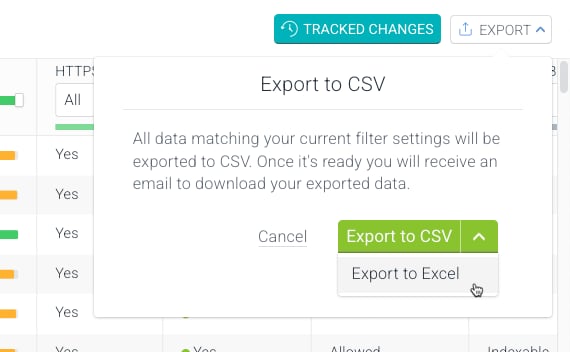
You can export data from Conductor Monitoring to do additional analysis.
1. Go to the report from which you want to generate a data export.
2. Click the **Export** button and, depending on the format you prefer:
* Click **Export to CSV**.
* Click the arrow to select **Export to Excel**.\\
 If you have only Conductor Monitoring and not also Conductor Creator or Conductor Intelligence, you can add, remove, or change user permissions for Conductor Monitoring from the **Account** settings in Monitoring. Learn how in the [Users & Roles](/docs/monitoring/users-roles/#adding-removing-and-changing-users) article.
If you do have Conductor Creator or Conductor Intelligence, you can add, remove, or change user permissions for Conductor Monitoring from Conductor Intelligence's [User Management activity](/docs/platform/user-setup-in-conductor-creator-and-conductor-intelligence/). Editing users' email settings can still be configured in Conductor Monitoring.
Just one! Conductor connects all of our customers' accounts to a single Conductor Monitoring account to streamline their experience between applications.
ContentKing is the former name of Conductor Website Monitoring—which became Conductor Monitoring in 2025. You may see references to ContentKing and Conductor Website Monitoring—especially in previous correspondence, older articles and training videos, or in other media on our site.
If you have only Conductor Monitoring and not also Conductor Creator or Conductor Intelligence, you can add, remove, or change user permissions for Conductor Monitoring from the **Account** settings in Monitoring. Learn how in the [Users & Roles](/docs/monitoring/users-roles/#adding-removing-and-changing-users) article.
If you do have Conductor Creator or Conductor Intelligence, you can add, remove, or change user permissions for Conductor Monitoring from Conductor Intelligence's [User Management activity](/docs/platform/user-setup-in-conductor-creator-and-conductor-intelligence/). Editing users' email settings can still be configured in Conductor Monitoring.
Just one! Conductor connects all of our customers' accounts to a single Conductor Monitoring account to streamline their experience between applications.
ContentKing is the former name of Conductor Website Monitoring—which became Conductor Monitoring in 2025. You may see references to ContentKing and Conductor Website Monitoring—especially in previous correspondence, older articles and training videos, or in other media on our site.