> ## Documentation Index
> Fetch the complete documentation index at: https://www.conductor.com/docs/llms.txt
> Use this file to discover all available pages before exploring further.
# Slack
> Send Conductor Monitoring alerts into Slack channels alongside or in place of email and Microsoft Teams.
You can configure alerts to be sent via email as well as via a messaging app: Slack or Microsoft Teams.
If you have both Slack integration and [Microsoft Teams](/docs/monitoring/microsoft-teams/) connected you can select either Slack or Microsoft Teams channels for the same alert definition.
## Alerts in Slack
Conductor Monitoring integrates with Slack, pushing important alerts right into any of your team's channels. You can read more about the Alerts in a dedicated article about [Alerts](/docs/monitoring/alerts/).
When an alert opens, it will be delivered to Slack right away, bringing your entire team up-to-speed at once and facilitating discussions:\\
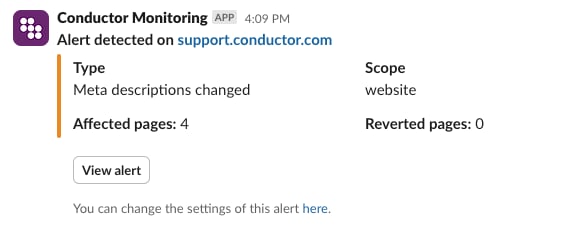 Conductor Monitoring will also send a notification to Slack once the alert incident has been resolved, keeping your whole team in the loop this way.
## Connect Slack to Conductor Monitoring
Setting up the integration couldn't be easier:
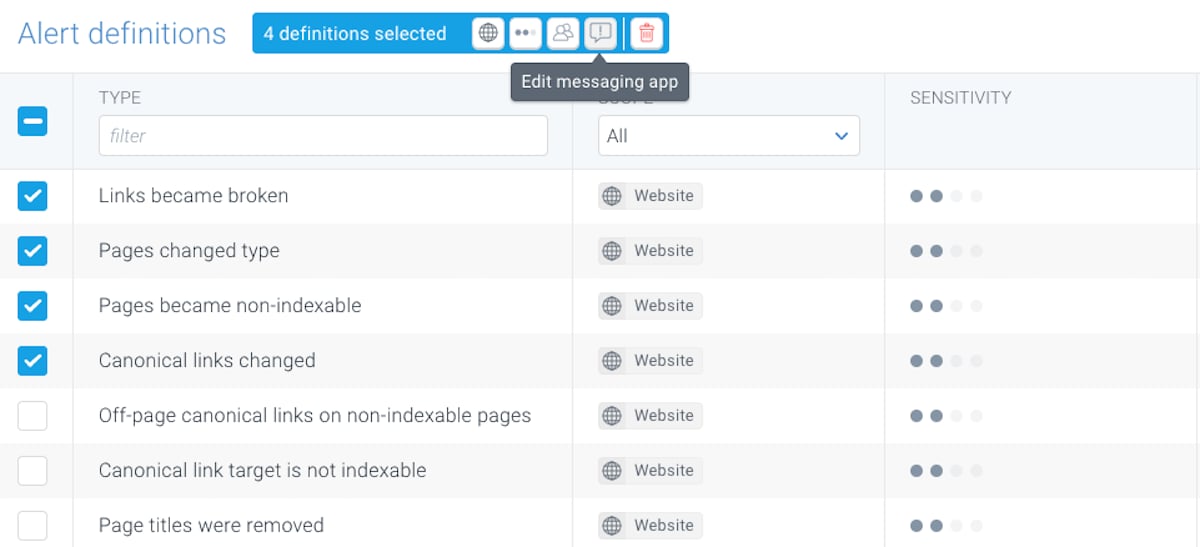
1. Go to **Alert definitions**.
2. Select all the alerts you want to send to Slack.
3. Click the **Edit messaging app** icon in the toolbar at the top.
4. In the window that appears, click **Connect** and follow the steps.\\
Conductor Monitoring will also send a notification to Slack once the alert incident has been resolved, keeping your whole team in the loop this way.
## Connect Slack to Conductor Monitoring
Setting up the integration couldn't be easier:
1. Go to **Alert definitions**.
2. Select all the alerts you want to send to Slack.
3. Click the **Edit messaging app** icon in the toolbar at the top.
4. In the window that appears, click **Connect** and follow the steps.\\
 #### Conductor Privacy Policy
If you would like to learn more about the information that Conductor collects and processes, please check out our [Privacy Policy](https://www.conductor.com/legal/privacy-policy/).
#### Conductor Privacy Policy
If you would like to learn more about the information that Conductor collects and processes, please check out our [Privacy Policy](https://www.conductor.com/legal/privacy-policy/).