> ## Documentation Index
> Fetch the complete documentation index at: https://www.conductor.com/docs/llms.txt
> Use this file to discover all available pages before exploring further.
# CMS API
> Trigger priority page audits in Conductor Monitoring via API as soon as content changes in your CMS.
## Getting Started
### Overview
Integrating the CMS API into your publishing workflow triggers priority auditing of the page you're working on for on-the-fly auditing. This allows you to see the results in Conductor Monitoring immediately after making a change.
### Note!
Conductor provides APIs for several different uses across its Conductor Monitoring and Conductor Intelligence products. This article describes Conductor Monitoring's CMS API. If you are looking for information about a different API offering, consider the following articles:
* [Conductor's Data API](/docs/api/introduction/)
* [Conductor Intelligence's Reporting API](/docs/other-apis/conductor-intelligences-legacy-reporting-api/)
* [Conductor Intelligence's User Management API](/docs/other-apis/user-management/conductors-user-management-api/)
* [Conductor Monitoring's Reporting API](/docs/other-apis/conductor-monitoring-reporting-api/)
* [Conductor Monitoring's Data Enrichment API](/docs/other-apis/data-enrichment-api/)
### How does the CMS API work?
The CMS API uses a single endpoint in Conductor Monitoring's Reporting v1 API. When you publish a new or edited page, you can send the URL in the request body to this endpoint to let Conductor Monitoring know that it should be prioritized for auditing.
### Authentication
#### Get your CMS API integration token
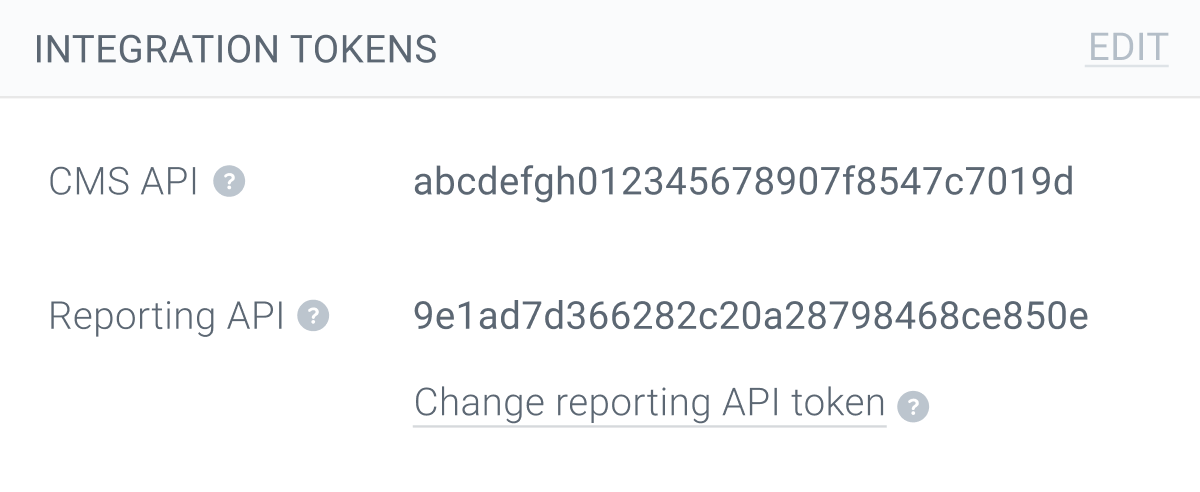
To use the CMS API you need to get your Conductor Monitoring account's CMS API token. You'll find it in the **Integration Tokens** section under the **Account** tab in the main **Account** section.
 #### Configure your request headers
To authenticate your requests, you need to include the following request headers:
```
Authorization: token {Your-CMS-API-Token}
Content-Type: application/json
```
### Note!
The value for the **Authorization** header must be the string "token" followed by a space and then your actual API token.
## Using the CMS API
### Prioritize a Page for Audit by Conductor Monitoring
#### [https://api.cm.conductor.com/v1/check\\\_url](https://api.cm.conductor.com/v1/check\\_url)
Every time you make a change through your CMS, such as adding, deleting, or changing a page, you need your website to call the Conductor Monitoring API with a POST request to this endpoint.
#### Request Body
```
{
"url": "https://www.example.com/url-to-check/"
}
```
### Note!
Don't forget to include the domain name and protocol (http or https) in your request.
#### Responses
| | |
| --- | ------------------------------------------------------------------------------------------------------------------------------------------------------------------------------------------------------------------------------------------------------------------------------------------------------------------------------------------------------------------------------------------------------------------------------------------------------------------------------------------------------------------------------------------------------------------------------------------------------------------------------------------------ |
| 200 | Successfully processed. The request was successfully processed and the page will be checked immediately. **Example** `{ "status" : "ok" }` |
| 400 | Bad Request: - Invalid URL. The URL is formatted incorrectly. Confirm that you sent a full URL, including the domain and protocol, not just the path - Unknown website. The website associated with the URL you sent doesn't exist in the Conductor Monitoring account belonging to the API token. **Examples** `{ "code": "invalid_url", "message": "Invalid url format provided.", "errors": [] }` `{ "code": "unknown_website", "message": "Website isn't registered in CK account.", "errors": [] }` |
| 401 | Unauthorized: - Missing token. The request was received, but it's lacking an authorization token and can therefore not be processed. Make sure to correctly set the Authorization header. - Failed. The request could not be processed because the supplied API token is invalid or expired. **Example** `{ "code": "auth_missing_token", "message": "Authentication token must be passed in Authorization HTTP header.", "errors": [] }` `{ "code": "auth_failed", "message": "Authentication token is expired or invalid.", "errors": [] }` |
| 422 | Authorization malformed. The request was received, but the authorization wasn't formatted correctly. Make sure to correctly set the Authorization header. **Example** `{ "code": "auth_malformed", "message": "Authorization HTTP header must conform to format described in docs.", "errors": [] }` |
## Need some help with integrating the CMS API?
In case you or your developer need any help with integrating the API [don't hesitate to reach out](/docs/platform/getting-help-with-conductor-products/). We're always happy to help!
#### Configure your request headers
To authenticate your requests, you need to include the following request headers:
```
Authorization: token {Your-CMS-API-Token}
Content-Type: application/json
```
### Note!
The value for the **Authorization** header must be the string "token" followed by a space and then your actual API token.
## Using the CMS API
### Prioritize a Page for Audit by Conductor Monitoring
#### [https://api.cm.conductor.com/v1/check\\\_url](https://api.cm.conductor.com/v1/check\\_url)
Every time you make a change through your CMS, such as adding, deleting, or changing a page, you need your website to call the Conductor Monitoring API with a POST request to this endpoint.
#### Request Body
```
{
"url": "https://www.example.com/url-to-check/"
}
```
### Note!
Don't forget to include the domain name and protocol (http or https) in your request.
#### Responses
| | |
| --- | ------------------------------------------------------------------------------------------------------------------------------------------------------------------------------------------------------------------------------------------------------------------------------------------------------------------------------------------------------------------------------------------------------------------------------------------------------------------------------------------------------------------------------------------------------------------------------------------------------------------------------------------------ |
| 200 | Successfully processed. The request was successfully processed and the page will be checked immediately. **Example** `{ "status" : "ok" }` |
| 400 | Bad Request: - Invalid URL. The URL is formatted incorrectly. Confirm that you sent a full URL, including the domain and protocol, not just the path - Unknown website. The website associated with the URL you sent doesn't exist in the Conductor Monitoring account belonging to the API token. **Examples** `{ "code": "invalid_url", "message": "Invalid url format provided.", "errors": [] }` `{ "code": "unknown_website", "message": "Website isn't registered in CK account.", "errors": [] }` |
| 401 | Unauthorized: - Missing token. The request was received, but it's lacking an authorization token and can therefore not be processed. Make sure to correctly set the Authorization header. - Failed. The request could not be processed because the supplied API token is invalid or expired. **Example** `{ "code": "auth_missing_token", "message": "Authentication token must be passed in Authorization HTTP header.", "errors": [] }` `{ "code": "auth_failed", "message": "Authentication token is expired or invalid.", "errors": [] }` |
| 422 | Authorization malformed. The request was received, but the authorization wasn't formatted correctly. Make sure to correctly set the Authorization header. **Example** `{ "code": "auth_malformed", "message": "Authorization HTTP header must conform to format described in docs.", "errors": [] }` |
## Need some help with integrating the CMS API?
In case you or your developer need any help with integrating the API [don't hesitate to reach out](/docs/platform/getting-help-with-conductor-products/). We're always happy to help!