> ## Documentation Index
> Fetch the complete documentation index at: https://www.conductor.com/docs/llms.txt
> Use this file to discover all available pages before exploring further.
# Conductor Intelligence's Legacy Reporting API
> Reference for Conductor's legacy Intelligence Reporting API, which provides programmatic access to account configuration and reports.
## Getting Started
### Overview
The Conductor Intelligence Reporting API provides secure, programmatic access to data in Conductor accounts. This API allows organizations to receive data about the current configuration of their accounts and to request reports related to those accounts.
Work with your IT or web team to build a connection.
### Note!
Conductor provides APIs for several different uses across its Conductor Monitoring and Conductor Intelligence products. This article describes Conductor Intelligence's Legacy Reporting API. If you are looking for information about a different API offering, consider the following articles:
* [Conductor's Data API](/docs/api/introduction/)
* [Conductor Intelligence's User Management API](/docs/other-apis/user-management/conductors-user-management-api/)
* [Conductor Monitoring's Reporting API](/docs/other-apis/conductor-monitoring-reporting-api/)
* [Conductor Monitoring's CMS API](/docs/other-apis/cms-api/)
* [Conductor Monitoring's Data Enrichment API](/docs/other-apis/data-enrichment-api/)
#### Base URL
The base URL for Conductor Intelligence's Reporting API is:
```
https://api.conductor.com
```
#### Python Package
To get a head-start on creating connections with the Conductor Reporting API, your team can use our [client Python package](https://pypi.org/project/conductor-api/), which helps:
* Improve ease of use for authenticating and accessing data from our Reporting API.
* Accelerate comprehensive analysis by providing an easy solution for aggregating SEO across Conductor accounts for deeper insights into search performance.
* Provide an out-of-the-box way to customize data exploration with a Pandas library to help manipulate, visualize, and analyze data.
### Authentication
Conductor uses a signed URL parameter to securely authenticate users. To create this signed parameter, you'll need the following building blocks:
* An **API Key**
* An API **Secret**
* The current time (expressed as seconds since the UNIX epoch: `unixEpochTimeSeconds`)
We'll deal with the first two building blocks before moving on to the third. Then we'll cover how to use all of them to build your full request, below.
#### 1. Generate your Conductor API Key and Secret
If you want to build connections with Conductor's public API, you'll need to generate a Key and Secret to use to make calls to the API.
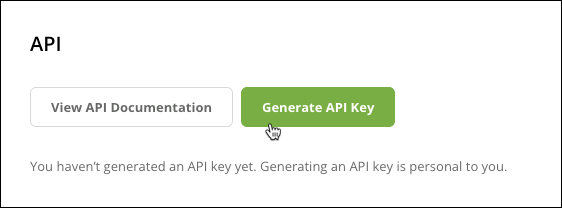
1. [**Click here**](https://app.conductor.com/u/api-key) or follow the path **Integrations** > **API** in Conductor.
2. Click **Generate API Key**.\\
 3. Click to copy your API Key and Secret to use in building your API calls.\\
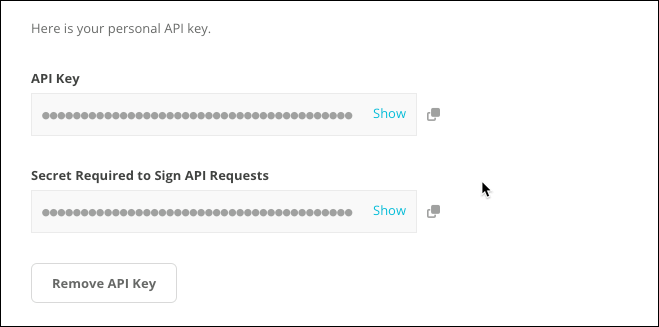 Temporarily save these values so you can reference them below—but be sure to delete or erase your notes after. You can always retrieve these values from the platform again.
#### 2. Generate Your Signed URL Parameter
A signature is a one-way MD5 hash of three values:
* A user's **API key**
* A user's **Secret**
* The current time expressed as seconds since the UNIX epoch (`unixEpochTimeSeconds`)
Your programming environment must provide the ability to do the following, which is part of the standard library for most programming languages:
* Get the current UNIX time in seconds.
* Compute MD5 hashes.
Note that, to allow for reasonable clock drift between your servers and Conductor's servers, the Conductor API considers a signature matching if it was signed within 5 minutes of the time on Conductor's servers.
### Code Examples
Review the Python samples below for computing the signature:
**Python 2**
```
import time
import hashlib
def gen_api_sig(api_key, shared_secret):
m = hashlib.md5()
m.update(api_key)
m.update(shared_secret)
epoch_sec = int(time.time())
m.update(str(epoch_sec))
digest = m.digest()
hex_digest = digest.encode('hex')
return hex_digest
```
**Python 3**
```
import time
import hashlib
def gen_api_sig(api_key, shared_secret):
m = hashlib.md5()
m.update(api_key.encode())
m.update(shared_secret.encode())
epoch_sec = int(time.time())
m.update(str(epoch_sec).encode())
hex_digest = m.hexdigest()
return hex_digest
```
#### 3. Build Your Request URL
You can build request URLs with the building blocks you now have:
* **Base URL:** `https://api.conductor.com`
* **Request Path:** This is your desired endpoint. Each endpoint is documented below.
* **Parameters:**
* `apiKey`\
This is your **API Key** generated in the platform.
* `sig`\
This is the signature you generated above.
```
https://api.conductor.com/{REQUEST PATH}?apiKey={YOUR API KEY}&sig={YOUR SIGNATURE}
```
### Other Notes
#### Responses
Responses from Conductor’s API are in JSON. To achieve the highest performance and minimize unnecessary requests, consider doing the following:
* Set your **Accept** header to `application/json`.
* Expect responses to have the **Content-Type** header with value `application/json`. Note that responses might include standard http cache-related or ETag headers.
#### Redirects
For maximum flexibility, reliability, and performance, the Conductor API may use standard http redirect functionality, such as 301 or 302 redirects. Configure your integration to allow for these redirects.
#### Data Warehousing
The Conductor API is a data warehousing API. It is meant for bulk transfers of data from one system to another where the destination is capable of processing that data without loading it all into memory—such as a MySQL database. As such, it is not well suited for online in-memory processing of that data—such as an interactive app.
We recommend that you use a mechanism for transferring data between systems without materializing or parsing it. For example, you might use curl or wget, and send the output to a file. The expectation is that the data is loaded into a backing store (like a relational database) for further querying and analysis. Using a JSON parser to attempt to parse or materialize the entire dataset will likely cause performance issues.
**Suggested Procedure for Warehousing**
To support the suggested data warehouse use case, we recommend the following procedure weekly (or daily, if your Conductor use case and configuration supports it). Note that this requires making multiple calls to different endpoints (described in the section at the end of this document) to retrieve associated data:
1. Get responses from the following endpoints described below and insert them into corresponding tables using each item’s identifier string as a unique key. Although items will never be removed from these lists, new items may be added and existing descriptive information may change:
1. [Available Search Engines](/docs/other-apis/conductor-intelligences-legacy-reporting-api/#get-a-list-of-available-search-engines-for-keyword-tracking)
2. [Available Locations](/docs/other-apis/conductor-intelligences-legacy-reporting-api/#get-a-list-of-available-locations-for-keyword-tracking)
3. [Available Devices](/docs/other-apis/conductor-intelligences-legacy-reporting-api/#get-a-list-of-available-devices-for-keyword-tracking)
Retrieve a [list of your platform accounts](/docs/other-apis/conductor-intelligences-legacy-reporting-api/#get-your-list-of-accounts), and for each active account returned that you want to reference, retrieve a [list of your web properties](/docs/other-apis/conductor-intelligences-legacy-reporting-api/#get-your-list-of-web-properties-for-an-account) that correspond to each account. Insert them into a corresponding table using their identifier strings as unique keys.
If you want, you can maintain their respective comparison web properties, each specific to a given search engine, in separate tables. Note that the same comparison web property may appear under multiple combinations of tracked web property and search engine, and with different labels.
1. For each tracked web property, request [your list of tracked keywords](/docs/other-apis/conductor-intelligences-legacy-reporting-api/#get-your-list-of-tracked-keywords) to retrieve the currently-configured tracked keywords (formerly called "searches") in those web properties. Use the [Available Search Engines](/docs/other-apis/conductor-intelligences-legacy-reporting-api/#get-a-list-of-available-search-engines-for-keyword-tracking), the [Available Locations](/docs/other-apis/conductor-intelligences-legacy-reporting-api/#get-a-list-of-available-locations-for-keyword-tracking), and the [Available Devices](/docs/other-apis/conductor-intelligences-legacy-reporting-api/#get-a-list-of-available-devices-for-keyword-tracking) endpoints to interpret the data associated with each tracked keyword.
2. For each combination of tracked web property and search engine, make a request to your [keyword rank performance report](/docs/other-apis/conductor-intelligences-legacy-reporting-api/#get-your-keyword-rank-performance-report) endpoint. Use [your list of tracked keywords](/docs/other-apis/conductor-intelligences-legacy-reporting-api/#get-your-list-of-tracked-keywords) and the [list of your web properties](/docs/other-apis/conductor-intelligences-legacy-reporting-api/#get-your-list-of-web-properties-for-an-account) to interpret the data associated with each report item.
### Test Out Your API Calls in Swagger UI
Dig into the documentation below to understand what data is available each resource and constituent endpoint. Then, use our [Swagger UI site](https://app.conductor.com/api-documentation/swagger-ui/index.html) to authenticate and test requests with interactive API documentation to see this API in action.
## Account Configuration Data
### Get Your List of Accounts
#### /v3/accounts
Returns a list of all Conductor platform accounts available to the user.
This is the primary entry point for accessing the API. Most subsequent requests can be made using URLs contained in response bodies.
#### Request Path Parameters
None
#### Query Parameters
None
#### Responses
| | |
| --- | ------------ |
| 200 | |
| 401 | Unauthorized |
### Get Your List of Web Properties for an Account
#### /v3/accounts/{accountId}/web-properties
Returns a list of all web properties (and their comparison web properties) tracked by a given account. Also get API links to other related information.
#### Request Path Parameters
[`accountId`](#account)(Required)
***
#### Query Parameters
None
#### Responses
| | |
| --- | ----------------------------------------------------------------------------------------------------------------------------------------------------------------------------------------------------------------------------------------------------------------------------------------------------------------------------------------------------------------------------------------------------------------------------------------------------------------------------------------------------------------------------------------------------------------------------------------------------------------------------------------------------------------------------------------------------------------------------------------------------------------------------------------------------------------------------------------------------------------------------------------------------------------------------------------------------------------------------------------------------- |
| 200 | `[ { "webPropertyId": "3283746", "name": "yoyodyne.com", "isActive": true, "trackedSearchList": "https://api.conductor.com/v3/accounts/13414534/web-properties/3283746/tracked-searches", "rankSourceInfo": [ { "rankSourceId": "1", "comparisonWebProperties": [ { "webPropertyId": "14520678", "name": "hypergolicenterprises.com", "label": "Competitor" } ], "reports": { "CURRENT": { "startDate": "2015-06-12T00:00:00Z", "endDate": "2015-06-18T23:59:59Z", "webPropertySearchVolumeReport": "https://api.conductor.com/v3/13414534/web-properties/3283746/rank-sources/1/tp/CURRENT/search-volumes", "webPropertyRankReport": "https://api.conductor.com/v3/13414534/web-properties/3283746/rank-sources/1/tp/CURRENT/serp-items", "timePeriodId": "273" } } } ] } ]` |
| 401 | Unauthorized |
### Get Your List of Keyword Groups
#### /v3/accounts/{accountId}/categories
Returns a list of an account's active keyword groups (formerly called "categories") and their constituent tracked keywords (formerly called "searches").
For smart keyword groups this endpoint returns all current tracked keywords at the time of endpoint engagement.
#### Request Path Parameters
[`accountId`](#account) (Required)
***
#### Query Parameters
None
#### Responses
| | |
| --- | ---------------------------------------------------------------------------------------------------------------------------------------------------------------------------------------------- |
| 200 | `[ { "name": "Branded Keywords", "trackedSearchIds": [ 789012, 34567 ], "created": "2015-01-01T17:58:07.000Z", "modified": "2015-01-02T17:58:07.000Z" } ]` |
| 401 | Unauthorized |
### Get Your List of Tracked Keywords
#### /v3/accounts/{accountId}/web-properties/{webPropertyId}/tracked-searches
Returns a list of a web property's configured tracked keywords (formerly called "searches"), for use when interpreting your [Keyword Rank Performance report](#get-your-keyword-rank-performance-report) endpoint.
#### Request Path Parameters
[`accountId`](#account) (Required)
***
[`webPropertyId`](#web-property) (Required)
***
#### Query Parameters
None
#### Responses
| | |
| --- | ------------------------------------------------------------------------------------------------------------------------------------------------------------------------------------------------------------------------------------------------------------------------- |
| 200 | `[ { "trackedSearchId": "3665365", "isActive": true, "preferredUrl": "http://us.yoyodyne.com/home/community-relations/", "queryPhrase": "San Francisco Chamber of Commerce", "locationId": "1", "rankSourceId": "1", "deviceId": "2" } ]` |
| 401 | Unauthorized |
### Get a List of Available Search Engines for Keyword Tracking
#### /v3/rank-sources
Returns a list of rank sources on which you can track keywords in a Conductor account. The combination of search engine and language are considered a single "rank source". For example, the following are four different search engines (what we call "rank sources" in our data model) with four different `rankSourceIds`:
* Google (United Kingdom / English)
* Google (US / Spanish)
* Google (Canada / English)
* Google (Canada / French)
#### Request Path Parameters
None
#### Query Parameters
None
#### Responses
| | |
| --- | ------------------------------------------------------------------------------------------------------------------------------------------------ |
| 200 | `[ { "rankSourceId": "4", "name": "GOOGLE_EN_CA", "description": "Google (Canada / English)", "baseDomain": "google.ca" } ]` |
| 401 | Unauthorized |
### Get a List of Available Locations for Keyword Tracking
#### /v3/locations
Lists all locations with descriptive information as needed to interpret results in your [list of tracked keywords](#get-your-list-of-tracked-keywords) results. Locations include countries, cities, regions, or any other locations that are supported in Conductor.
#### Request Path Parameters
None
#### Query Parameters
None
#### Responses
| | |
| --- | ------------------------------------------------------------------------ |
| 200 | `[ { "locationId": "3", "description": "United Kingdom" } ]` |
| 401 | Unauthorized |
### Get a List of Available Devices for Keyword Tracking
#### /v3/devices
Returns the list of supported devices associated with tracked keywords.
#### Request Path Parameters
None
#### Query Parameters
None
#### Responses
| | |
| --- | ------------------------------------------------------------------ |
| 200 | `[ { "deviceId": "2", "description": "Smartphone" } ]` |
| 401 | Unauthorized |
## Tracked Keywords and Ranks Data
### Get Your Keyword Rank Performance Report
#### /v3/{accountId}/web-properties/{webPropertyId}/rank-sources/{rankSourceId}/tp/{timePeriodId}/serp-items
This endpoint provides a report of each result on a particular combination of search engine and language (what we call a "rank source" in our data model) that appeared for keywords tracked in a web property during a single reporting time period at a weekly or daily frequency.
For some of the largest accounts that Conductor supports, clients should be prepared to digest reports up to 15MB gzip compressed with hundreds of thousands of search result items in them. Users may wish to process this report in a streaming fashion for import into their data warehouse if memory constraints are a consideration. Alternatively, you can limit the number of responses using the optional limit parameter\
documented below.
The items Conductor includes in this report are:
* Top Rankers: The top 10 results for any keyword, regardless of whether they belong to a tracked web property or a tracked comparison web property.
* Ranking results: Results that belong to a tracked web property.
* Ranking comparison results: Results that belong to a comparison web property configured for the web property and rank source requested.
* Results type: Results that are of a "universal" type—typically rich results such as image results or answer boxes.
It is possible for an item to satisfy more than one of these reasons for inclusion. For example, an item with CLASSIC\_RANK of 2 pointing at a web property would have two different reasons to be included in this report since it's both a top ranker and targeted at a web property.
*Update July 2022*
If your organization tracks any keywords at a daily frequency, the optional `reportingDuration` parameter set to DAY returns daily data. By default, the reportingDuration parameter is set to WEEK. You can change this to daily data by changing the reportingDuration parameter to DAY. See more information about configuring this parameter below.
#### Request Path Parameters
[`accountId`](#account) (Required)
***
[`webPropertyId`](#web-property) (Required)
***
[`rankSourceId`](#web-property) (Required)
***
[`timePeriodId`](#web-property) (Required)
***
#### Query Parameters
`reportingDuration` (Optional)
This parameter determines whether the data called reflects the weekly data collected by Conductor or the daily data. Note that only organizations that track daily data in Conductor will see results called through the API when it is set to DAY. By default, this parameter is set to WEEK. Note that when this parameter is set to DAY, the `timePeriodId` parameter should be formatted as YYYYMMDD. Note also that no daily data will be returned through API for requests using daily time periods more distant than 32 days from the current date. Conductor retains only 32 days of daily data.
* Available values : `WEEK`, `DAY`
* Default value : `WEEK`
***
`limit` (Optional)
The `limit` parameter limits the number of results that are returned by a call. This is useful if you are concerned about the size of your calls, which, depending on the configuration of the account, may be quite large. Or, you may find this useful for paginating through large sets of results when paired with the `skip` parameter. For example, you might set `limit=1000` and `skip=0` to call the results for the first thousand tracked keywords; then, `limit=1000`, `skip=1000` for results for the next thousand tracked keywords, and so on.
***
`skip` (Optional)
The `skip` parameter specifies the number of tracked keywords that the call will skip before returning data. This is useful for paginating through large sets of results when paired with the `limit` parameter. For example, you might set `limit=1000` and `skip=0` to call the results for the first thousand tracked keywords; then, `limit=1000`, `skip=1000` for results for the next thousand tracked keywords, and so on.
***
#### Responses
| | |
| --- | --------------------------------------------------------------------------------------------------------------------------------------------------------------------------------------------------------------------------------------------------------------------------------------------------------------------------------------------------------------- |
| 200 | `[ { "trackedSearchId": 3665365, "webPropertyId": 1189951, "targetDomainName": "yoyodyne.com", "itemType": "STANDARD_LINK", "target": "Yoyodyne Distributors", "targetUrl": "http://us.yoyodyne.com/home/community-relations/", "ranks": { "TRUE_RANK": 1, "UNIVERSAL_RANK": 3, "CLASSIC_RANK": 10 } } ]` |
| 401 | Unauthorized |
## Monthly Search Volume Data
### Get a Report with Your Keywords' Monthly Search Volumes
#### /v3/{accountId}/web-properties/{webPropertyId}/rank-sources/{rankSourceId}/tp/{timePeriodId}/search-volumes
Returns a list of all tracked keywords for a given web property; the average monthly search volume of the past 12 months for each tracked keyword; and the monthly search volume for each of the previous 12 months for each tracked keyword.
#### Request Path Parameters
[`accountId`](#account) (Required)
***
[`webPropertyId`](#web-property) (Required)
***
[`rankSourceId`](#web-property) (Required)
***
[`timePeriodId`](#web-property) (Required)
***
#### Query Parameters
None
#### Responses
| | |
| --- | ------------------------------------------------------------------------------------------------------------------------------------------------------------------------------------ |
| 200 | `[ { "averageVolume": 1700, "trackedSearchId": 3665366, "volumeItems": [ { "volume": 2900, "month": 7, "year": 2019 } ] } ]` |
| 401 | Unauthorized |
## Schemas and Definitions
### Account
#### `accountId`
Type: **string** | Example: `13434`
Indicates the numerical identification string for the returned Conductor account.
***
#### `name`
Type: **string** | Example: `yoyodyne.com`
Indicates the name associated with the Conductor account.
***
#### `isActive`
Type: **boolean** | Example: `true`
Indicates whether the account is active in Conductor or not.
***
#### `webProperties`
Type: **string** | Example: `https://api.conductor.com/v3/accounts/13434/web-properties`
The API URL of this account’s [Web Property List](/docs/other-apis/conductor-intelligences-legacy-reporting-api/#get-your-list-of-web-properties-for-an-account) endpoint.
***
### Web Property
#### `webPropertyId`
Type: **string** | Example: `3283746`
The web property’s numeric identifier string. This also appears in the `webPropertyId` object of the [Keyword Rank Performance Report](#get-your-keyword-rank-performance-report) and appears in Conductor platform URLs that are specific to web properties.
***
#### `name`
Type: **string** | Example: `yoyodyne.com`
The name associated in the platform with the web property.
***
#### `isActive`
Type: **boolean** | Example: `true`
Indicates whether the web property is currently active in Conductor or not.
***
#### `trackedSearchList`
Type: **string** | Example: `https://api.conductor.com/v3/accounts/13414534/web-properties/3283746/tracked-searches`
The API URL of this web property’s list of tracked keywords, found in the [Tracked Keywords](#get-your-list-of-tracked-keywords) endpoint.
***
#### `rankSourceInfo`
An array of objects describing a web property and its performance.
* `rankSourceId`:\
Type: **string** | Example: `1`\
The numeric identifier for the rank source. The combination of search engine provider, location, and language are considered a single "rank source". For example, Google (US / English).
* `comparisonWebProperties`:\
An array of objects that describe specific comparison web properties.
* `webPropertyId`:\
Type: **string** | Example: `14520678`\
The comparison web property’s numeric identifier string. This also appears in the webPropertyId column of the Client Web Property Rank Report and appears in Conductor platform URLs that include comparison web properties.
* `name`:\
Type: **string** | Example: `hypergolicenterprises.com`\
The name associated in the platform with the comparison web property.
* `label`:\
Type: **string** | Example: `Competitor` \
The comparison web property’s label, or "null" if none is configured.
* `reports`:\
An array of objects about a web property's performance.
* `startDate`:\
Type: **string** | Example: `2015-06-12T00:00:00Z`\
The (inclusive) beginning of this reporting period.
* `endDate`:\
Type: **string** | Example: `2015-06-18T23:59:59Z`\
The (inclusive) end of this reporting period.
* `webPropertySearchVolumeReport`:\
Type: **string** | Example: `https://api.conductor.com/v3/13414534/web-properties/3283746/rank-sources/1/tp/CURRENT/search-volumes`\
The API URL of this web property and rank source combination’s [Tracked Keywords Monthly Search Volume Report](#get-a-report-with-your-keywords-monthly-search-volumes) endpoint for this reporting period.
* `webPropertyRankReport`:\
Type: **string** | Example: `https://api.conductor.com/v3/13414534/web-properties/3283746/rank-sources/1/tp/CURRENT/serp-items`\
The API URL of this web property and rank source combination’s [Keyword Rank Performance Report](#get-your-keyword-rank-performance-report) for this reporting period.
* `timePeriodId`:\
Type: **string** | Example: `834`\
This reporting period’s numeric identifier string. Time period IDs can be inferred from URLs in the Conductor platform. For example, in the following legacy Keywords report URL, the report indicates that the time periods 832 and 834 are being compared:\
`https://api.conductor.com/12345/keywords?rankType=TRUE_RANK&compareTP=832&reportTP=834`\
New time periods always take the next subsequent integer from the current time period (i.e. time period 687 is followed by time period 688, 688 by 689, and so on).
***
### Keyword Group
#### `name`
Type: **string** | Example: `Branded Keywords`
The name associated in the platform with the keyword group.
***
#### `trackedSearchIds`
An array of the tracked keywords (active or inactive) that are members of the keyword group.
* `trackedSearchId`:\
Type: **integer** | Example: `789012`
* `created`:\
Type: **string** | Example: `2015-01-01T17:58:07.000Z`\
Date the keyword group was created.
* `modified`:\
Type: **string** | Example: `2015-01-02T17:58:07.000Z`\
The most recent date the keyword group was modified.
***
### Tracked Keyword
#### `trackedSearchId`
Type: **string** | Example: `3665365`
The numeric identifier of tracked keyword (active or inactive). This also appears in [Keyword Rank Performance Report](#get-your-keyword-rank-performance-report) endpoint’s `trackedSearchId` object.
***
#### `isActive`
Type: **boolean** | Example: `true`
Indicates whether the keyword is currently active in Conductor or not.
***
#### `preferredUrl`
Type: **string** | Example: `http://us.yoyodyne.com/home/community-relations/`
Indicates the preferred URL set for this tracked keyword. If no preferred URL is configured, the response is "null".
***
#### `queryPhrase`
Type: **string** | Example: `San Francisco Chamber of Commerce`
The keyword phrase string.
***
#### `locationId`
Type: **string** | Example: `1`
The numeric identifier of the location being tracked. This value also appears in the [Location List](#get-a-list-of-available-locations-for-keyword-tracking) endpoint.
***
#### `rankSourceId`
Type: **string** | Example: `1`
The numeric identifier for the search engine. The combination of search engine and language are considered a single "rank source". For example, "Google (US / English)". This value also appears in the `rankSourceInfo` object.
***
#### `deviceId`
Type: **string** | Example: `2`
The numeric identifier of the device type being tracked. This value appears in the [Device List](#get-a-list-of-available-devices-for-keyword-tracking) endpoint.
***
### Keyword Rank Item
#### `trackedSearchId`
Type: **integer** | Example: `3665365`
The tracked keyword’s identifier string, which also appears in the [Tracked Keywords List](#get-your-list-of-tracked-keywords) endpoint.
***
#### `webPropertyId`
Type: **integer** | Example: `1189951`
The web property’s numeric identifier string. This also appears in the `webPropertyId` object in the [Web Property List](#get-your-list-of-web-properties-for-an-account) endpoint and appears in Conductor platform URLs that are specific to web properties.
***
#### `targetDomainName`
Type: **string** | Example: `yoyodyne.com`
The root domain associated with the `targetURL`, when `targetURL` is present.
***
#### `itemType`
Type: **string** | Example: `STANDARD_LINK`
A string that represents Conductor's classification of that particular result type. This might be a standard blue link ("STANDARD\_LINK") or a universal result of one type or another (such as "IMAGE\_RESULT" or "VIDEO\_RESULT").
***
#### `target`
Type: **string** | Example: `Yoyodyne Distributors`
The text of the "blue link" for this result snippet—usually the HTML title tag (when not rewritten by the search engine). For non-universal results with no target text, this will be blank.
***
#### `targetUrl`
Type: **string** | Example: `http://us.yoyodyne.com/home/community-relations/`
The URL that is associated with this result, when present.
***
#### `ranks`
An array with the ranks associated with your results across different rank types. Potential values:
* `TRUE_RANK`:\
Type: **integer** | Example: `1`\
A number representing Conductor's True Rank for the result. True Rank is inclusive of standard link `itemType` and universal result `itemType`.
* `UNIVERSAL_RANK`:\
Type: **integer** | Example: `3`\
A number representing the rank within the set of results belonging to a particular result type. For example, if four IMAGE\_RESULT `itemType` are returned, the UNIVERSAL\_RANK will indicate ranks one through four of each image result on the search engine results page. This also applies to STANDARD\_LINK result types.
* `CLASSIC_RANK`:\
Type: **integer** | Example: `10`\
A number representing Conductor's Standard Rank (formerly called Classic Rank) for the result. CLASSIC\_RANK (Standard Rank) excludes universal `itemType`; it includes "just the classic blue links".
***
### Monthly Search Volume
Values related to the search volumes with tracked keywords in Conductor.
#### `averageVolume`
Type: **integer** | Example: `1700`
The number of times people have searched for the tracked keyword each month, averaged over the last twelve months.
***
#### `trackedSearchId`
Type: **integer** | Example: `3665366`
The numeric identifier of tracked keyword (active or inactive). This also appears in Tracked Keyword List endpoint.
***
#### `volumeItems`
An array of objects describing this tracked keyword's last twelve months of search volume data
* `volume`:\
Type: **integer** | Example: `2900`\
The search volume reported for the associated month and year.
* `month`:\
Type: **integer** | Example: `7`\
The month identifier of the data as represented by 1-12
* `year`:\
Type: **integer** | Example: `2019`\
The year identifier of the data as represented by YYYY
***
### Location
Values related to the locations for which you can track keywords in Conductor.
#### `locationId`
Type: **string** | Example: `3`
The numeric identifier of the location being tracked. This value also appears in the Tracked Search List endpoint.
***
#### `description`
Type: **string** | Example: `United Kingdom`
A user-facing identifying string.
***
### Device
Values related to the devices on which you can track keywords in Conductor.
#### `deviceId`
Type: **string** | Example: `2`
The numeric identifier of the device type being tracked. This value also appears in the Tracked Keywords List endpoint.
***
#### `description`
Type: **string** | Example: `Smartphone`
A user-facing identifying string.
### Search Engine
Values related to the combination of search engine and language ("rank source") associated with tracked keywords in Conductor.
#### `rankSourceId`
Type: **string** | Example: `4`
The numeric identifier for the rank source. This value also appears in the Rank Source List endpoint.
***
#### `name`
Type: **string** | Example: `GOOGLE_EN_CA`
The unique name associated with the rank source in the backend of Conductor, in the format SEARCH ENGINE PROVIDER\_LANGUAGE CODE\_COUNTRY CODE. For example; GOOGLE\_EN\_US.
***
#### `description`
Type: **string** | Example: `Google (Canada / English)`
The identifier for the rank source in the Conductor platform.
***
#### `baseDomain`
Type: **string** | Example: `google.ca`
The web domain associated with the rank source's search engine.
***
## FAQs
With the help of your IT or dev team, you can pull data related to:
* Your account configuration, including your accounts, web properties, keyword groups, keywords, tracked search engines, tracked locations, and tracked devices.
* Rank data for a particular rank source (that's the combination of a particular web property, search engine, location, and language).
* Search volumes for your tracked keywords.
By pulling this data from the API into a database at your organization, your IT or dev team can query the data in any number of ways that can provide insight and reporting depth that goes beyond what you see in the Conductor platform.
The Conductor Intelligence Reporting API can generally be connected to business intelligence tools just like other API applications. Contact your business intelligence team to learn how to use the API to send data to the tool you use.
Besides the technical specifications in this document, your dev team can find interactive documentation on our [SwaggerUI site](https://api.conductor.com/api-documentation/swagger-ui/index.html).
Better yet, to get a head-start on creating connections with the Conductor Reporting API, your team can use our [client Python package](https://pypi.org/project/conductor-api/), which helps:
* Improve ease of use for authenticating and accessing data from our Reporting API.
* Accelerate comprehensive analysis by providing an easy solution for aggregating SEO across Conductor accounts for deeper insights into search performance.
* Provide an out-of-the-box way to customize data exploration with a Pandas library to help manipulate, visualize, and analyze data.
To access the Conductor API, users must have an account in the Conductor platform. Usually, this means the team at your organization that is responsible for building your connection with the Conductor API does not have access initially.
[Admin users](/docs/platform/user-management-faqs/) in Conductor can quickly and easily [add any user at your organization](/docs/platform/user-setup-in-conductor-creator-and-conductor-intelligence/) to Conductor. Once the right person at your organization has access to Conductor, they can access the Conductor API.
By default, the Conductor API's call rate limit is set to 2 calls per second or 5,000 calls per day.
Conductor has a separate API to help you with user management. You can learn more in the [Conductor User Management API](/docs/other-apis/user-management/conductors-user-management-api/) article.
Temporarily save these values so you can reference them below—but be sure to delete or erase your notes after. You can always retrieve these values from the platform again.
#### 2. Generate Your Signed URL Parameter
A signature is a one-way MD5 hash of three values:
* A user's **API key**
* A user's **Secret**
* The current time expressed as seconds since the UNIX epoch (`unixEpochTimeSeconds`)
Your programming environment must provide the ability to do the following, which is part of the standard library for most programming languages:
* Get the current UNIX time in seconds.
* Compute MD5 hashes.
Note that, to allow for reasonable clock drift between your servers and Conductor's servers, the Conductor API considers a signature matching if it was signed within 5 minutes of the time on Conductor's servers.
### Code Examples
Review the Python samples below for computing the signature:
**Python 2**
```
import time
import hashlib
def gen_api_sig(api_key, shared_secret):
m = hashlib.md5()
m.update(api_key)
m.update(shared_secret)
epoch_sec = int(time.time())
m.update(str(epoch_sec))
digest = m.digest()
hex_digest = digest.encode('hex')
return hex_digest
```
**Python 3**
```
import time
import hashlib
def gen_api_sig(api_key, shared_secret):
m = hashlib.md5()
m.update(api_key.encode())
m.update(shared_secret.encode())
epoch_sec = int(time.time())
m.update(str(epoch_sec).encode())
hex_digest = m.hexdigest()
return hex_digest
```
#### 3. Build Your Request URL
You can build request URLs with the building blocks you now have:
* **Base URL:** `https://api.conductor.com`
* **Request Path:** This is your desired endpoint. Each endpoint is documented below.
* **Parameters:**
* `apiKey`\
This is your **API Key** generated in the platform.
* `sig`\
This is the signature you generated above.
```
https://api.conductor.com/{REQUEST PATH}?apiKey={YOUR API KEY}&sig={YOUR SIGNATURE}
```
### Other Notes
#### Responses
Responses from Conductor’s API are in JSON. To achieve the highest performance and minimize unnecessary requests, consider doing the following:
* Set your **Accept** header to `application/json`.
* Expect responses to have the **Content-Type** header with value `application/json`. Note that responses might include standard http cache-related or ETag headers.
#### Redirects
For maximum flexibility, reliability, and performance, the Conductor API may use standard http redirect functionality, such as 301 or 302 redirects. Configure your integration to allow for these redirects.
#### Data Warehousing
The Conductor API is a data warehousing API. It is meant for bulk transfers of data from one system to another where the destination is capable of processing that data without loading it all into memory—such as a MySQL database. As such, it is not well suited for online in-memory processing of that data—such as an interactive app.
We recommend that you use a mechanism for transferring data between systems without materializing or parsing it. For example, you might use curl or wget, and send the output to a file. The expectation is that the data is loaded into a backing store (like a relational database) for further querying and analysis. Using a JSON parser to attempt to parse or materialize the entire dataset will likely cause performance issues.
**Suggested Procedure for Warehousing**
To support the suggested data warehouse use case, we recommend the following procedure weekly (or daily, if your Conductor use case and configuration supports it). Note that this requires making multiple calls to different endpoints (described in the section at the end of this document) to retrieve associated data:
1. Get responses from the following endpoints described below and insert them into corresponding tables using each item’s identifier string as a unique key. Although items will never be removed from these lists, new items may be added and existing descriptive information may change:
1. [Available Search Engines](/docs/other-apis/conductor-intelligences-legacy-reporting-api/#get-a-list-of-available-search-engines-for-keyword-tracking)
2. [Available Locations](/docs/other-apis/conductor-intelligences-legacy-reporting-api/#get-a-list-of-available-locations-for-keyword-tracking)
3. [Available Devices](/docs/other-apis/conductor-intelligences-legacy-reporting-api/#get-a-list-of-available-devices-for-keyword-tracking)
Retrieve a [list of your platform accounts](/docs/other-apis/conductor-intelligences-legacy-reporting-api/#get-your-list-of-accounts), and for each active account returned that you want to reference, retrieve a [list of your web properties](/docs/other-apis/conductor-intelligences-legacy-reporting-api/#get-your-list-of-web-properties-for-an-account) that correspond to each account. Insert them into a corresponding table using their identifier strings as unique keys.
If you want, you can maintain their respective comparison web properties, each specific to a given search engine, in separate tables. Note that the same comparison web property may appear under multiple combinations of tracked web property and search engine, and with different labels.
1. For each tracked web property, request [your list of tracked keywords](/docs/other-apis/conductor-intelligences-legacy-reporting-api/#get-your-list-of-tracked-keywords) to retrieve the currently-configured tracked keywords (formerly called "searches") in those web properties. Use the [Available Search Engines](/docs/other-apis/conductor-intelligences-legacy-reporting-api/#get-a-list-of-available-search-engines-for-keyword-tracking), the [Available Locations](/docs/other-apis/conductor-intelligences-legacy-reporting-api/#get-a-list-of-available-locations-for-keyword-tracking), and the [Available Devices](/docs/other-apis/conductor-intelligences-legacy-reporting-api/#get-a-list-of-available-devices-for-keyword-tracking) endpoints to interpret the data associated with each tracked keyword.
2. For each combination of tracked web property and search engine, make a request to your [keyword rank performance report](/docs/other-apis/conductor-intelligences-legacy-reporting-api/#get-your-keyword-rank-performance-report) endpoint. Use [your list of tracked keywords](/docs/other-apis/conductor-intelligences-legacy-reporting-api/#get-your-list-of-tracked-keywords) and the [list of your web properties](/docs/other-apis/conductor-intelligences-legacy-reporting-api/#get-your-list-of-web-properties-for-an-account) to interpret the data associated with each report item.
### Test Out Your API Calls in Swagger UI
Dig into the documentation below to understand what data is available each resource and constituent endpoint. Then, use our [Swagger UI site](https://app.conductor.com/api-documentation/swagger-ui/index.html) to authenticate and test requests with interactive API documentation to see this API in action.
## Account Configuration Data
### Get Your List of Accounts
#### /v3/accounts
Returns a list of all Conductor platform accounts available to the user.
This is the primary entry point for accessing the API. Most subsequent requests can be made using URLs contained in response bodies.
#### Request Path Parameters
None
#### Query Parameters
None
#### Responses
| | |
| --- | ------------ |
| 200 | |
| 401 | Unauthorized |
### Get Your List of Web Properties for an Account
#### /v3/accounts/{accountId}/web-properties
Returns a list of all web properties (and their comparison web properties) tracked by a given account. Also get API links to other related information.
#### Request Path Parameters
[`accountId`](#account)(Required)
***
#### Query Parameters
None
#### Responses
| | |
| --- | ----------------------------------------------------------------------------------------------------------------------------------------------------------------------------------------------------------------------------------------------------------------------------------------------------------------------------------------------------------------------------------------------------------------------------------------------------------------------------------------------------------------------------------------------------------------------------------------------------------------------------------------------------------------------------------------------------------------------------------------------------------------------------------------------------------------------------------------------------------------------------------------------------------------------------------------------------------------------------------------------------- |
| 200 | `[ { "webPropertyId": "3283746", "name": "yoyodyne.com", "isActive": true, "trackedSearchList": "https://api.conductor.com/v3/accounts/13414534/web-properties/3283746/tracked-searches", "rankSourceInfo": [ { "rankSourceId": "1", "comparisonWebProperties": [ { "webPropertyId": "14520678", "name": "hypergolicenterprises.com", "label": "Competitor" } ], "reports": { "CURRENT": { "startDate": "2015-06-12T00:00:00Z", "endDate": "2015-06-18T23:59:59Z", "webPropertySearchVolumeReport": "https://api.conductor.com/v3/13414534/web-properties/3283746/rank-sources/1/tp/CURRENT/search-volumes", "webPropertyRankReport": "https://api.conductor.com/v3/13414534/web-properties/3283746/rank-sources/1/tp/CURRENT/serp-items", "timePeriodId": "273" } } } ] } ]` |
| 401 | Unauthorized |
### Get Your List of Keyword Groups
#### /v3/accounts/{accountId}/categories
Returns a list of an account's active keyword groups (formerly called "categories") and their constituent tracked keywords (formerly called "searches").
For smart keyword groups this endpoint returns all current tracked keywords at the time of endpoint engagement.
#### Request Path Parameters
[`accountId`](#account) (Required)
***
#### Query Parameters
None
#### Responses
| | |
| --- | ---------------------------------------------------------------------------------------------------------------------------------------------------------------------------------------------- |
| 200 | `[ { "name": "Branded Keywords", "trackedSearchIds": [ 789012, 34567 ], "created": "2015-01-01T17:58:07.000Z", "modified": "2015-01-02T17:58:07.000Z" } ]` |
| 401 | Unauthorized |
### Get Your List of Tracked Keywords
#### /v3/accounts/{accountId}/web-properties/{webPropertyId}/tracked-searches
Returns a list of a web property's configured tracked keywords (formerly called "searches"), for use when interpreting your [Keyword Rank Performance report](#get-your-keyword-rank-performance-report) endpoint.
#### Request Path Parameters
[`accountId`](#account) (Required)
***
[`webPropertyId`](#web-property) (Required)
***
#### Query Parameters
None
#### Responses
| | |
| --- | ------------------------------------------------------------------------------------------------------------------------------------------------------------------------------------------------------------------------------------------------------------------------- |
| 200 | `[ { "trackedSearchId": "3665365", "isActive": true, "preferredUrl": "http://us.yoyodyne.com/home/community-relations/", "queryPhrase": "San Francisco Chamber of Commerce", "locationId": "1", "rankSourceId": "1", "deviceId": "2" } ]` |
| 401 | Unauthorized |
### Get a List of Available Search Engines for Keyword Tracking
#### /v3/rank-sources
Returns a list of rank sources on which you can track keywords in a Conductor account. The combination of search engine and language are considered a single "rank source". For example, the following are four different search engines (what we call "rank sources" in our data model) with four different `rankSourceIds`:
* Google (United Kingdom / English)
* Google (US / Spanish)
* Google (Canada / English)
* Google (Canada / French)
#### Request Path Parameters
None
#### Query Parameters
None
#### Responses
| | |
| --- | ------------------------------------------------------------------------------------------------------------------------------------------------ |
| 200 | `[ { "rankSourceId": "4", "name": "GOOGLE_EN_CA", "description": "Google (Canada / English)", "baseDomain": "google.ca" } ]` |
| 401 | Unauthorized |
### Get a List of Available Locations for Keyword Tracking
#### /v3/locations
Lists all locations with descriptive information as needed to interpret results in your [list of tracked keywords](#get-your-list-of-tracked-keywords) results. Locations include countries, cities, regions, or any other locations that are supported in Conductor.
#### Request Path Parameters
None
#### Query Parameters
None
#### Responses
| | |
| --- | ------------------------------------------------------------------------ |
| 200 | `[ { "locationId": "3", "description": "United Kingdom" } ]` |
| 401 | Unauthorized |
### Get a List of Available Devices for Keyword Tracking
#### /v3/devices
Returns the list of supported devices associated with tracked keywords.
#### Request Path Parameters
None
#### Query Parameters
None
#### Responses
| | |
| --- | ------------------------------------------------------------------ |
| 200 | `[ { "deviceId": "2", "description": "Smartphone" } ]` |
| 401 | Unauthorized |
## Tracked Keywords and Ranks Data
### Get Your Keyword Rank Performance Report
#### /v3/{accountId}/web-properties/{webPropertyId}/rank-sources/{rankSourceId}/tp/{timePeriodId}/serp-items
This endpoint provides a report of each result on a particular combination of search engine and language (what we call a "rank source" in our data model) that appeared for keywords tracked in a web property during a single reporting time period at a weekly or daily frequency.
For some of the largest accounts that Conductor supports, clients should be prepared to digest reports up to 15MB gzip compressed with hundreds of thousands of search result items in them. Users may wish to process this report in a streaming fashion for import into their data warehouse if memory constraints are a consideration. Alternatively, you can limit the number of responses using the optional limit parameter\
documented below.
The items Conductor includes in this report are:
* Top Rankers: The top 10 results for any keyword, regardless of whether they belong to a tracked web property or a tracked comparison web property.
* Ranking results: Results that belong to a tracked web property.
* Ranking comparison results: Results that belong to a comparison web property configured for the web property and rank source requested.
* Results type: Results that are of a "universal" type—typically rich results such as image results or answer boxes.
It is possible for an item to satisfy more than one of these reasons for inclusion. For example, an item with CLASSIC\_RANK of 2 pointing at a web property would have two different reasons to be included in this report since it's both a top ranker and targeted at a web property.
*Update July 2022*
If your organization tracks any keywords at a daily frequency, the optional `reportingDuration` parameter set to DAY returns daily data. By default, the reportingDuration parameter is set to WEEK. You can change this to daily data by changing the reportingDuration parameter to DAY. See more information about configuring this parameter below.
#### Request Path Parameters
[`accountId`](#account) (Required)
***
[`webPropertyId`](#web-property) (Required)
***
[`rankSourceId`](#web-property) (Required)
***
[`timePeriodId`](#web-property) (Required)
***
#### Query Parameters
`reportingDuration` (Optional)
This parameter determines whether the data called reflects the weekly data collected by Conductor or the daily data. Note that only organizations that track daily data in Conductor will see results called through the API when it is set to DAY. By default, this parameter is set to WEEK. Note that when this parameter is set to DAY, the `timePeriodId` parameter should be formatted as YYYYMMDD. Note also that no daily data will be returned through API for requests using daily time periods more distant than 32 days from the current date. Conductor retains only 32 days of daily data.
* Available values : `WEEK`, `DAY`
* Default value : `WEEK`
***
`limit` (Optional)
The `limit` parameter limits the number of results that are returned by a call. This is useful if you are concerned about the size of your calls, which, depending on the configuration of the account, may be quite large. Or, you may find this useful for paginating through large sets of results when paired with the `skip` parameter. For example, you might set `limit=1000` and `skip=0` to call the results for the first thousand tracked keywords; then, `limit=1000`, `skip=1000` for results for the next thousand tracked keywords, and so on.
***
`skip` (Optional)
The `skip` parameter specifies the number of tracked keywords that the call will skip before returning data. This is useful for paginating through large sets of results when paired with the `limit` parameter. For example, you might set `limit=1000` and `skip=0` to call the results for the first thousand tracked keywords; then, `limit=1000`, `skip=1000` for results for the next thousand tracked keywords, and so on.
***
#### Responses
| | |
| --- | --------------------------------------------------------------------------------------------------------------------------------------------------------------------------------------------------------------------------------------------------------------------------------------------------------------------------------------------------------------- |
| 200 | `[ { "trackedSearchId": 3665365, "webPropertyId": 1189951, "targetDomainName": "yoyodyne.com", "itemType": "STANDARD_LINK", "target": "Yoyodyne Distributors", "targetUrl": "http://us.yoyodyne.com/home/community-relations/", "ranks": { "TRUE_RANK": 1, "UNIVERSAL_RANK": 3, "CLASSIC_RANK": 10 } } ]` |
| 401 | Unauthorized |
## Monthly Search Volume Data
### Get a Report with Your Keywords' Monthly Search Volumes
#### /v3/{accountId}/web-properties/{webPropertyId}/rank-sources/{rankSourceId}/tp/{timePeriodId}/search-volumes
Returns a list of all tracked keywords for a given web property; the average monthly search volume of the past 12 months for each tracked keyword; and the monthly search volume for each of the previous 12 months for each tracked keyword.
#### Request Path Parameters
[`accountId`](#account) (Required)
***
[`webPropertyId`](#web-property) (Required)
***
[`rankSourceId`](#web-property) (Required)
***
[`timePeriodId`](#web-property) (Required)
***
#### Query Parameters
None
#### Responses
| | |
| --- | ------------------------------------------------------------------------------------------------------------------------------------------------------------------------------------ |
| 200 | `[ { "averageVolume": 1700, "trackedSearchId": 3665366, "volumeItems": [ { "volume": 2900, "month": 7, "year": 2019 } ] } ]` |
| 401 | Unauthorized |
## Schemas and Definitions
### Account
#### `accountId`
Type: **string** | Example: `13434`
Indicates the numerical identification string for the returned Conductor account.
***
#### `name`
Type: **string** | Example: `yoyodyne.com`
Indicates the name associated with the Conductor account.
***
#### `isActive`
Type: **boolean** | Example: `true`
Indicates whether the account is active in Conductor or not.
***
#### `webProperties`
Type: **string** | Example: `https://api.conductor.com/v3/accounts/13434/web-properties`
The API URL of this account’s [Web Property List](/docs/other-apis/conductor-intelligences-legacy-reporting-api/#get-your-list-of-web-properties-for-an-account) endpoint.
***
### Web Property
#### `webPropertyId`
Type: **string** | Example: `3283746`
The web property’s numeric identifier string. This also appears in the `webPropertyId` object of the [Keyword Rank Performance Report](#get-your-keyword-rank-performance-report) and appears in Conductor platform URLs that are specific to web properties.
***
#### `name`
Type: **string** | Example: `yoyodyne.com`
The name associated in the platform with the web property.
***
#### `isActive`
Type: **boolean** | Example: `true`
Indicates whether the web property is currently active in Conductor or not.
***
#### `trackedSearchList`
Type: **string** | Example: `https://api.conductor.com/v3/accounts/13414534/web-properties/3283746/tracked-searches`
The API URL of this web property’s list of tracked keywords, found in the [Tracked Keywords](#get-your-list-of-tracked-keywords) endpoint.
***
#### `rankSourceInfo`
An array of objects describing a web property and its performance.
* `rankSourceId`:\
Type: **string** | Example: `1`\
The numeric identifier for the rank source. The combination of search engine provider, location, and language are considered a single "rank source". For example, Google (US / English).
* `comparisonWebProperties`:\
An array of objects that describe specific comparison web properties.
* `webPropertyId`:\
Type: **string** | Example: `14520678`\
The comparison web property’s numeric identifier string. This also appears in the webPropertyId column of the Client Web Property Rank Report and appears in Conductor platform URLs that include comparison web properties.
* `name`:\
Type: **string** | Example: `hypergolicenterprises.com`\
The name associated in the platform with the comparison web property.
* `label`:\
Type: **string** | Example: `Competitor` \
The comparison web property’s label, or "null" if none is configured.
* `reports`:\
An array of objects about a web property's performance.
* `startDate`:\
Type: **string** | Example: `2015-06-12T00:00:00Z`\
The (inclusive) beginning of this reporting period.
* `endDate`:\
Type: **string** | Example: `2015-06-18T23:59:59Z`\
The (inclusive) end of this reporting period.
* `webPropertySearchVolumeReport`:\
Type: **string** | Example: `https://api.conductor.com/v3/13414534/web-properties/3283746/rank-sources/1/tp/CURRENT/search-volumes`\
The API URL of this web property and rank source combination’s [Tracked Keywords Monthly Search Volume Report](#get-a-report-with-your-keywords-monthly-search-volumes) endpoint for this reporting period.
* `webPropertyRankReport`:\
Type: **string** | Example: `https://api.conductor.com/v3/13414534/web-properties/3283746/rank-sources/1/tp/CURRENT/serp-items`\
The API URL of this web property and rank source combination’s [Keyword Rank Performance Report](#get-your-keyword-rank-performance-report) for this reporting period.
* `timePeriodId`:\
Type: **string** | Example: `834`\
This reporting period’s numeric identifier string. Time period IDs can be inferred from URLs in the Conductor platform. For example, in the following legacy Keywords report URL, the report indicates that the time periods 832 and 834 are being compared:\
`https://api.conductor.com/12345/keywords?rankType=TRUE_RANK&compareTP=832&reportTP=834`\
New time periods always take the next subsequent integer from the current time period (i.e. time period 687 is followed by time period 688, 688 by 689, and so on).
***
### Keyword Group
#### `name`
Type: **string** | Example: `Branded Keywords`
The name associated in the platform with the keyword group.
***
#### `trackedSearchIds`
An array of the tracked keywords (active or inactive) that are members of the keyword group.
* `trackedSearchId`:\
Type: **integer** | Example: `789012`
* `created`:\
Type: **string** | Example: `2015-01-01T17:58:07.000Z`\
Date the keyword group was created.
* `modified`:\
Type: **string** | Example: `2015-01-02T17:58:07.000Z`\
The most recent date the keyword group was modified.
***
### Tracked Keyword
#### `trackedSearchId`
Type: **string** | Example: `3665365`
The numeric identifier of tracked keyword (active or inactive). This also appears in [Keyword Rank Performance Report](#get-your-keyword-rank-performance-report) endpoint’s `trackedSearchId` object.
***
#### `isActive`
Type: **boolean** | Example: `true`
Indicates whether the keyword is currently active in Conductor or not.
***
#### `preferredUrl`
Type: **string** | Example: `http://us.yoyodyne.com/home/community-relations/`
Indicates the preferred URL set for this tracked keyword. If no preferred URL is configured, the response is "null".
***
#### `queryPhrase`
Type: **string** | Example: `San Francisco Chamber of Commerce`
The keyword phrase string.
***
#### `locationId`
Type: **string** | Example: `1`
The numeric identifier of the location being tracked. This value also appears in the [Location List](#get-a-list-of-available-locations-for-keyword-tracking) endpoint.
***
#### `rankSourceId`
Type: **string** | Example: `1`
The numeric identifier for the search engine. The combination of search engine and language are considered a single "rank source". For example, "Google (US / English)". This value also appears in the `rankSourceInfo` object.
***
#### `deviceId`
Type: **string** | Example: `2`
The numeric identifier of the device type being tracked. This value appears in the [Device List](#get-a-list-of-available-devices-for-keyword-tracking) endpoint.
***
### Keyword Rank Item
#### `trackedSearchId`
Type: **integer** | Example: `3665365`
The tracked keyword’s identifier string, which also appears in the [Tracked Keywords List](#get-your-list-of-tracked-keywords) endpoint.
***
#### `webPropertyId`
Type: **integer** | Example: `1189951`
The web property’s numeric identifier string. This also appears in the `webPropertyId` object in the [Web Property List](#get-your-list-of-web-properties-for-an-account) endpoint and appears in Conductor platform URLs that are specific to web properties.
***
#### `targetDomainName`
Type: **string** | Example: `yoyodyne.com`
The root domain associated with the `targetURL`, when `targetURL` is present.
***
#### `itemType`
Type: **string** | Example: `STANDARD_LINK`
A string that represents Conductor's classification of that particular result type. This might be a standard blue link ("STANDARD\_LINK") or a universal result of one type or another (such as "IMAGE\_RESULT" or "VIDEO\_RESULT").
***
#### `target`
Type: **string** | Example: `Yoyodyne Distributors`
The text of the "blue link" for this result snippet—usually the HTML title tag (when not rewritten by the search engine). For non-universal results with no target text, this will be blank.
***
#### `targetUrl`
Type: **string** | Example: `http://us.yoyodyne.com/home/community-relations/`
The URL that is associated with this result, when present.
***
#### `ranks`
An array with the ranks associated with your results across different rank types. Potential values:
* `TRUE_RANK`:\
Type: **integer** | Example: `1`\
A number representing Conductor's True Rank for the result. True Rank is inclusive of standard link `itemType` and universal result `itemType`.
* `UNIVERSAL_RANK`:\
Type: **integer** | Example: `3`\
A number representing the rank within the set of results belonging to a particular result type. For example, if four IMAGE\_RESULT `itemType` are returned, the UNIVERSAL\_RANK will indicate ranks one through four of each image result on the search engine results page. This also applies to STANDARD\_LINK result types.
* `CLASSIC_RANK`:\
Type: **integer** | Example: `10`\
A number representing Conductor's Standard Rank (formerly called Classic Rank) for the result. CLASSIC\_RANK (Standard Rank) excludes universal `itemType`; it includes "just the classic blue links".
***
### Monthly Search Volume
Values related to the search volumes with tracked keywords in Conductor.
#### `averageVolume`
Type: **integer** | Example: `1700`
The number of times people have searched for the tracked keyword each month, averaged over the last twelve months.
***
#### `trackedSearchId`
Type: **integer** | Example: `3665366`
The numeric identifier of tracked keyword (active or inactive). This also appears in Tracked Keyword List endpoint.
***
#### `volumeItems`
An array of objects describing this tracked keyword's last twelve months of search volume data
* `volume`:\
Type: **integer** | Example: `2900`\
The search volume reported for the associated month and year.
* `month`:\
Type: **integer** | Example: `7`\
The month identifier of the data as represented by 1-12
* `year`:\
Type: **integer** | Example: `2019`\
The year identifier of the data as represented by YYYY
***
### Location
Values related to the locations for which you can track keywords in Conductor.
#### `locationId`
Type: **string** | Example: `3`
The numeric identifier of the location being tracked. This value also appears in the Tracked Search List endpoint.
***
#### `description`
Type: **string** | Example: `United Kingdom`
A user-facing identifying string.
***
### Device
Values related to the devices on which you can track keywords in Conductor.
#### `deviceId`
Type: **string** | Example: `2`
The numeric identifier of the device type being tracked. This value also appears in the Tracked Keywords List endpoint.
***
#### `description`
Type: **string** | Example: `Smartphone`
A user-facing identifying string.
### Search Engine
Values related to the combination of search engine and language ("rank source") associated with tracked keywords in Conductor.
#### `rankSourceId`
Type: **string** | Example: `4`
The numeric identifier for the rank source. This value also appears in the Rank Source List endpoint.
***
#### `name`
Type: **string** | Example: `GOOGLE_EN_CA`
The unique name associated with the rank source in the backend of Conductor, in the format SEARCH ENGINE PROVIDER\_LANGUAGE CODE\_COUNTRY CODE. For example; GOOGLE\_EN\_US.
***
#### `description`
Type: **string** | Example: `Google (Canada / English)`
The identifier for the rank source in the Conductor platform.
***
#### `baseDomain`
Type: **string** | Example: `google.ca`
The web domain associated with the rank source's search engine.
***
## FAQs
With the help of your IT or dev team, you can pull data related to:
* Your account configuration, including your accounts, web properties, keyword groups, keywords, tracked search engines, tracked locations, and tracked devices.
* Rank data for a particular rank source (that's the combination of a particular web property, search engine, location, and language).
* Search volumes for your tracked keywords.
By pulling this data from the API into a database at your organization, your IT or dev team can query the data in any number of ways that can provide insight and reporting depth that goes beyond what you see in the Conductor platform.
The Conductor Intelligence Reporting API can generally be connected to business intelligence tools just like other API applications. Contact your business intelligence team to learn how to use the API to send data to the tool you use.
Besides the technical specifications in this document, your dev team can find interactive documentation on our [SwaggerUI site](https://api.conductor.com/api-documentation/swagger-ui/index.html).
Better yet, to get a head-start on creating connections with the Conductor Reporting API, your team can use our [client Python package](https://pypi.org/project/conductor-api/), which helps:
* Improve ease of use for authenticating and accessing data from our Reporting API.
* Accelerate comprehensive analysis by providing an easy solution for aggregating SEO across Conductor accounts for deeper insights into search performance.
* Provide an out-of-the-box way to customize data exploration with a Pandas library to help manipulate, visualize, and analyze data.
To access the Conductor API, users must have an account in the Conductor platform. Usually, this means the team at your organization that is responsible for building your connection with the Conductor API does not have access initially.
[Admin users](/docs/platform/user-management-faqs/) in Conductor can quickly and easily [add any user at your organization](/docs/platform/user-setup-in-conductor-creator-and-conductor-intelligence/) to Conductor. Once the right person at your organization has access to Conductor, they can access the Conductor API.
By default, the Conductor API's call rate limit is set to 2 calls per second or 5,000 calls per day.
Conductor has a separate API to help you with user management. You can learn more in the [Conductor User Management API](/docs/other-apis/user-management/conductors-user-management-api/) article.