> ## Documentation Index
> Fetch the complete documentation index at: https://www.conductor.com/docs/llms.txt
> Use this file to discover all available pages before exploring further.
# AI Search Performance Got a Major Upgrade — Here's Your Re-Orientation Guide
> A re-orientation guide to Conductor's redesigned AI Search Performance report—its new tabs, global filters, and where your familiar data now lives.
**Conductor customers:** [Review this in our Community](https://app.conductor.com/u/community?ms_url=%2Fdocuments%2F68ec5ede-545b-4826-8d94-2fcb3be719d3)
If you opened AI Search Performance recently and thought, “Wait... where did everything go?” — you're in the right place. What you're looking at is a ground-up redesign packed with new capabilities. Let’s get you up to speed fast.
In this guide:
* Why the Report Changed
* The New Structure at a Glance
* 📺 Watch: Orientation Video
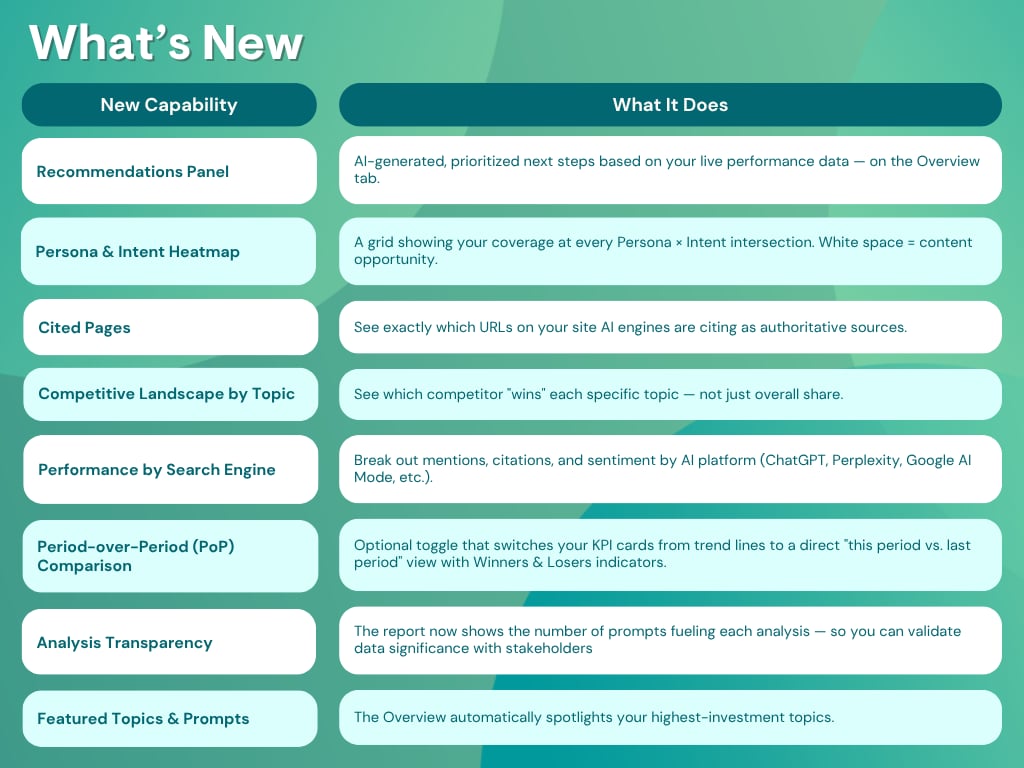
* What's New
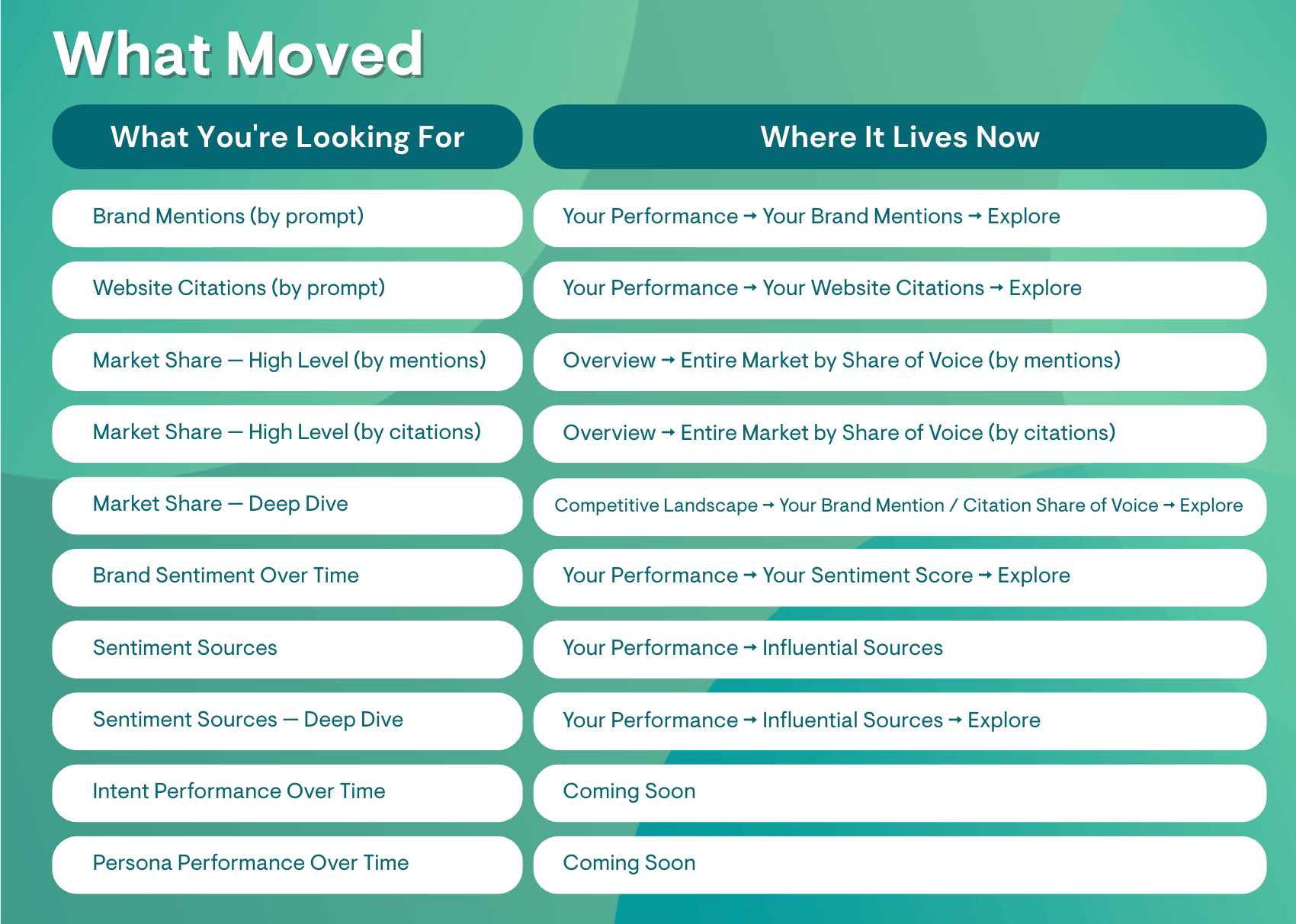
* What Moved
* What's Been Retired
* 🗺️ Your New Report Scavenger Hunt
#### Why the Report Changed
AI search is maturing fast — and so is what teams need from their data. The redesign is built around three things the market was asking for: clearer answers to specific strategic questions, analysis that reflects your actual audience rather than the entire market, and a faster path from insight to action.
Same data you trusted. Smarter structure. More horsepower.
 The report is organized around five tabs: Overview, Competitive Landscape, Your Performance, Topics, and Prompts. The first three are where the biggest changes live.
📊 Overview: What's my headline performance right now, and what should I do next?
🏆 Competitive Landscape: How do I stack up — and who's winning the topics I care about?
📈 Your Performance: Why are my numbers where they are, and where are my gaps?
Global Filters
Intent and Persona are now global filters — set them once at the top of the report and they apply across every view simultaneously. No more re-applying them per widget. It's a small change that adds a lot of flexibility when you want to slice your entire analysis through the lens of a specific audience or intent stage.
#### Watch: A Tour of the New AI Search Performance Report
The report is organized around five tabs: Overview, Competitive Landscape, Your Performance, Topics, and Prompts. The first three are where the biggest changes live.
📊 Overview: What's my headline performance right now, and what should I do next?
🏆 Competitive Landscape: How do I stack up — and who's winning the topics I care about?
📈 Your Performance: Why are my numbers where they are, and where are my gaps?
Global Filters
Intent and Persona are now global filters — set them once at the top of the report and they apply across every view simultaneously. No more re-applying them per widget. It's a small change that adds a lot of flexibility when you want to slice your entire analysis through the lens of a specific audience or intent stage.
#### Watch: A Tour of the New AI Search Performance Report
 #### What's Been Retired
Brand Mentions / Website Citations Over Time (by topic) have been replaced by the Competitive Landscape by Topic view and Topic Coverage analysis in Your Performance — more actionable visualizations that answer the same underlying question with more context.
#### What's Been Retired
Brand Mentions / Website Citations Over Time (by topic) have been replaced by the Competitive Landscape by Topic view and Topic Coverage analysis in Your Performance — more actionable visualizations that answer the same underlying question with more context.
 Seven things to find and try to get your bearings.
✅ 1. Find your three views. Navigate Overview, Competitive Landscape, and Your Performance. For each, ask: "What question is this designed to answer?"
✅ 2. Read your headline KPIs — then toggle PoP mode. On the Overview, scan your Summary Cards (default: trend lines). Then switch on Period-over-Period mode and see how the same data looks as a direct period comparison with Winners & Losers. Decide which your stakeholders would prefer.
✅ 3. Open the Recommendations panel (in Alpha). Find the Recommendations button on the Overview tab. Expand a card and read the AI Summary and What's Going Well / What Needs Work breakdown. Select a prompt, choose a page to optimize, and launch into Writing Assistant.
✅ 4. Apply a Global Filter and feel the difference. Set a Persona or Intent filter at the top of the report. Watch everything update at once — then note how differently your brand performs for that specific audience vs. your overall numbers.
✅ 5. Find a topic your competitor is winning. Go to Competitive Landscape → Competitive Landscape by Topic and identify at least one topic where a competitor is the current winner. That's your first strategic target.
✅ 6. Find a content gap in the Heatmap. In Your Performance, open the Persona & Intent Heatmap. Spot a cell with low or zero coverage for an audience-intent combo that matters to your business. That blank cell is a content opportunity.
✅ 7. Locate your most-used widgets. Use the relocation table above to find where your go-to data points now live.
#### Related Resources
* [New: 2026 AI Search Performance Redesign](https://support.conductor.com/new-2026-ai-search-performance-redesign)
* [AI Search Performance Support Article ](/docs/intelligence/ai-search-performance/)
* [AI Search Setup Guide ](/docs/intelligence/ai-search-setup/)
* [AI Search FAQs ](/docs/intelligence/ai-search-faqs/)
Seven things to find and try to get your bearings.
✅ 1. Find your three views. Navigate Overview, Competitive Landscape, and Your Performance. For each, ask: "What question is this designed to answer?"
✅ 2. Read your headline KPIs — then toggle PoP mode. On the Overview, scan your Summary Cards (default: trend lines). Then switch on Period-over-Period mode and see how the same data looks as a direct period comparison with Winners & Losers. Decide which your stakeholders would prefer.
✅ 3. Open the Recommendations panel (in Alpha). Find the Recommendations button on the Overview tab. Expand a card and read the AI Summary and What's Going Well / What Needs Work breakdown. Select a prompt, choose a page to optimize, and launch into Writing Assistant.
✅ 4. Apply a Global Filter and feel the difference. Set a Persona or Intent filter at the top of the report. Watch everything update at once — then note how differently your brand performs for that specific audience vs. your overall numbers.
✅ 5. Find a topic your competitor is winning. Go to Competitive Landscape → Competitive Landscape by Topic and identify at least one topic where a competitor is the current winner. That's your first strategic target.
✅ 6. Find a content gap in the Heatmap. In Your Performance, open the Persona & Intent Heatmap. Spot a cell with low or zero coverage for an audience-intent combo that matters to your business. That blank cell is a content opportunity.
✅ 7. Locate your most-used widgets. Use the relocation table above to find where your go-to data points now live.
#### Related Resources
* [New: 2026 AI Search Performance Redesign](https://support.conductor.com/new-2026-ai-search-performance-redesign)
* [AI Search Performance Support Article ](/docs/intelligence/ai-search-performance/)
* [AI Search Setup Guide ](/docs/intelligence/ai-search-setup/)
* [AI Search FAQs ](/docs/intelligence/ai-search-faqs/)