
Can I upload edits to inactive keywords?
Can I upload edits to inactive keywords?
Yes, you can do this the same way you do for active keywords.
Can I use the Keyword Bulk Update tool to upload my own spreadsheet with keyword and preferred URL?
Can I use the Keyword Bulk Update tool to upload my own spreadsheet with keyword and preferred URL?
You can upload any spreadsheet with the Keyword Bulk Update tool, but it must have the correct column headers. If you already have a file you use to track some of these values, you can add all of the required columns with the appropriate headers and leave the rest of the columns blank.
Do the columns in the uploaded Excel file need to be in a particular order?
Do the columns in the uploaded Excel file need to be in a particular order?
Yes. The Keyword Bulk Update tool assumes the following columns of data are in this order (from left to right):
- Active (A/I)
- Keyword
- Search Engine
- Language
- Standard Categories
- Preferred URL
- Prime
- Daily Reporting
- Location
- Device
How does Bulk Update work if I have location- and device-specific keywords?
How does Bulk Update work if I have location- and device-specific keywords?
The Keyword Bulk Update tool assumes that your current uploaded keywords, if not already designated for specific locations and devices, are for a desktop device and the location of origin for each search engine. For new keywords, you can specify location and device for each keyword listed in your bulk update file. Each combination of keyword, device, and location represents a unique tracked keyword for your account.
What if I accidentally put the same keyword twice in the same file?
What if I accidentally put the same keyword twice in the same file?
Conductor will not let you proceed with your Keyword Bulk Update if you have the same keyword multiple times in the same file.
What if I have multiple sheets in my Excel file?
What if I have multiple sheets in my Excel file?
Conductor processes the first sheet in the file, regardless of how many sheets there are in the file.
What if I leave a cell empty?
What if I leave a cell empty?
The answer to this depends on which type of cell you leave empty, and which options you choose when uploading the file:
- Active
If a cell is empty in the Active column for a new keyword, Conductor considers the keyword to be Active (A) by default, when uploaded. For any existing keyword, if the Active cell is empty, Conductor will assume that you do not want to change the Active status for that keyword. - Keyword and Search Engine
Both of these fields are required for every row in your spreadsheet. Conductor will not allow you to proceed if any of these are blank. - Preferred URL
You have two options for how Conductor will treat cells with empty URL values in the upload file:- Choose Ignore Blank URL Values if you have blank URLs in your file that you do not want to merge into your account. If you select this option, cells that previously contained a URL, but are now blank in the upload file will be ignored and the prior URL will remain associated with that keyword in the account.
- Choose Accept Blank Values if you want to disassociate URLs from keywords by leaving the URL field blank in your update file. You can review these deletions in the Change Details area.
- Keyword Group
You have two options for how the upload will treat cells with empty keyword group values in the upload file:- Choose Merge with Existing Keyword Groups if you want the empty cells to be ignored. If the keyword previously had a keyword group associated with it, but that value has been removed without being replaced (left blank), that change will not be made to that keyword. The keyword will remain associated with that keyword group.
- Choose Override Existing Keyword Groups if you want to remove the keyword from the keyword group it was associated with and have left the keyword group value for that keyword blank, the keyword will no longer be associated with any keyword group after the upload.
- Prime
If a Prime value is empty for a keyword, it will leave the current Prime status (Y or N) unchanged upon update. For example, if the Prime status for a keyword was “Y” (Yes) and you leave that same cell blank in the upload file, the keyword will remain as a Prime keyword.
What can I enter in the Preferred URL field for keywords in the bulk update file?
What can I enter in the Preferred URL field for keywords in the bulk update file?
- The URL must contain either http:// or https:// at the beginning.
- The domain in the URL must match a domain that you track in the web properties to which you are uploading keywords. You cannot enter a preferred URL from a domain you do not track in the relevant web property.
Why am I getting an error when I try to upload my file?
Why am I getting an error when I try to upload my file?
Seeing an error that reads “Please make sure that your file is a valid file that can be opened in Excel”?The most common reason for this error is that one or more of the rows in your file: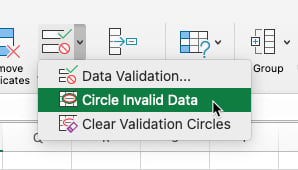
- Is missing required entries. Recall that each column is required to have an entry except Standard Keyword Groups and Preferred URL.
- Has an invalid entry. Refer to the instructions above where you’ll find links to the supported locations, characters, and symbols.
Need to identify potential invalid entries?
You can use Excel to find invalid data in cells. Under the Data tab Follow the path Data Validation > Circle Invalid Data. Excel will identify up to 255 invalid entries.