Authenticate with a Conductor API token Connections to Conductor’s API can be authenticated using a Bearer token.
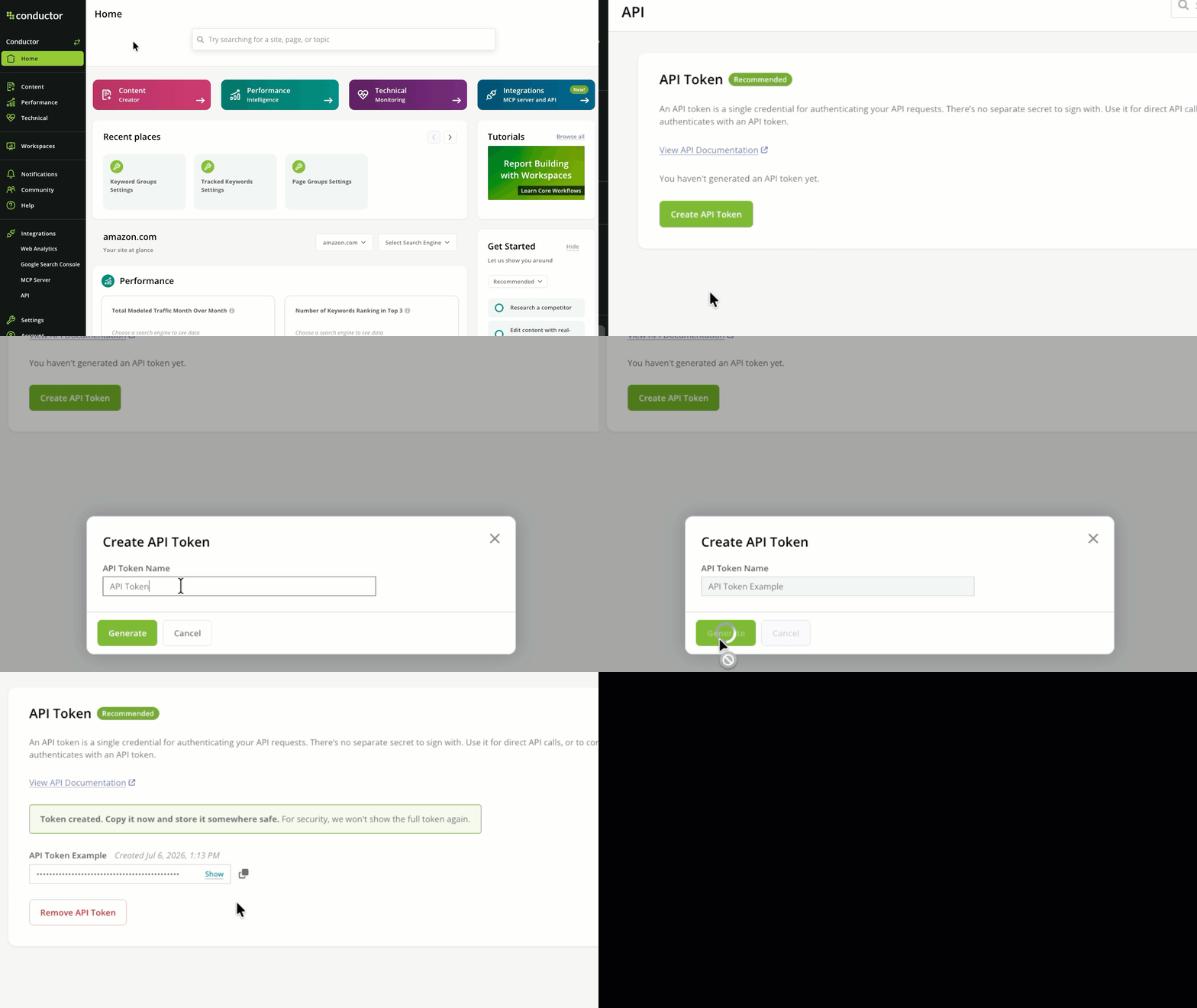
Generate your Conductor API token To generate or copy your Conductor API token:
In Conductor, follow the path Integrations > API .
In the API Token section, click Create API Token .
In the form that appears, give your token a name and click Generate .
Copy the generated token. Its full string won’t be shown again.
Not a Conductor user yourself? Have a Conductor admin user add you to the platform to generate a token for yourself.
Sending your request When configuring your requests, pass the API token you generated above. Review some common examples across different languages you might use.
Examples curl -X POST "https://api.conductor.com/YOUR_REQUEST_PATH" \ -H "Authorization: Bearer YOUR_CONDUCTOR_API_TOKEN" \ -H "Content-Type: application/json" \ -d '{"key": "value"}'
import requests response = requests.post( "https://api.conductor.com/YOUR_REQUEST_PATH" , headers = { "Authorization" : "Bearer YOUR_CONDUCTOR_API_TOKEN" , "Content-Type" : "application/json" , }, json = { "key" : "value" }, ) response.raise_for_status() data = response.json()
const response = await fetch ( "https://api.conductor.com/YOUR_REQUEST_PATH" , { method: "POST" , headers: { Authorization: "Bearer YOUR_CONDUCTOR_API_TOKEN" , "Content-Type" : "application/json" , }, body: JSON . stringify ({ key: "value" }), }); if ( ! response . ok ) throw new Error ( `HTTP ${ response . status } ` ); const data = await response . json ();
require "net/http" require "uri" require "json" uri = URI ( "https://api.conductor.com/YOUR_REQUEST_PATH" ) http = Net :: HTTP . new (uri. host , uri. port ) http. use_ssl = true request = Net :: HTTP :: Post . new (uri) request[ "Authorization" ] = "Bearer YOUR_CONDUCTOR_API_TOKEN" request[ "Content-Type" ] = "application/json" request. body = { key: "value" }. to_json response = http. request (request) data = JSON . parse (response. body )
import java.net.URI; import java.net.http.HttpClient; import java.net.http.HttpRequest; import java.net.http.HttpResponse; HttpClient client = HttpClient . newHttpClient (); HttpRequest request = HttpRequest . newBuilder () . uri ( URI . create ( "https://api.conductor.com/YOUR_REQUEST_PATH" )) . header ( "Authorization" , "Bearer YOUR_CONDUCTOR_API_TOKEN" ) . header ( "Content-Type" , "application/json" ) . POST ( HttpRequest . BodyPublishers . ofString ( "{ \" key \" : \" value \" }" )) . build (); HttpResponse < String > response = client . send (request, HttpResponse . BodyHandlers . ofString ());
package main import ( " io " " net/http " " strings " ) func main () { body := strings . NewReader ( `{"key": "value"}` ) req , _ := http . NewRequest ( "POST" , "https://api.conductor.com/YOUR_REQUEST_PATH" , body ) req . Header . Set ( "Authorization" , "Bearer YOUR_CONDUCTOR_API_TOKEN" ) req . Header . Set ( "Content-Type" , "application/json" ) resp , err := http . DefaultClient . Do ( req ) if err != nil { panic ( err ) } defer resp . Body . Close () respBody , _ := io . ReadAll ( resp . Body ) _ = respBody }
<? php $ch = curl_init ( "https://api.conductor.com/YOUR_REQUEST_PATH" ); curl_setopt_array ( $ch , [ CURLOPT_RETURNTRANSFER => true , CURLOPT_POST => true , CURLOPT_POSTFIELDS => json_encode ([ "key" => "value" ]), CURLOPT_HTTPHEADER => [ "Authorization: Bearer YOUR_CONDUCTOR_API_TOKEN" , "Content-Type: application/json" , ], ]); $response = curl_exec ( $ch ); curl_close ( $ch ); $data = json_decode ( $response , true );
Support for legacy connections Conductor still supports existing connections to Conductor’s API using this legacy method. However, we recommend new connections use the API token method described above: it’s simpler—one credential, no separate secret, and no signature to compute or keep in sync with a clock.
Conductor’s API also supports secure authentication using a combination of an API key and a request signature to ensure your data stays secure.
Required credentials Each endpoint requires that you pass both of the following elements together:
API Key (Query Parameter): apiKey=<your-api-key>Request Signature (Query Parameter): sig=<computed-signature>
Computing the signature The signature is an MD5 hash computed using your API key, your secret, and a Unix timestamp.
Code Examples generateSig.py
generateSig.java
import hashlib import time def compute_signature ( api_key : str , secret : str ) -> str : timestamp = str ( int (time.time())) string_to_sign = f " { api_key }{ secret }{ timestamp } " return hashlib.md5(string_to_sign.encode( 'utf-8' )).hexdigest() api_key = "your-api-key" secret = "your-secret" signature = compute_signature(api_key, secret) url = f "https://api.conductor.com/v4/accounts/123/drafts?apiKey= { api_key } &sig= { signature } "
import java.security.NoSuchAlgorithmException; import java.security.MessageDigest; import java.math.BigInteger; String generateSignature ( final String apiKey, final String sharedSecret) throws NoSuchAlgorithmException { final long curTimeEpochSeconds = Math . round ( System . currentTimeMillis () / 1000.0 ); final String stringToHash = apiKey + sharedSecret + curTimeEpochSeconds; final MessageDigest md = MessageDigest . getInstance ( "MD5" ); final byte [] digestBytes = md . digest ( stringToHash . getBytes ()); final StringBuffer sb = new StringBuffer (); for ( int i = 0 ; i < digestBytes . length ; i ++ ) { sb . append ( Integer . toString ((digestBytes[i] & 0xff ) + 0x100 , 16 ). substring ( 1 )); } final String hexEncoded = sb . toString (); return hexEncoded; }