
What and how much data can I see with Research?
What and how much data can I see with Research?
Site Reports
- The At a Glance tab includes all the data for the entered domain, subdomain, subfolder, or page that our data provider Semrush has available.
- The Keywords tab includes:
- For the current month, a sample of up to 10,000 keywords (determined by top monthly search volume)—or the full data set up to 2,000,000 keywords by request and depending on custom pricing—for any domains, subdomains, subfolders, and pages.

- For previous months, up to 13 months of historical data. By default, you’ll see a sample of up to 10,000 keywords (determined by top monthly search volume). However, if you are comparing months during which you requested the full data set (up to 2,000,000 as described above), you will see all that previously requested data in comparison.
- For the current month, a sample of up to 10,000 keywords (determined by top monthly search volume)—or the full data set up to 2,000,000 keywords by request and depending on custom pricing—for any domains, subdomains, subfolders, and pages.
Topic Reports
- View and export up to 1,000 results for any keyword phrase.
- Review historical data up to:
- 12 months for monthly search volume
- 30 days for social mentions
- 3 years for seasonality insights
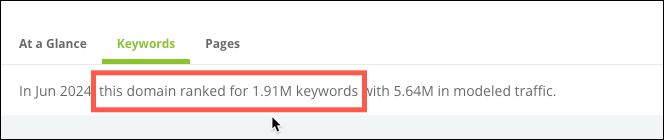
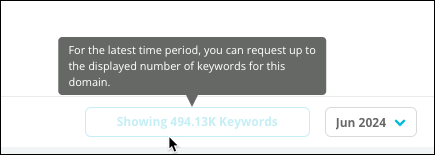
Why do Research's Domain reports say my domain ranks for more keywords than the number of keywords that appear in the report?
Why do Research's Domain reports say my domain ranks for more keywords than the number of keywords that appear in the report?
From which search engines are Questions drawn in Research reports?
From which search engines are Questions drawn in Research reports?
- Dutch
- English
- French
- German
- Italian
- Portuguese
- Spanish
How does the Research report define what early- and late-stage topics are?
How does the Research report define what early- and late-stage topics are?
Are keyword results in Research specific to a web property you track in Conductor?
Are keyword results in Research specific to a web property you track in Conductor?
Why don't keywords I track with Conductor appear in Research as tracked?
Why don't keywords I track with Conductor appear in Research as tracked?
Where does Conductor source its Cost per Click (CPC) data?
Where does Conductor source its Cost per Click (CPC) data?
Why do some topics and sites not have results?
Why do some topics and sites not have results?
- Plural form (if the phrase is singular). For example, “credit cards” instead of “credit card”.
- Singular form (if the phrase is plural). For example, “credit card” instead of “credit cards”.
- Root word (if there is a prefix or suffix). For example, “doodle” instead of “doodler”.
Why doesn't the Monthly Search Interest trend always include the months for the data in the chart?
Why doesn't the Monthly Search Interest trend always include the months for the data in the chart?
Which languages can I see Sentiment data for in Research's Topic Overview reports?
Which languages can I see Sentiment data for in Research's Topic Overview reports?
- Albanian
- Arabic
- Chinese
- Croatian
- Czech
- Danish
- Dutch
- English
- Finnish
- Flemish
- French
- German
- Hungarian
- Italian
- Korean
- Malay
- Norwegian
- Polish
- Portuguese
- Russian
- Slovak
- Spanish
- Swedish
- Turkish
When I enter a topic, widgets in the Overview tab say "No historical data available for this topic". Why?
When I enter a topic, widgets in the Overview tab say "No historical data available for this topic". Why?
- The data provider has no data for the topic. In this case, Conductor can’t and won’t show data for the topic until the data provider has the data to send for the request.
- The data provider cannot provide data for a live call, because they limit the number of times Conductor users can make requests for the data. In this case, consider waiting a minute and then refresh your browser. A new live request will be created for the data.
Is there a limit to the number of topics I can research at once?
Is there a limit to the number of topics I can research at once?
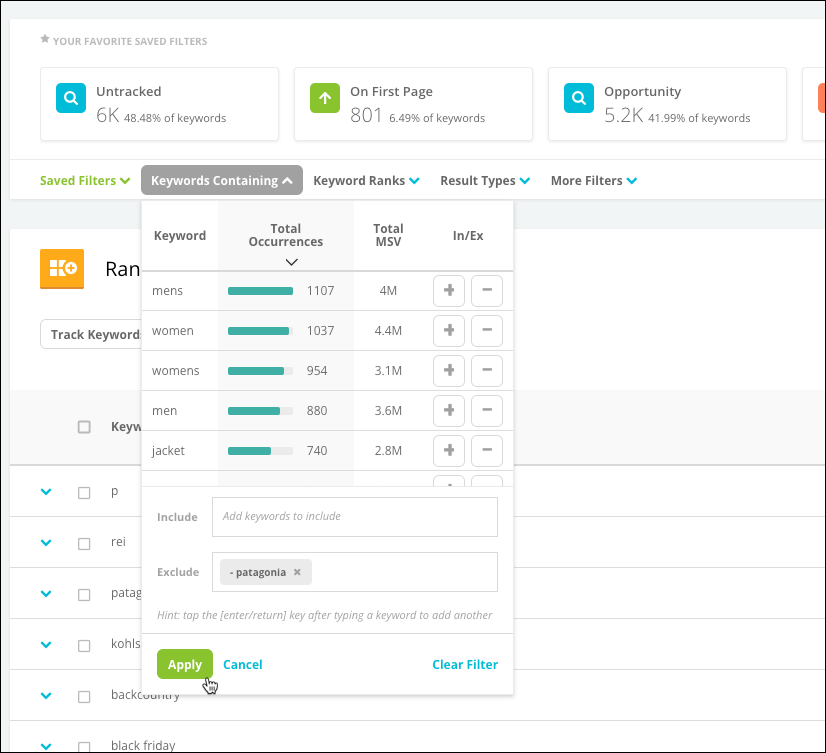
How do I filter for (or filter out) branded terms?
How do I filter for (or filter out) branded terms?
Why filter out branded keywords?
You might filter out branded keywords to:- Identify opportunities to engage with audiences who might not be familiar with your brand.
- Understand how people think about the kinds of products and services you offer in general—separate from how they feel about your specific products and services.
Why filter to show only branded keywords?
You might want to focus only on branded keywords if you want to investigate the language your audience uses when they are searching for your products and services.How do I focus my research in Research on my tracked keywords?
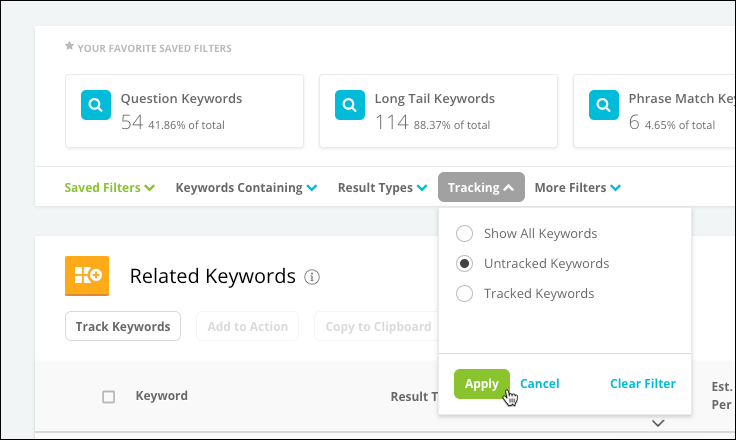
How do I focus my research in Research on my tracked keywords?
Why filter for only tracked keywords?
You might want to research only tracked keywords if you want to focus on the keywords you’ve already established as important for your organization’s online visibility.Why filter for only untracked keywords?
You might want to research only untracked keywords if you want to focus on discovering new topics you aren’t already aware of—and which might be valuable keywords to target with content.Not seeing keywords appearing as tracked?
Review the Why don’t keywords I track with Conductor appear in Research as tracked? FAQ for more information.What is Explorer?
What is Explorer?