
Available tools
Conductor’s plugin and custom connections both include the current set of tools:tracked_configsai_brand_insightsai_citation_insightskeyword_insights
keyword_insights. You no longer need a custom connector to reach it.
Learn more about the data you can access through these tools.
Configure Conductor for ChatGPT and Codex
Add a custom MCP connection in your OpenAI account settings
Configuring a custom connection currently requires you to:
- Create an API token in the Conductor platform. Learn how: Authenticating Custom Connections
- Add the custom MCP connection in your OpenAI account settings.
Verify your ChatGPT plan and permissions
To set up this connection, you will need to have the ability to create plugins. Doing so requires:- Any of ChatGPT’s paid plans: Pro, Plus, Business, Enterprise, and Education.
- Admin access.
Configure your custom connection
Before members of Business, Enterprise, and Education plans can use a custom plugin, an Admin user needs to perform the following steps to add the plugin to your organization’s Workspace. (If your organization uses multiple ChatGPT Workspaces, this configuration would have to be done in each.)- Go to ChatGPT.
- If you are not already, sign into the paid account you want to use to configure this integration. Be sure to use the correct account (likely an account belonging to your organization and not your personal ChatGPT account).
- From the navigation on the left, click your profile and select Settings.
- On the left, click Security and login.
- Scroll to the Developer mode section and enable Developer mode if not already enabled.
- On the left, click Plugins, then click Browse plugins.
- In the top-right, click the Plus (+) icon.
- In the New Plugin form, complete the following:
- Name:
Conductor - Connection:
- Toggle above field:
Streamable HTTP - Field:
https://mcp-universal.conductor.com/mcp/v3
- Toggle above field:
- Authentication:
Access token / API key - Header scheme:
Bearer
- Name:
- Select the I understand and want to continue checkbox.
- Click Create. OpenAI will process your information.
- In the authentication form that appears, enter the API token you generated above and click Connect.

Install Conductor's plugin from the OpenAI plugin directory
This is the fastest path and requires no API token. Once installed, the plugin is available in ChatGPT and Codex.
OpenAI allows organizations to choose whether non-Admin users may add specific Plugins and Apps to their accounts or whether they need to request access.To add Conductor’s plugin, your organization’s ChatGPT Admins might need to allow the plugin to be installed on your account.For more information about provisioning and permissioning plugins, refer to OpenAI’s documentation.
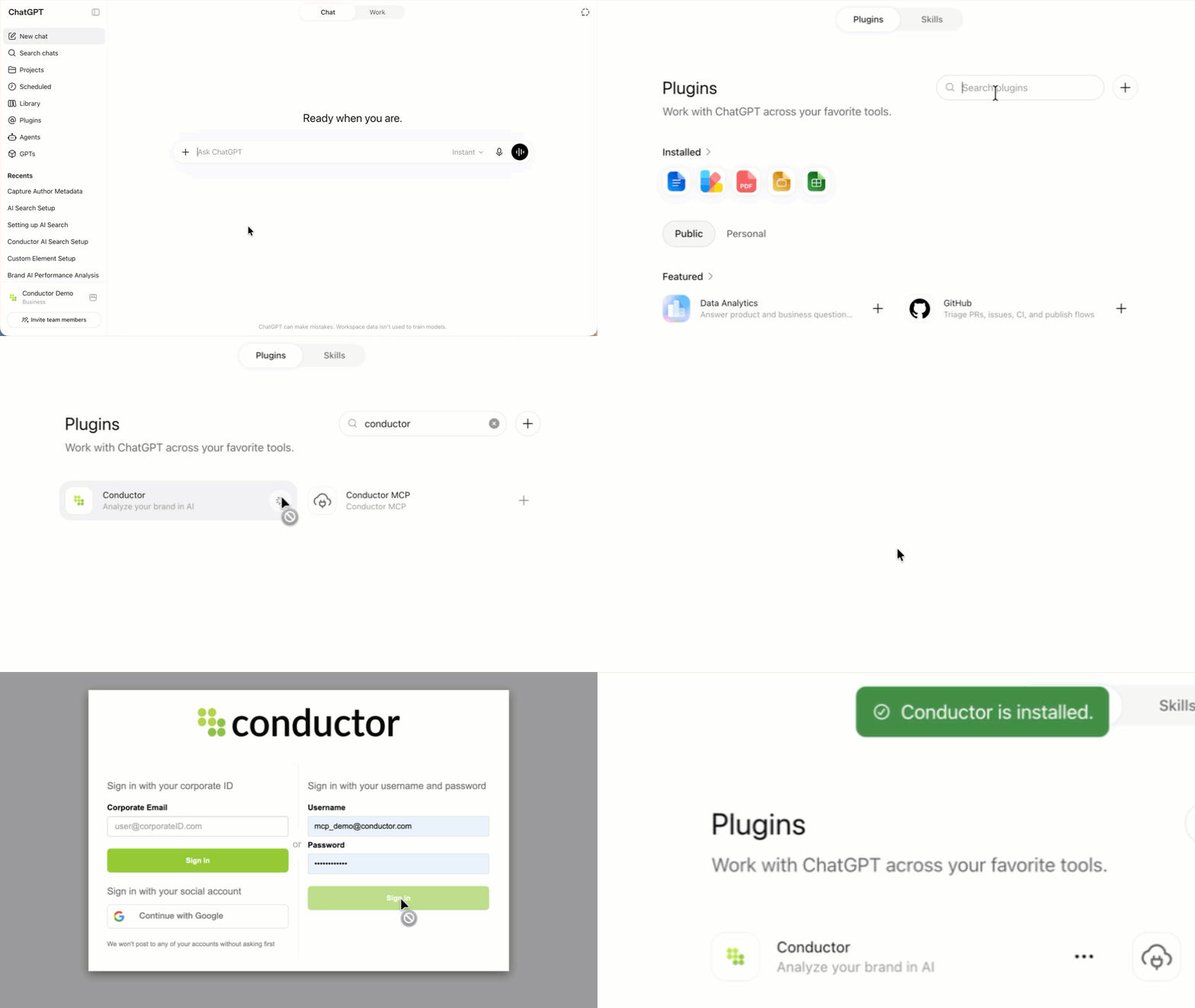
- Go to ChatGPT.
- If you are not already, sign into the paid account you want to use to configure this integration. Be sure to use the correct account (likely an account belonging to your organization and not your personal ChatGPT account).
- In the navigation menu on the left, click Plugins.
- Search for and select the Conductor app in the Plugins marketplace.
See more than one Conductor plugin? Choose the plugin with the latest version. You can find this in the Information section after you click the plugin in the marketplace.
- Click Install plugin.
If you see Disabled by admin instead of the Install plugin button, contact your Workspace admin to enable the plugin for your organization as described above.
- Authenticate using your Conductor credentials.
Query your data
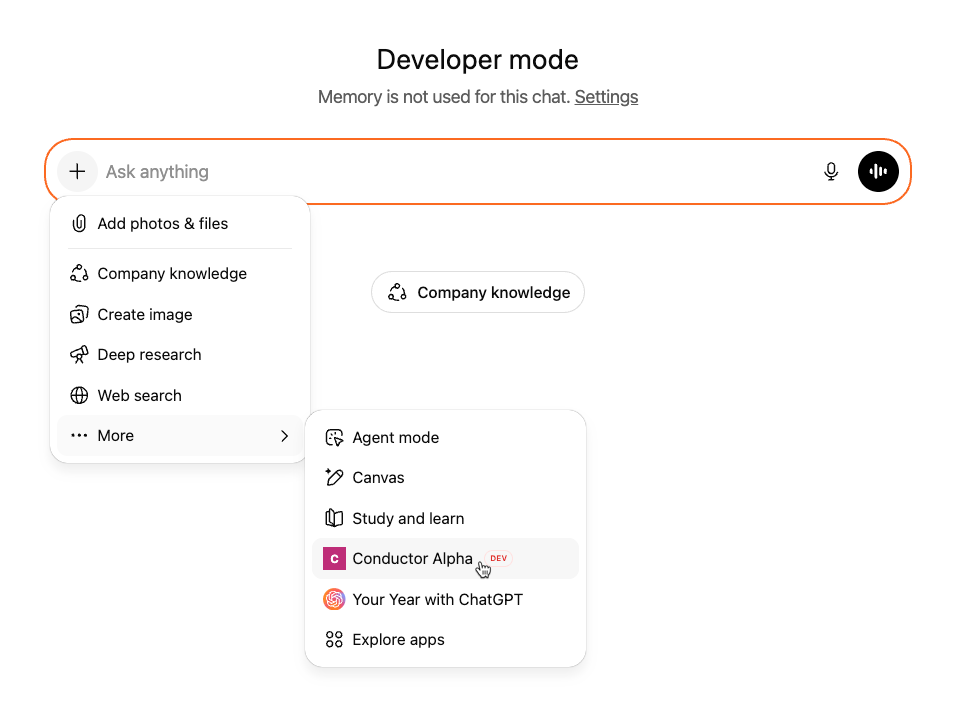
In ChatGPT, click the + icon, and in the More menu, select your Conductor plugin.
FAQs
Review this feature’s frequently asked questionsChange Log
- 2026-07-30 · Added — Conductor’s plugin for ChatGPT and Codex now includes the
keyword_insightstool. Traditional search data—rankings, seasonality, SERP result types, and competitive rankings—no longer requires a custom connector. - 2026-07-08 · Added — Setup guide for connecting Conductor’s MCP to OpenAI’s Codex through a custom connector.
- 2026-07-08 · Changed — Setup now uses bearer-token authentication. Generate an API token in Conductor and supply it when adding the connector.
