
Getting Started

Overview

Our Reporting API is used for extracting data and metrics from your Conductor Monitoring account. Typical use-cases include connecting several software solutions together to streamline your reporting tasks and integrating Conductor Monitoring in your client portal.

Important

This support article is covering the current 2.0 version of Conductor Monitoring’s Reporting API. We recommend using the Reporting API v2.0 for your reporting tasks and integrations as all new endpoints will be only supported on this version.The legacy Conductor Monitoring Reporting API version is still available. You can find the relevant support documentation and our migration guide in the Conductor Monitoring Reporting API V1.0 article.Please note that while the legacy Reporting API v1.0 remains available at the moment, it will likely be deprecated in the future. Therefore we highly recommend using (and migrating to) the Reporting API v2.0.Note!Conductor provides APIs for several different uses across its Conductor Monitoring and Conductor Intelligence products. This article describes Conductor Monitoring’s Reporting API. If you are looking for information about a different API offering, consider the following articles:

Reporting API Terms of Use

By using the Reporting API you agree to the Terms of Use.

Authentication

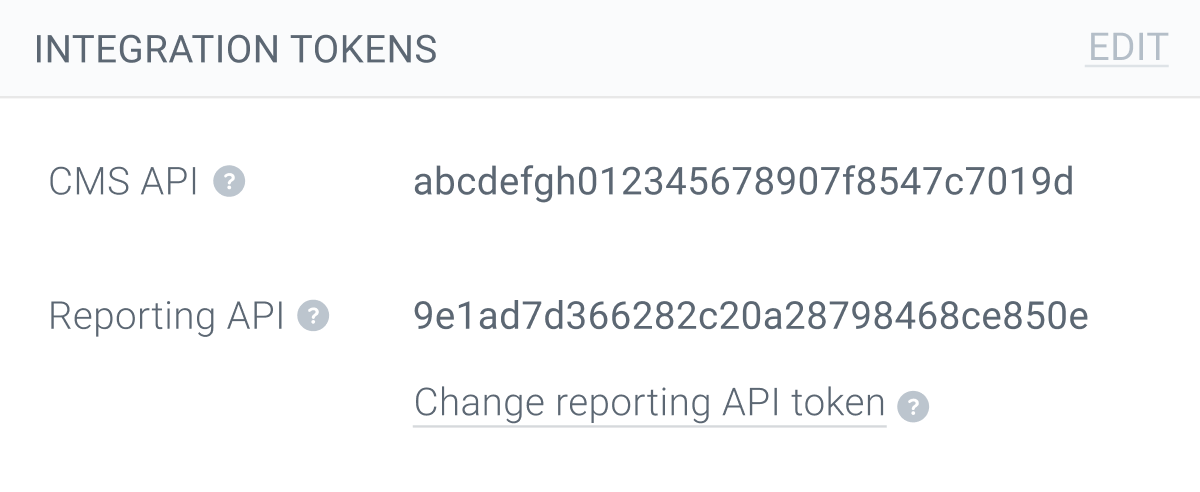
Get your API integration token

To use Conductor Monitoring’s Reporting API you need to get your account’s Reporting API token. You’ll find it in the Integration Tokens section under the Account tab in the main Account section.
Configure your request headers

To authenticate your requests, you need to include the following request headers:

Note!

The value for the Authorization header must be the string “token” followed by a space and then your actual API token.

Rate limits

The Reporting API uses rate limits to ensure API request traffic can be handled efficiently. Rate limits define the maximum number of requests which can be made in a given time range. Conductor Monitoring’s Reporting API has the following rate limits:
  • 6 requests/second/requester IP address
  • When the limit is hit the API returns a 429 status code for 1 minute
Note that there is no maximum number of calls you can make to this API.

Using the Conductor Monitoring Reporting API

Base URL

Conductor Monitoring Reporting API is available on the following URL:

Retrieving a list of websites in your account

/v2/entities/websites

Request Body

None

Responses

200

Successful query execution

Schema: See below

Example

 {
“data”: [
{
“id”: “1-234”,
“app_url”: “https://app.cm.conductor.com/websites/1-234/dashboard”,
“domain”: “https://www.conductor.com”,
“name”: “null”,
“page_capacity”: 1000
},
{
“id”: “1-2345”,
“app_url”: “https://app.cm.conductor.com/websites/1-2345/dashboard”,
“domain”: “https://www.conductor.de”,
“name”: “Conductor Monitoring - DE”,
“page_capacity”: 1000
},
]
}
401

Unauthorized:

  • Missing authentication token. The request was received but it’s lacking an authorization token and can therefore not be processed. Make sure to correctly set the Authorization header.
  • Authentication failed. The request could not be processed because the supplied API token is invalid or expired.

Examples

{
“code”: “auth_missing_token”,
“message”: “Authentication token must be passed in Authorization HTTP header.”,
“errors”: []
}
or
{
“code”: “auth_failed”,
“message”: “Authentication token is expired or invalid.”,
“errors”: []
}
403

Forbidden:

  • Terms of use not accepted. You have not accepted Reporting API Terms of Use yet. You need to accept them in Account Settings before you start using Conductor Monitoring Reporting API.
  • Our CDN is blocking your user agent, which might be a generic or default user agent like Python urllib3. Changing the user agent to something less generic or more closely resembling a browser often bypasses these restrictions.

Example

{
“code”: “terms_of_use_not_accepted”,
“message”: “Reporting API Terms of Use have not been accepted yet. Please accept Terms of Use in Account Settings.”,
“errors”: []
}
404

Not found

Example

{
“error”: “Requested website ID was not found”
}
422

Unprocessable Entity.

  • The request was received, but the authorization wasn’t formatted correctly. Make sure to correctly configure the Authorization header as described in the Authentication section above.

Schema data types for this endpoint

PropertyData Type
idstring
app_urlstring (absolute URL)
domainstring (absolute URL)
namestring
page_capacityinteger

Retrieving a list of segments for a website

/v2/entities/segments?website_id={website_id}

Send this request—using a website ID—to get a list of segments for a specific website in your account.

Request Path Parameters

website_id (Required). Can be inferred from the GET /v2/entities/websites endpoint described above.

Request Response

200

Successful query execution

Schema: See below

Example

 {
“data”: [
{
“id”: “1”,
“color”: “bf86d5”,
“label”: “Important pages”,
“shortcode”: null
},
{
“id”: “2”,
“color”: “72c035”,
“label”: “Indexable”,
“shortcode”: null
},
]
}
401

Unauthorized:

  • Missing authentication token. The request was received but it’s lacking an authorization token and can therefore not be processed. Make sure to correctly set the Authorization header.
  • Authentication failed. The request could not be processed because the supplied API token is invalid or expired.

Examples

{
“code”: “auth_missing_token”,
“message”: “Authentication token must be passed in Authorization HTTP header.”,
“errors”: []
}
or
{
“code”: “auth_failed”,
“message”: “Authentication token is expired or invalid.”,
“errors”: []
}
403

Forbidden:

  • Terms of use not accepted. You have not accepted Reporting API Terms of Use yet. You need to accept them in Account Settings before you start using Conductor Monitoring Reporting API.
  • Our CDN is blocking your user agent, which might be a generic or default user agent like Python urllib3. Changing the user agent to something less generic or more closely resembling a browser often bypasses these restrictions.

Example

{
“code”: “terms_of_use_not_accepted”,
“message”: “Reporting API Terms of Use have not been accepted yet. Please accept Terms of Use in Account Settings.”,
“errors”: []
}
404

Not found

Example

{
“error”: “Requested website ID was not found”
}
422

Unprocessable Entity.

  • The request was received, but the authorization wasn’t formatted correctly. Make sure to correctly configure the Authorization header as described in the Authentication section above.

Schema data types for this endpoint

PropertyData Type
idstring
colorstring
labelstring
shortcodestring

Retrieving statistics for a website or website’s segment

/v2/data/statistics?website_id={website_id}

Use this endpoint to pull data for one of your tracked websites or for a part of a tracked website.

Request Path Parameters

website_id (Required). Can be inferred from the GET /v2/entities/websites endpoint described above.

Query Parameters

scope (Required). Determines whether data for the whole website is returned or specific parts. Potential values:
  • website. Retrieves data for the whole website.
  • segment:{segment_id}. Retrieves data for a specific segment. Segment IDs can be inferred with the GET /v2/entities/segments endpoint described above.
  • segment_label:{segment_label}. Retrieves data for a specific segment. Segment label can be inferred from the GET /v2/entities/segments endpoint described above.

Request Responses

200

Successful query execution

Schema: See below

Example

 {
“data”: {
“health”: 916,
“number_of_issues”: 1234,
“number_of_urls”: {
“missing”: 0,
“page”: 123,
“redirect”: 0,
“server_error”: 0,
“unreachable”: 0
},
“number_of_urls_per_property”: {
“h1”: {
“available”: 123,
“empty”: 0,
“missing”: 0
},
“health”: {
“0-100”: 0,
“100-200”: 0,
“200-300”: 0,
“300-400”: 0,
“400-500”: 0,
“500-600”: 0,
“600-700”: 0,
“700-800”: 0,
“800-900”: 0,
“900-1000”: 1234
},
“hreflang_language”: {
“en”: 1234,
“missing”: 0,
“others”: 0
},
“is_disallowed_in_robots_txt”: {
“true”: 0,
“false”: 1234
},
“is_in_sitemap”: {
“true”: 1234,
“false”: 0
},
“is_indexable”: {
“true”: 1234,
“false”: 0
},
“is_indexable_due_to_meta_robots”: {
“no”: 0,
“not_applicable”: 0,
“yes”: 1234
},
“is_indexable_due_to_x_robots_tag”: {
“no”: 0,
“not_applicable”: 0,
“yes”: 1234
},
“is_linked”: {
“true”: 1234,
“false”: 0
},
“meta_description”: {
“available”: 1234,
“empty”: 0,
“missing”: 0
},
“open_graph_description”: {
“available”: 1234,
“empty”: 0,
“missing”: 0
},
“open_graph_image”: {
“available”: 1234,
“empty”: 0,
“missing”: 0
},
“open_graph_title”: {
“available”: 1234,
“empty”: 0,
“missing”: 0
},
“open_graph_type”: {
“empty”: 0,
“missing”: 0,
“others”: 0,
“values”: {
“article”: 1230,
“website”: 2,
“object”: 2
}
},
“open_graph_url”: {
“available”: 1234,
“empty”: 0,
“missing”: 0
},
“importance”: {
“0-1”: 0,
“1-2”: 0,
“2-3”: 0,
“3-4”: 109,
“4-5”: 109,
“5-6”: 103,
“6-7”: 43,
“7-8”: 28,
“8-9”: 16,
“9-10”: 800
},
“status_code”: {
“200”: 1234
},
“title”: {
“available”: 1234,
“empty”: 0,
“missing”: 0
},
“twitter_card”: {
“empty”: 0,
“missing”: 0,
“others”: 0,
“values”: {
“summary_large_image”: 1234
}
},
“twitter_description”: {
“available”: 1234,
“empty”: 0,
“missing”: 0
},
“twitter_image”: {
“available”: 1234,
“empty”: 0,
“missing”: 0
},
“twitter_site”: {
“empty”: 0,
“missing”: 0,
“others”: 0,
“values”: {
“@conductor”: 1234
}
},
“twitter_title”: {
“available”: 1234,
“empty”: 0,
“missing”: 0
},
“is_https”: {
“true”: 1234,
“false”: 0
},
“url_depth”: {
“0”: 1,
“1”: 15,
“2”: 399,
“3”: 29,
“4”: 1000,
“5”: 0,
“6”: 0,
“7”: 0,
“8”: 0,
“9”: 0,
“10+”: 0
},
“domain”: {
“www.conductor.de”: 1234
},
“lighthouse_cls”: {
“good”: 1234,
“needsImprovement”: 0,
“bad”: 0
},
“lighthouse_fcp”: {
“good”: 1234,
“needsImprovement”: 0,
“bad”: 0
},
“lighthouse_lcp”: {
“good”: 1234,
“needsImprovement”: 0,
“bad”: 0
},
“lighthouse_performance”: {
“good”: 1234,
“needsImprovement”: 0,
“bad”: 0
},
“lighthouse_si”: {
“good”: 1234,
“needsImprovement”: 0,
“bad”: 0
},
“lighthouse_tbt”: {
“good”: 1234,
“needsImprovement”: 0,
“bad”: 0
},
“lighthouse_tti”: {
“good”: 1234,
“needsImprovement”: 0,
“bad”: 0
}
}
},
“data_captured_at”: “2022-08-04T15:23:01+02:00”,
“is_data_golden”: false
}
401

Unauthorized:

  • Missing authentication token. The request was received but it’s lacking an authorization token and can therefore not be processed. Make sure to correctly set the Authorization header.
  • Authentication failed. The request could not be processed because the supplied API token is invalid or expired.

Examples

{
“code”: “auth_missing_token”,
“message”: “Authentication token must be passed in Authorization HTTP header.”,
“errors”: []
}
or
{
“code”: “auth_failed”,
“message”: “Authentication token is expired or invalid.”,
“errors”: []
}
403

Forbidden:

  • Terms of use not accepted. You have not accepted Reporting API Terms of Use yet. You need to accept them in Account Settings before you start using Conductor Monitoring Reporting API.
  • Our CDN is blocking your user agent, which might be a generic or default user agent like Python urllib3. Changing the user agent to something less generic or more closely resembling a browser often bypasses these restrictions.

Example

{
“code”: “terms_of_use_not_accepted”,
“message”: “Reporting API Terms of Use have not been accepted yet. Please accept Terms of Use in Account Settings.”,
“errors”: []
}
404

Not found

Example

{
“error”: “Requested website ID was not found”
}
422

Unprocessable Entity.

  • The request was received, but the authorization wasn’t formatted correctly. Make sure to correctly configure the Authorization header as described in the Authentication section above.

Schema data types for this endpoint

PropertyData Type
healthinteger
number_of_issuesinteger
number_of_urlsarray
number_of_urls.pageinteger
number_of_urls.missinginteger
number_of_urls.redirectinteger
number_of_urls.server_errorinteger
number_of_urls.unreachableinteger
number_of_urls_per_propertyarray
h1array
h1.availableinteger
h1.emptyinteger
h1.missinginteger
healtharray
health.0-100integer
health.100-200integer
health.200-300integer
health.300-400integer
health.400-500integer
health.600-700integer
health.800-900integer
health.900-1000integer
hreflang_languagearray
hreflang_language.hreflang_attributestring
hreflang_language.missinginteger
hreflang_language.otherinteger
is_disallowed_in_robots_txtarray
is_disallowed_in_robots_txt.trueinteger
is_disallowed_in_robots_txt.falseinteger
is_in_sitemaparray
is_in_sitemap.trueinteger
is_in_sitemap.falseinteger
is_indexablearray
is_indexable.trueinteger
is_indexable.falseinteger
is_indexable_due_to_meta_robotsarray
is_indexable_due_to_meta_robots.nointeger
is_indexable_due_to_meta_robots.not_applicableinteger
is_indexable_due_to_meta_robots.yesinteger
is_indexable_due_to_x_robots_tagarray
is_indexable_due_to_x_robots_tag.nointeger
is_linkedarray
is_linked.trueinteger
is_linked.falseinteger
meta_descriptionarray
meta_description.availableinteger
meta_description.emptyinteger
meta_description.missinginteger
open_graph_descriptionarray
open_graph_description.availableinteger
open_graph_description.emptyinteger
open_graph_description.missinginteger
open_graph_imagearray
open_graph_image.availableinteger
open_graph_image.emptyinteger
open_graph_image.missinginteger
open_graph_titlearray
open_graph_title.availableinteger
open_graph_title.emptyinteger
open_graph_title.missinginteger
open_graph_typearray
open_graph_type.emptyinteger
open_graph_type.missinginteger
open_graph_type.othersinteger
open_graph_type.valuesarray
open_graph_type.values.nameinteger
open_graph_URLarray
open_graph_URL.availableinteger
open_graph_URL.emptyinteger
open_graph_URL.missinginteger
importancearray
importance.0-1integer
importance.1-2integer
importance.2-3integer
importance.3-4integer
importance.4-5integer
importance.6-7integer
importance.8-9integer
importance.9-10integer
status_codearray
status_code.valueinteger
titlearray
title.availableinteger
title.emptyinteger
title.missinginteger
twitter_cardarray
twitter_card.emptyinteger
twitter_card.missinginteger
twitter_card.othersinteger
twitter_card.valuesarray
twitter_card.values_nameinteger
twitter_descriptionarray
twitter_description.availableinteger
twitter_description.emptyinteger
twitter_description.missinginteger
twitter_imagearray
twitter_image.availableinteger
twitter_image.emptyinteger
twitter_image.missinginteger
twitter_sitearray
twitter_site.emptyinteger
twitter_site.missinginteger
twitter_site.othersinteger
twitter_site.valuesarray
twitter_site.values.nameinteger
twitter_titlearray
twitter_title.availableinteger
twitter_title.emptyinteger
twitter_title.missinginteger
is_httpsarray
is_https.trueboolean
is_https.falseboolean
url_deptharray
url_depth.0integer
url_depth.1integer
url_depth.2integer
url_depth.3integer
url_depth.4integer
url_depth.6integer
url_depth.7integer
url_depth.8integer
url_depth.9integer
url_depth.10+integer
domainarray
domain_namestring
data_captured_atdatetime (ISO-8601 format)
is_data_goldenboolean

Specific errors when requesting statistics

This response means that the statistics for the given scope (website or segment) are not available at this time. They may or may not become available at a later time, depending on the actual content of the scope.

Retrieving list of pages for a website

/v2/data/pages

Use this endpoint to pull a list of pages belonging to one of your tracked websites or for a part of a tracked website.

Query Parameters

website_id (Required). Can be inferred from the GET /v2/entities/websites endpoint described above.
per_page (Required). Can be used with page and page_cursor for pagination. Value can be in range from 1 to 1000.
page (Optional) Can be used with per_page and page_cursor for pagination. Value can be 1 up to ceil(total / per_page). If page is higher than the maximum value, the urls array will be empty.
page_cursor (Optional). Can be used with page and per_page for pagination. Value should be a string retrieved from the next_page_cursor object in the request response for the previous page.
sort and direction (Optional). Can be used to determine sort order.
  • sort should be set to url
  • direction can be either asc or desc

Important

Make sure to use the page_cursor parameter when retrieving large paginated datasets to ensure smooth performance of the API.The page_cursor parameter allows you to specify the exact point in the dataset where the previous page (response) ended and the next page should start, optimizing the process of retrieving large paginated datasets.The page_cursor parameter takes precedence over the page parameter. This means that if the page_cursor parameter is used in the request URL, the page parameter should not be used at the same time.

Request Responses

200

Successful query execution. Each successful response contains 2 main keys:

  • total count of URLs in result set for given query
  • urls paginated URLs based on query parameters per_page, page, and page_cursor

Schema: See below

Example

{
“data”: {
“next_page_cursor”: “WyIvencvY3NoZWxwL2FydGljbGUv2YPZit”,
“total”: 1,
“urls”: [
{
“aa_average_time_spent_on_site”: null,
“aa_bounce_rate”: null,
“aa_page_views”: null,
“aa_revenue”: null,
“aa_unique_visitors”: null,
“analytics_services”: [
“google_analytics”
],
“app_url”: “https://app.cm.conductor.com/websites/1-2345/pages/123456”,
“canonical”: null,
“canonical_type”: “none”,
“custom_elements”: [],
“ga_average_time”: null,
“ga_bounce_rate”: null,
“ga_page_value”: null,
“ga_page_views”: null,
“ga_unique_page_views”: null,
“ga_v4_active_users”: null,
“ga_v4_average_engagement_time”: null,
“ga_v4_engagement_rate”: null,
“ga_v4_screen_page_views”: null,
“gsc_clicks”: null,
“gsc_ctr”: null,
“gsc_impressions”: null,
“gsc_position”: null,
“h1”: “null”,
“health”: 920,
“hreflang_language”: null,
“is_disallowed_in_robots_txt”: false,
“is_https”: false,
“is_in_sitemap”: false,
“is_indexable”: false,
“is_indexable_due_to_meta_robots”: false,
“is_indexable_due_to_x_robots_tag”: true,
“is_linked”: true,
“lfa_bing_desktop_frequency”: null,
“lfa_bing_desktop_last_visit”: null,
“lfa_bing_frequency”: null,
“lfa_bing_last_visit”: null,
“lfa_bing_mobile_frequency”: null,
“lfa_bing_mobile_last_visit”: null,
“lfa_google_desktop_frequency”: null,
“lfa_google_desktop_last_visit”: null,
“lfa_google_frequency”: null,
“lfa_google_last_visit”: null,
“lfa_google_mobile_frequency”: null,
“lfa_google_mobile_last_visit”: null,
“lfa_openai_bot_frequency”: null,
“lfa_openai_bot_last_visit”: null,
“lfa_openai_desktop_frequency”: null,
“lfa_openai_desktop_last_visit”: null,
“lfa_openai_frequency”: null,
“lfa_openai_last_visit”: null,
“lfa_openai_search_frequency”: null,
“lfa_openai_search_last_visit”: null,
“lfa_openai_user_frequency”: null,
“lfa_openai_user_last_visit”: null,
“lfa_perplexity_bot_frequency”: null,
“lfa_perplexity_bot_last_visit”: null,
“lfa_perplexity_desktop_frequency”: null,
“lfa_perplexity_desktop_last_visit”: null,
“lfa_perplexity_frequency”: null,
“lfa_perplexity_last_visit”: null,
“lfa_perplexity_user_frequency”: null,
“lfa_perplexity_user_last_visit”: null,
“lighthouse_cls”: null,
“lighthouse_fcp”: null,
“lighthouse_lcp”: null,
“lighthouse_performance”: null,
“lighthouse_si”: null,
“lighthouse_tbt”: null,
“lighthouse_tti”: null,
“link_amp”: null,
“link_next”: null,
“link_prev”: null,
“meta_description”: “null”,
“mobile_variant”: null,
“number_of_hreflangs”: 0,
“number_of_incoming_internal_canonicals”: 0,
“number_of_incoming_internal_links”: 0,
“number_of_incoming_internal_redirects”: 0,
“number_of_outgoing_external_links”: 5,
“number_of_outgoing_internal_links”: 147,
“open_graph_description”: null,
“open_graph_image”: null,
“open_graph_title”: null,
“open_graph_type”: null,
“open_graph_url”: null,
“redirect”: null,
“relevance”: 3,
“schema_org_number_of_types”: 0,
“schema_org_types”: [],
“segments”: [],
“status_code”: 200,
“tag_managers”: null,
“time_document_download”: 12,
“title”: “null”,
“twitter_card”: null,
“twitter_description”: null,
“twitter_image”: null,
“twitter_site”: null,
“twitter_title”: null,
“type”: “page”,
“url”: “https://www.conductor.com/”,
“url_depth”: 0,
“url_path”: ”/”,
“visual_analytics_services”: null
}
]
},
“data_captured_at”: “2022-08-16T11:24:27+02:00”,
“is_data_golden”: false
}
401

Unauthorized:

  • Missing authentication token. The request was received but it’s lacking an authorization token and can therefore not be processed. Make sure to correctly set the Authorization header.
  • Authentication failed. The request could not be processed because the supplied API token is invalid or expired.

Examples

{
“code”: “auth_missing_token”,
“message”: “Authentication token must be passed in Authorization HTTP header.”,
“errors”: []
}
or
{
“code”: “auth_failed”,
“message”: “Authentication token is expired or invalid.”,
“errors”: []
}
403

Forbidden:

  • Terms of use not accepted. You have not accepted Reporting API Terms of Use yet. You need to accept them in Account Settings before you start using Conductor Monitoring Reporting API.
  • Our CDN is blocking your user agent, which might be a generic or default user agent like Python urllib3. Changing the user agent to something less generic or more closely resembling a browser often bypasses these restrictions.

Example

{
“code”: “terms_of_use_not_accepted”,
“message”: “Reporting API Terms of Use have not been accepted yet. Please accept Terms of Use in Account Settings.”,
“errors”: []
}
404

Not found

Example

{
“error”: “Requested website ID was not found”
}
422

Unprocessable Entity.

  • The request was received, but the authorization wasn’t formatted correctly. Make sure to correctly configure the Authorization header as described in the Authentication section above.

Schema data types for this endpoint

PropertyData Type
next_page_cursorstring
urlsarray
urls.aa_average_time_spent_on_siteinteger (seconds)
urls.aa_bounce_ratefloat (percentage)
urls.aa_page_viewsinteger
urls.aa_unique_visitorsinteger
urls.aa_revenuefloat
urls.analytics_servicesstring
urls.app_urlstring
urls.canonicalstring
urls.canonical_typestring
urls.custom_elementsarray
urls.custom_elements.custom_element_namestring/number/boolean/date (depending on configuration)
urls.ga_average_timeinteger (seconds)
urls.ga_bounce_ratefloat (percentage)
urls.ga_page_viewsinteger
urls.ga_unique_page_viewsinteger
urls.ga_page_valuefloat
urls.ga_v4_active_usersinteger
urls.ga_v4_average_engagement_timeinteger (seconds)
urls.ga_v4_engagement_ratefloat (percentage)
urls.ga_v4_screen_page_viewsinteger
urls.gsc_clicksinteger
urls.gsc_impressionsinteger
urls.gsc_ctrfloat (percentage)
urls.gsc_positionfloat
urls.gsc_date_rangearray
urls.gsc_date_range.sincedate (YYYY-MM-DD)
urls.gsc_date_range.untildate (YYYY-MM-DD)
urls.healthnumber
urls.hreflang_languagestring
urls.is_disallowed_in_robots_txtboolean
urls.is_httpsboolean
urls.is_in_sitemapboolean
urls.is_indexableboolean
urls.is_indexable_due_to_meta_robotsboolean
urls.is_indexable_due_to_x_robots_tagboolean
urls.is_linkedboolean
urls.legacy_id_fallbackstring
urls.lfa_bing_desktop_frequencyarray
urls.lfa_bing_desktop_frequency.valuefloat
urls.lfa_bing_desktop_frequency.unitstring
urls.lfa_bing_desktop_last_visitdatetime (ISO-8601 format)
urls.lfa_bing_frequencyarray
urls.lfa_bing_frequency.valuefloat
urls.lfa_bing_frequency.unitstring
urls.lfa_bing_last_visitdatetime (ISO-8601 format)
urls.lfa_bing_mobile_frequencyarray
urls.lfa_bing_mobile_frequency.valuefloat
urls.lfa_bing_mobile_frequency.unitstring
urls.lfa_bing_mobile_last_visitdatetime (ISO-8601 format)
urls.lfa_google_desktop_frequencyarray
urls.lfa_google_desktop_frequency.valuefloat
urls.lfa_google_desktop_frequency.unitstring
urls.lfa_google_desktop_last_visitdatetime (ISO-8601 format)
urls.lfa_google_frequencyarray
urls.lfa_google_frequency.valuefloat
urls.lfa_google_frequency.unitstring
urls.lfa_google_last_visitdatetime (ISO-8601 format)
urls.lfa_google_mobile_frequencyarray
urls.lfa_google_mobile_frequency.valuefloat
urls.lfa_google_mobile_frequency.unitstring
urls.lfa_google_mobile_last_visitdatetime (ISO-8601 format)
urls.lfa_openai_bot_frequencyarray
urls.lfa_openai_bot_frequency.valuefloat
urls.lfa_openai_bot_frequency.unitstring
urls.lfa_openai_bot_last_visitdatetime (ISO-8601 format)
urls.lfa_openai_desktop_frequencyarray
urls.lfa_openai_desktop_frequency.valuefloat
urls.lfa_openai_desktop_frequency.unitstring
urls.lfa_openai_desktop_last_visitdatetime (ISO-8601 format)
urls.lfa_openai_frequencyarray
urls.lfa_openai_frequency.valuefloat
urls.lfa_openai_frequency.unitstring
urls.lfa_openai_last_visitdatetime (ISO-8601 format)
urls.lfa_openai_search_frequencyarray
urls.lfa_openai_search_frequency.valuefloat
urls.lfa_openai_search_frequency.unitstring
urls.lfa_openai_search_last_visitdatetime (ISO-8601 format)
urls.lfa_openai_user_frequencyarray
urls.lfa_openai_user_frequency.valuefloat
urls.lfa_openai_user_frequency.unitstring
urls.lfa_openai_user_last_visitdatetime (ISO-8601 format)
urls.lfa_perplexity_bot_frequencyarray
urls.lfa_perplexity_bot_frequency.valuefloat
urls.lfa_perplexity_bot_frequency.unitstring
urls.lfa_perplexity_bot_last_visitdatetime (ISO-8601 format)
urls.lfa_perplexity_desktop_frequencyarray
urls.lfa_perplexity_desktop_frequency.valuefloat
urls.lfa_perplexity_desktop_frequency.unitstring
urls.lfa_perplexity_desktop_last_visitdatetime (ISO-8601 format)
urls.lfa_perplexity_frequencyarray
urls.lfa_perplexity_frequency.valuefloat
urls.lfa_perplexity_frequency.unitstring
urls.lfa_perplexity_last_visitdatetime (ISO-8601 format)
urls.lfa_perplexity_user_frequencyarray
urls.lfa_perplexity_user_frequency.valuefloat
urls.lfa_perplexity_user_frequency.unitstring
urls.lfa_perplexity_user_last_visitdatetime (ISO-8601 format)
urls.lighthouse_performancearray
urls.lighthouse_performance.valueinteger
urls.lighthouse_performance.rangestring
urls.lighthouse_clsarray
urls.lighthouse_cls.valuefloat
urls.lighthouse_cls.rangestring
urls.lighthouse_fcparray
urls.lighthouse_fcp.valueinteger (milliseconds)
urls.lighthouse_fcp.rangestring
urls.lighthouse_lcparray
urls.lighthouse_lcp.valueinteger (milliseconds)
urls.lighthouse_lcp.rangestring
urls.lighthouse_siarray
urls.lighthouse_si.valueinteger (milliseconds)
urls.lighthouse_si.rangestring
urls.lighthouse_tbtarray
urls.lighthouse_tbt.valueinteger (milliseconds)
urls.lighthouse_tbt.rangestring
urls.lighthouse_ttiarray
urls.lighthouse_tti.valueinteger (milliseconds)
urls.lighthouse_tti.rangestring
urls.link_ampstring (absolute URL)
urls.link_nextstring (absolute URL)
urls.link_prevstring (absolute URL)
urls.mobile_variantstring (absolute URL)
urls.titlestring
urls.url_idstring
urls.is_videoboolean
urls.video_durationfloat (seconds)
urls.video_titlestring
urls.webpstring (absolute URL)
urls.watched_eventsarray
urls.watched_events.watched_event_namestring
data_captured_atdatetime (ISO-8601 format)
is_data_goldenboolean

Retrieving data for a specific page within a website

/v2/data/page

Use this endpoint to get data for a specific page belonging to a website in your account.

Query Parameters

website_id (Required). Can be inferred from the GET /v2/entities/websites endpoint described above.
url (Required). Can be inferred from the value of the url object for a specific page returned in the urls array called by the GET /v2/data/pages endpoint described above

Response for a page

200

Successful query execution

Schema: See below

Examples

Successful response for a page with a 2xx HTTP response code (Successful)

 {
“data”: {
“url”: “https://www.conductor.com”,
“url_unique_id”: “1-234”,
“is_https”: true,
“ga_v4_active_users”: 10,
“ga_v4_average_engagement_time”: 10,
“ga_v4_date_range”: {
“since”: “2022-05-16”,
“until”: “2022-08-14”
},
“ga_v4_engagement_rate”: 10,
“ga_v4_screen_page_views”: 10,
“gsc_clicks”: 10,
“gsc_ctr”: 10,
“gsc_date_range”: {
“since”: “2022-05-16”,
“until”: “2022-08-14”
},
“gsc_impressions”: 10,
“gsc_position”: 10,
“health”: 881,
“is_disallowed_in_robots_txt”: false,
“is_indexable”: true,
“is_indexable_due_to_meta_robots”: “yes”,
“is_indexable_due_to_x_robots_tag”: “yes”,
“is_in_sitemap”: true,
“lfa_bing_desktop_frequency”: null,
“lfa_bing_desktop_last_visit”: null,
“lfa_bing_frequency”: null,
“lfa_bing_last_visit”: null,
“lfa_bing_mobile_frequency”: null,
“lfa_bing_mobile_last_visit”: null,
“lfa_google_desktop_frequency”: null,
“lfa_google_desktop_last_visit”: null,
“lfa_google_frequency”: null,
“lfa_google_last_visit”: null,
“lfa_google_mobile_frequency”: null,
“lfa_google_mobile_last_visit”: null,
“lfa_openai_desktop_frequency”: null,
“lfa_openai_desktop_last_visit”: null,
“lfa_openai_search_last_visit”: null,
“lfa_openai_search_frequency”: null,
“lfa_openai_user_last_visit”: null,
“lfa_openai_user_frequency”: null,
“lfa_openai_bot_last_visit”: null,
“lfa_openai_bot_frequency”: null,
“lfa_openai_frequency”: null,
“lfa_openai_last_visit”: null,
“lfa_perplexity_desktop_frequency”: null,
“lfa_perplexity_desktop_last_visit”: null,
“lfa_perplexity_user_last_visit”: null,
“lfa_perplexity_user_frequency”: null,
“lfa_perplexity_bot_last_visit”: null,
“lfa_perplexity_bot_frequency”: null,
“lfa_perplexity_frequency”: null,
“lfa_perplexity_last_visit”: null,
“lighthouse_cls”: {
“value”: 0,
“range”: “good”
},
“lighthouse_fcp”: {
“value”: 1000,
“range”: “good”
},
“lighthouse_lcp”: {
“value”: 2000,
“range”: “good”
},
“lighthouse_performance”: {
“value”: 95,
“range”: “good”
},
“lighthouse_si”: {
“value”: 3700,
“range”: “needsImprovement”
},
“lighthouse_tbt”: {
“value”: 669,
“range”: “bad”
},
“lighthouse_tti”: {
“value”: 2000,
“range”: “good”
},
“relevance”: 9.33,
“status_code”: 200,
“type”: “page”,
“enrichment_fields_data”: {},
“content”: [
{
“type”: “canonical”,
“content”: “null”
},
{
“type”: “link_alternate_hreflang”,
“content”: “null”,
“hreflang”: “en”
},
{
“type”: “link_alternate_hreflang”,
“content”: “null”,
“hreflang”: “x-default”
},
{
“type”: “title”,
“content”: “Some Title”
},
{
“type”: “meta_description”,
“content”: “Some Meta Description”
},
{
“type”: “h1”,
“content”: “null”
},
{
“type”: “open_graph_description”,
“content”: “null”
},
{
“type”: “open_graph_image”,
“content”: “null”
},
{
“type”: “open_graph_title”,
“content”: “null”
},
{
“type”: “open_graph_type”,
“content”: “null”
},
{
“type”: “open_graph_url”,
“content”: “null”
},
{
“type”: “twitter_card”,
“content”: “null”
},
{
“type”: “twitter_site”,
“content”: “null”
},
{
“type”: “twitter_title”,
“content”: “null”
},
{
“type”: “twitter_description”,
“content”: “null”
},
{
“type”: “twitter_image”,
“content”: “null”
},
{
“type”: “google_analytics”,
“content”: “UA-12345678-1”
},
{
“type”: “google_tag_manager”,
“content”: “GTM-AB12345”
}
],
“schema_org”: [],
“segments”: [
“1111111”
],
“app_url”: “https://app.cm.conductor.com/websites/1-12345/pages/123456789”,
“time_document_download”: 123,
“open_issues”: [
{
“name”: “analytics/visual_analytics_missing”
},
{
“name”: “open_graph/description_incorrect_length”
},
{
“name”: “open_graph/title_incorrect_length”
}
],
“custom_elements”: {},
“unstable_last_checked_at”: “2022-08-15T13:32:12+02:00”
},
“data_captured_at”: “2022-08-15T13:32:29+02:00”,
“is_data_golden”: false
}

Successful response for a page with a 3xx HTTP response code (Redirects)

{
“data”: {
“url”: “https://cm.conductor.com/”,
“url_unique_id”: “123345”,
“is_https”: true,
“is_disallowed_in_robots_txt”: false,
“is_indexable”: false,
“is_indexable_due_to_meta_robots”: “not_applicable”,
“is_indexable_due_to_x_robots_tag”: “not_applicable”,
“is_in_sitemap”: false,
“redirect”: {
“location”: “https://www.conductor.com/”,
“url”: “https://www.conductor.com/”
},
“status_code”: 301,
“type”: “redirect”,
“enrichment_fields_data”: {},
“segments”: [],
“app_url”: “https://app.cm.conductor.com/websites/5-2457491/pages/12334563485638745638465837465836”,
“time_document_download”: 123,
“unstable_last_checked_at”: “2022-08-15T06:28:42+02:00”
},
“data_captured_at”: “2022-08-15T13:55:35+02:00”,
“is_data_golden”: false
}

Successful response for a page with a 4xx HTTP response code (Missing)

{
“data”: {
“url”: “https://cm.conductor.com/this-page-does-not-exist/”,
“url_unique_id”: “123345”,
“is_https”: true,
“is_disallowed_in_robots_txt”: false,
“is_indexable”: false,
“is_indexable_due_to_meta_robots”: “not_applicable”,
“is_indexable_due_to_x_robots_tag”: “not_applicable”,
“is_in_sitemap”: false,
“status_code”: 404,
“type”: “missing”,
“enrichment_fields_data”: {},
“segments”: [],
“app_url”: “https://app.cm.conductor.com/websites/5-2457491/pages/12334563485638745638465837465836”,
“time_document_download”: 123,
“unstable_last_checked_at”: “2022-08-15T06:28:42+02:00”
},
“data_captured_at”: “2022-08-15T13:55:35+02:00”,
“is_data_golden”: false
}
401

Unauthorized:

  • Missing authentication token. The request was received but it’s lacking an authorization token and can therefore not be processed. Make sure to correctly set the Authorization header.
  • Authentication failed. The request could not be processed because the supplied API token is invalid or expired.

Examples

{
“code”: “auth_missing_token”,
“message”: “Authentication token must be passed in Authorization HTTP header.”,
“errors”: []
}
or
{
“code”: “auth_failed”,
“message”: “Authentication token is expired or invalid.”,
“errors”: []
}
403

Forbidden:

  • Terms of use not accepted. You have not accepted Reporting API Terms of Use yet. You need to accept them in Account Settings before you start using Conductor Monitoring Reporting API.
  • Our CDN is blocking your user agent, which might be a generic or default user agent like Python urllib3. Changing the user agent to something less generic or more closely resembling a browser often bypasses these restrictions.

Example

{
“code”: “terms_of_use_not_accepted”,
“message”: “Reporting API Terms of Use have not been accepted yet. Please accept Terms of Use in Account Settings.”,
“errors”: []
}
404

Not found

Examples

{
“error”: “Requested website ID was not found”                                                                                                                   }
{
“error”: “Requested URL was not found”
}

This response means that the URL passed in the request is not monitored by Conductor Monitoring.

{
“error”: “Requested URL cannot be provided via Reporting API”
}

This response means that data for the URL passed in the request is not available via the Reporting API.

422

Unprocessable Entity.

  • The request was received, but the authorization wasn’t formatted correctly. Make sure to correctly configure the Authorization header as described in the Authentication section above.

Schema data types for this endpoint

PropertyData Type
urlstring (absolute URL)
is_httpsboolean
ga_average_timeinteger (seconds)
ga_bounce_ratefloat (percentage)
ga_page_viewsinteger
ga_unique_page_viewsinteger
ga_page_valuefloat
ga_date_rangearray
ga_date_range.sincedate (YYYY-MM-DD)
ga_date_range.untildate (YYYY-MM-DD)
ga_v4_active_usersinteger
ga_v4_average_engagement_timeinteger (seconds)
ga_v4_engagement_ratefloat (percentage)
ga_v4_screen_page_viewsinteger
ga_v4_date_rangearray
ga_v4_date_range.sincedate (YYYY-MM-DD)
ga_v4_date_range.untildate (YYYY-MM-DD)
gsc_clicksinteger
gsc_impressionsinteger
gsc_ctrfloat (percentage)
gsc_positionfloat
gsc_date_rangearray
gsc_date_range.sincedate (YYYY-MM-DD)
gsc_date_range.untildate (YYYY-MM-DD)
healthnumber
relevancefloat
is_disallowed_in_robots_txtboolean
is_indexableboolean
is_indexable_due_to_meta_robotsboolean
is_indexable_due_to_x_robots_tagboolean
is_in_sitemapboolean
status_codeinteger
time_document_downloadnumber
typestring
contentarray
content.typestring
content.contentstring
custom_elementsarray
custom_elements.custom_element_namestring/number/boolean/date (depending on configuration)
schema_orgarray (containing different Schema properties as defined by schema.org)
segmentsarray of strings (containing Segment IDs)
app_urlstring (absolute URL)
open_issuesarray
open_issues.namestring (see List of issues)
lfa_bing_desktop_frequencyarray
lfa_bing_desktop_frequency.valuefloat
lfa_bing_desktop_frequency.unitstring
lfa_bing_desktop_last_visitdatetime (ISO-8601 format)
lfa_bing_frequencyarray
lfa_bing_frequency.valuefloat
lfa_bing_frequency.unitstring
lfa_bing_last_visitdatetime (ISO-8601 format)
lfa_bing_mobile_frequencyarray
lfa_bing_mobile_frequency.valuefloat
lfa_bing_mobile_frequency.unitstring
lfa_bing_mobile_last_visitdatetime (ISO-8601 format)
lfa_google_desktop_frequencyarray
lfa_google_desktop_frequency.valuefloat
lfa_google_desktop_frequency.unitstring
lfa_google_desktop_last_visitdatetime (ISO-8601 format)
lfa_google_frequencyarray
lfa_google_frequency.valuefloat
lfa_google_frequency.unitstring
lfa_google_last_visitdatetime (ISO-8601 format)
lfa_google_mobile_frequencyarray
lfa_google_mobile_frequency.valuefloat
lfa_google_mobile_frequency.unitstring
lfa_google_mobile_last_visitdatetime (ISO-8601 format)
lfa_openai_bot_frequencyarray
lfa_openai_bot_frequency.valuefloat
lfa_openai_bot_frequency.unitstring
lfa_openai_bot_last_visitdatetime (ISO-8601 format)
lfa_openai_desktop_frequencyarray
lfa_openai_desktop_frequency.valuefloat
lfa_openai_desktop_frequency.unitstring
lfa_openai_desktop_last_visitdatetime (ISO-8601 format)
lfa_openai_frequencyarray
lfa_openai_frequency.valuefloat
lfa_openai_frequency.unitstring
lfa_openai_last_visitdatetime (ISO-8601 format)
lfa_openai_search_frequencyarray
lfa_openai_search_frequency.valuefloat
lfa_openai_search_frequency.unitstring
lfa_openai_search_last_visitdatetime (ISO-8601 format)
lfa_openai_user_frequencyarray
lfa_openai_user_frequency.valuefloat
lfa_openai_user_frequency.unitstring
lfa_openai_user_last_visitdatetime (ISO-8601 format)
lfa_perplexity_bot_frequencyarray
lfa_perplexity_bot_frequency.valuefloat
lfa_perplexity_bot_frequency.unitstring
lfa_perplexity_bot_last_visitdatetime (ISO-8601 format)
lfa_perplexity_desktop_frequencyarray
lfa_perplexity_desktop_frequency.valuefloat
lfa_perplexity_desktop_frequency.unitstring
lfa_perplexity_desktop_last_visitdatetime (ISO-8601 format)
lfa_perplexity_frequencyarray
lfa_perplexity_frequency.valuefloat
lfa_perplexity_frequency.unitstring
lfa_perplexity_last_visitdatetime (ISO-8601 format)
lfa_perplexity_user_frequencyarray
lfa_perplexity_user_frequency.valuefloat
lfa_perplexity_user_frequency.unitstring
lfa_perplexity_user_last_visitdatetime (ISO-8601 format)
lighthouse_performancearray
lighthouse_performance.valueinteger
lighthouse_performance.rangestring
lighthouse_clsarray
lighthouse_cls.valuefloat
lighthouse_cls.rangestring
lighthouse_fcparray
lighthouse_fcp.valueinteger (milliseconds)
lighthouse_fcp.rangestring
lighthouse_lcparray
lighthouse_lcp.valueinteger (milliseconds)
lighthouse_lcp.rangestring
lighthouse_siarray
lighthouse_si.valueinteger (milliseconds)
lighthouse_si.rangestring
lighthouse_tbtarray
lighthouse_tbt.valueinteger (milliseconds)
lighthouse_tbt.rangestring
lighthouse_ttiarray
lighthouse_tti.valueinteger (milliseconds)
lighthouse_tti.rangestring
unstable_last_checked_atdatetime (ISO-8601 format)
data_captured_atdatetime (ISO-8601 format)
is_data_goldenboolean

Retrieving log file data for a website

/v2/data/page_lfa

Use this endpoint to return log file data from Conductor Monitoring’s Log File Analysis feature for your monitored pages. Log File Analysis data gives AEO and SEO professionals a better understanding of what search engines and AI bot crawlers are actually doing on their websites. Values returned for each day through this endpoint represent the number of times each crawler visited the page or pages for which you are querying data.

Query Parameters

website_id (Required). Can be inferred from the GET /v2/entities/websites endpoint described above.
urls (Required). A list of up to 50 valid URL strings from your website. Note: if any of these URLs are unknown, the endpoint returns a 404 error. This list can be added using repeated query parameters as follows: urls[]=https://example.com/page1&urls[]=https://example.com/page2&urls[]=https://example.com/page3…
date_range (Optional). This two-field parameter represents the range for which you want to query data.  By default, when this parameter is not included in the request, the endpoint returns data for the most recent 30 days. Both of the following fields must be included for the date_range parameter to work:
  • date_range[start_date]. Enter the start date from which to query data.
  • date_range[end_date]. Enter an end date up to which you want to query data.
This parameter must be formatted as follows: date_range[start_date]=YYYY-MM-DD&date_range[end_date]=YYYY-MM-DD

Request Responses

200

Successful query execution

Schema: See below

Example

{
“data”: {
“urls”: [
{
“url”: “https://www.example.com/”,
“visits_per_day”: {
“lfa_bing_desktop”: {
“2025-08-28”: 2,
“2025-08-29”: 1,
“2025-08-30”: 2,
…
},
“lfa_bing_mobile”: {…},
“lfa_google_desktop”: {…},
“lfa_google_mobile”: {…},
“lfa_openai_bot”: {…},
“lfa_openai_search”: {…},
“lfa_openai_user”: {…},
“lfa_perplexity_bot”: {…},
“lfa_perplexity_user”: {…}
}
},
{
“url”: “https://www.example.com/about-us/”,
“visits_per_day”: {…}
},
{…}
]
},
“data_captured_at”: “2026-01-06T16:07:41+01:00”
}
400

Log File Analysis is not enabled for this website in Conductor Monitoring.

Examples

{
“error”: “Log File Analysis is not enabled”
}
403


  • Not all URLs are one of the following types:
    • Page
    • Redirect
    • Server error
    • Missing
  • Our CDN is blocking your user agent, which might be a generic or default user agent like Python urllib3. Changing the user agent to something less generic or more closely resembling a browser often bypasses these restrictions.

Example

{
“error”: “Requested URL cannot be provided via Reporting API (url)”
}
404

Not found

Example

{
“error”: “Requested URL was not found (url)”
}

Schema data types for this endpoint

PropertyData Type
urlsarray
urls.urlstring (absolute URL)
urls.visits_per_dayarray
urls.visits_per_day.lfa_bing_desktoparray
urls.visits_per_day.lfa_bing_desktop.YYYY-MM-DDinteger
urls.visits_per_day.lfa_bing_mobilearray
urls.visits_per_day.lfa_bing_mobile.YYYY-MM-DDinteger
urls.visits_per_day.lfa_google_desktoparray
urls.visits_per_day.lfa_google_desktop.YYYY-MM-DDinteger
urls.visits_per_day.lfa_google_mobilearray
urls.visits_per_day.lfa_google_mobile.YYYY-MM-DDinteger
urls.visits_per_day.lfa_openai_botarray
urls.visits_per_day.lfa_openai_bot.YYYY-MM-DDinteger
url.visits_per_day.lfa_openai_searcharray
url.visits_per_day.lfa_openai_search.YYYY-MM-DDinteger
url.visits_per_day.lfa_openai_userarray
url.visits_per_day.lfa_openai_user.YYYY-MM-DDinteger
url.visits_per_day.lfa_perplexity_botarray
url.visits_per_day.lfa_perplexity_bot.YYYY-MM-DDinteger
url.visits_per_day.lfa_perplexity_userarray
url.visits_per_day.lfa_perplexity_user.YYYY-MM-DDinteger
data_captured_atdatetime (ISO-8601 format)

Retrieving list of alerts for a website

/v2/alerts

Use this endpoint to get a list of alerts for a website monitored in your account.

Query Parameters

website_id (Required). Can be inferred from the GET /v2/entities/websites endpoint described above.

Request Responses

200

Successful query execution

Schema: See below

Example

 {
“data”: [
{
“id”: “1”,
“app_url”: “https://app.cm.conductor.com/websites/1-234/alerts?alert=1”,
“date_last_updated”: “2022-08-04T13:40:50+02:00”,
“date_opened”: “2022-07-27T09:34:44+02:00”,
“scope”: “website”,
“type”: “content_change.meta_description”
},
{
“id”: “2”,
“app_url”: “https://app.cm.conductor.com/websites/1-234/alerts?alert=2”,
“date_last_updated”: “2022-08-04T13:40:50+02:00”,
“date_opened”: “2022-07-26T07:03:25+02:00”,
“scope”: “website”,
“type”: “pages_became_non_indexable”
}
]
}
401

Unauthorized:

  • Missing authentication token. The request was received but it’s lacking an authorization token and can therefore not be processed. Make sure to correctly set the Authorization header.
  • Authentication failed. The request could not be processed because the supplied API token is invalid or expired.

Examples

{
“code”: “auth_missing_token”,
“message”: “Authentication token must be passed in Authorization HTTP header.”,
“errors”: []
}
or
{
“code”: “auth_failed”,
“message”: “Authentication token is expired or invalid.”,
“errors”: []
}
403

Forbidden:

  • Terms of use not accepted. You have not accepted Reporting API Terms of Use yet. You need to accept them in Account Settings before you start using Conductor Monitoring Reporting API.
  • Our CDN is blocking your user agent, which might be a generic or default user agent like Python urllib3. Changing the user agent to something less generic or more closely resembling a browser often bypasses these restrictions.

Example

{
“code”: “terms_of_use_not_accepted”,
“message”: “Reporting API Terms of Use have not been accepted yet. Please accept Terms of Use in Account Settings.”,
“errors”: []
}
404

Not found

Example

{
“error”: “Requested website ID was not found”
}
422

Unprocessable Entity.

  • The request was received, but the authorization wasn’t formatted correctly. Make sure to correctly configure the Authorization header as described in the Authentication section above.

Schema data types for this endpoint

PropertyData Type
idstring
app_urlstring (absolute URL)
date_last_updateddatetime (ISO 8601 format)
date_openeddatetime (ISO 8601 format)
scopestring
typestring

Retrieving list of pages for a website alert

/v2/alerts/alert_pages

Use this endpoint to get a list of pages for a specific website alert.

Query Parameters

website_id (Required). Can be inferred from the GET /v2/entities/websites endpoint described above.
alert_id (Required). Can be inferred from the GET /v2/alerts endpoint described above.
page and per_page (Optional). Can be used for pagination.

Request Responses

200

Successful query execution

Schema: See below

Example

 {
“data”: {
“total”: 1,
“urls”: [
{
“app_url”: “https://app.cm.conductor.com/websites/1-2/pages/3”,
“relevance”: 6.05,
“segments”: [],
“status”: “entered”,
“url”: “https://www.conductor.com/”,
},
]
}
}
401

Unauthorized:

  • Missing authentication token. The request was received but it’s lacking an authorization token and can therefore not be processed. Make sure to correctly set the Authorization header.
  • Authentication failed. The request could not be processed because the supplied API token is invalid or expired.

Examples

{
“code”: “auth_missing_token”,
“message”: “Authentication token must be passed in Authorization HTTP header.”,
“errors”: []
}
or
{
“code”: “auth_failed”,
“message”: “Authentication token is expired or invalid.”,
“errors”: []
}
403

Forbidden:

  • Terms of use not accepted. You have not accepted Reporting API Terms of Use yet. You need to accept them in Account Settings before you start using Conductor Monitoring Reporting API.
  • Our CDN is blocking your user agent, which might be a generic or default user agent like Python urllib3. Changing the user agent to something less generic or more closely resembling a browser often bypasses these restrictions.

Example

{
“code”: “terms_of_use_not_accepted”,
“message”: “Reporting API Terms of Use have not been accepted yet. Please accept Terms of Use in Account Settings.”,
“errors”: []
}
404

Not found

Example

{
“error”: “Requested website ID was not found”
}
422

Unprocessable Entity.

  • The request was received, but the authorization wasn’t formatted correctly. Make sure to correctly configure the Authorization header as described in the Authentication section above.

Schema data types for this endpoint

PropertyData Type
totalinteger
urlsarray
urls.app_urlstring (absolute URL)
urls.relevancefloat
segmentsarray of strings (containing Segment IDs, see Retrieving a list of segments)
statusstring
urls.urlstring (absolute URL)

Retrieving a list of issues for a website or segment

/v2/data/issues

Use this endpoint to get a list of issues for a specific website in your account.

Query Parameters

website_id (Required). Can be inferred from the GET /v2/entities/websites endpoint described above.
scope (Required). Determines whether data for the whole website is returned or specific parts. Potential values:
  • website. Retrieves data for the whole website.
  • segment:{segment_id}. Retrieves data for a specific segment. Segment IDs can be inferred with the GET /v2/entities/segments endpoint described above.
  • segment_label:{segment_label}. Retrieves data for a specific segment. Segment label can be inferred from the GET /v2/entities/segments endpoint described above.

Request Responses

200

Successful query execution

Schema: See below

Example

 {
“data”: [
{
“name”: “analytics/analytics_missing”,
“points_gained”: 79,
“points_to_gain”: 0,
“scope”: “pages”,
“type”: “opportunity”,
“tags”: “seo”,
“pages_per_issue_state”: {
“absolute_number”: {
“open”: 0,
“closed”: 0,
“ignored”: 527,
“not_applicable”: 0,
“not_required”: 0,
“unknown”: 0
},
“percentage”: {
“open”: 0,
“closed”: 0,
“ignored”: 100,
“not_applicable”: 0,
“not_required”: 0,
“unknown”: 0
}
}
},
],
“data_captured_at”: “2022-08-04T14:03:19+02:00”,
“is_data_golden”: false
}
401

Unauthorized:

  • Missing authentication token. The request was received but it’s lacking an authorization token and can therefore not be processed. Make sure to correctly set the Authorization header.
  • Authentication failed. The request could not be processed because the supplied API token is invalid or expired.

Examples

{
“code”: “auth_missing_token”,
“message”: “Authentication token must be passed in Authorization HTTP header.”,
“errors”: []
}
or
{
“code”: “auth_failed”,
“message”: “Authentication token is expired or invalid.”,
“errors”: []
}
403

Forbidden:

  • Terms of use not accepted. You have not accepted Reporting API Terms of Use yet. You need to accept them in Account Settings before you start using Conductor Monitoring Reporting API.
  • Our CDN is blocking your user agent, which might be a generic or default user agent like Python urllib3. Changing the user agent to something less generic or more closely resembling a browser often bypasses these restrictions.

Example

{
“code”: “terms_of_use_not_accepted”,
“message”: “Reporting API Terms of Use have not been accepted yet. Please accept Terms of Use in Account Settings.”,
“errors”: []
}
404

Not found

Example

{
“error”: “Requested website ID was not found”
}
422

Unprocessable Entity.

  • The request was received, but the authorization wasn’t formatted correctly. Make sure to correctly configure the Authorization header as described in the Authentication section above.

Schema data types for this endpoint

PropertyData Type
namestring
points_gainedinteger
points_to_gaininteger
typestring (enum: critical, fix, opportunity)
tagsarray (enum: aeo, seo)
scopestring
pages_per_issue_statearray
pages_per_issue_state.absolute_number.openinteger
pages_per_issue_state.absolute_number.closedinteger
pages_per_issue_state.absolute_number.ignoredinteger
pages_per_issue_state.absolute_number.not_applicableinteger
pages_per_issue_state.absolute_number.not_requiredinteger
pages_per_issue_state.absolute_number.unknowninteger
pages_per_issue_state.percentage.openinteger
pages_per_issue_state.percentage.closedinteger
pages_per_issue_state.percentage.ignoredinteger
pages_per_issue_state.percentage.not_applicableinteger
pages_per_issue_state.percentage.not_requiredinteger
pages_per_issue_state.percentage.unknowninteger
data_captured_atdatetime (ISO-8601 format)
is_data_goldenboolean

Retrieving list of pages for a website issue

/v2/data/affected_pages

Use this endpoint to get list of pages for a specific website issue.

Query Parameters

website_id (Required). Can be inferred from the GET /v2/entities/websites endpoint described above.
issue (Required). Can be inferred from the GET /v2/data/issues endpoint described above.
page and per_page (Optional). Can be used for pagination.

Request Responses

200

Successful query execution

Schema: See below

Example

 {
“data”: {
“total”: 1,
“urls”: [
{
“app_url”: “https://app.cm.conductor.com/websites/1-123455/pages/123455678”,
“relevance”: 9.33,
“segments”: [
“88611”,
],
“url”: “https://www.conductor.com/”,
“url_path”: ”/”
},
]
},
“data_captured_at”: “2022-08-16T12:42:35+02:00”,
“is_data_golden”: false
}
401

Unauthorized:

  • Missing authentication token. The request was received but it’s lacking an authorization token and can therefore not be processed. Make sure to correctly set the Authorization header.
  • Authentication failed. The request could not be processed because the supplied API token is invalid or expired.

Examples

{
“code”: “auth_missing_token”,
“message”: “Authentication token must be passed in Authorization HTTP header.”,
“errors”: []
}
or
{
“code”: “auth_failed”,
“message”: “Authentication token is expired or invalid.”,
“errors”: []
}
403

Forbidden:

  • Terms of use not accepted. You have not accepted Reporting API Terms of Use yet. You need to accept them in Account Settings before you start using Conductor Monitoring Reporting API.
  • Our CDN is blocking your user agent, which might be a generic or default user agent like Python urllib3. Changing the user agent to something less generic or more closely resembling a browser often bypasses these restrictions.

Example

{
“code”: “terms_of_use_not_accepted”,
“message”: “Reporting API Terms of Use have not been accepted yet. Please accept Terms of Use in Account Settings.”,
“errors”: []
}
404

Not found

Example

{
“error”: “Requested website ID was not found”
}
422

Unprocessable Entity.

  • The request was received, but the authorization wasn’t formatted correctly. Make sure to correctly configure the Authorization header as described in the Authentication section above.

Schema data types for this endpoint

PropertyData Type
totalinteger
urlsarray
urls.app_urlstring (absolute URL)
urls.relevancefloat
segmentsarray of strings (containing Segment IDs)
urls.urlstring (absolute URL)
urls.pathstring (absolute URL)
data_captured_atdatetime (ISO-8601 format)
is_data_goldenboolean

List of issues

IssueIssue TagTypeDescription
analytics/analytics_missingseoopportunityNo analytics installed
analytics/visual_analytics_missingseoopportunityNo visual analytics installed
h1/duplicateaeo, seofixH1 heading is not unique
h1/incorrect_lengthaeo, seofixH1 heading has incorrect length
h1/missingaeo, seofixH1 heading is missing
h1/too_manyaeo, seofixMore than one H1 heading
canonical_link/incorrectly_canonicalizedaeo, seofixCanonical link to other page present on non-indexable page
canonical_link/missingaeo, seofixCanonical link is missing
canonical_link/points_to_unindexableaeo, seocriticalCanonical link is pointing to non-indexable page
canonical_link/too_manyaeo, seofixMore than one canonical link
content_depth/html_size_too_bigaeo, seoopportunityContent size greater than 2,097,152  bytes
content_depth/body_emptyaeo, seocriticalNo content in <body>
content_depth/body_size_too_bigaeo, seoopportunityWord count in <main> greater than 5000 words
content_depth/body_size_too_smallaeo, seocriticalWord count in <main> fewer than 600 words
content_depth/text_to_code_ratioaeo, seofixText-to-code ratio less than 10%
content_depth/rich_text_elements_are_missingaeo, seofixRich text elements (lists/quotes/tables ) not present in <main>
images/alt_attributeaeo, seofixImages are missing alt-attribute
links/brokenaeo, seocriticalPage contains broken links
links/redirectedaeo, seofixPage contains links to redirects
links/to_canonicalizedaeo, seofixPage contains links to canonicalized URLs
meta_description/duplicateaeo, seofixMeta description is not unique
meta_description/incorrect_lengthaeo, seofixMeta description has incorrect length
meta_description/missingaeo, seofixMeta description is missing
meta_description/too_manyaeo, seofixThere are multiple meta descriptions on the page
title/duplicateaeo, seofixPage title is not unique
title/incorrect_lengthaeo, seofixPage title has incorrect length
title/missingaeo, seocriticalTitle is missing
title/too_manyaeo, seofixThere are multiple titles on pages
open_graph/description_incorrect_lengthseoopportunityOpen Graph description has incorrect length
open_graph/description_missingseoopportunityOpen Graph description is missing
open_graph/image_missingseoopportunityOpen Graph image is missing
open_graph/title_incorrect_lengthseoopportunityOpen Graph title has incorrect length
open_graph/title_missingseoopportunityOpen Graph title is missing
open_graph/url_missingseoopportunityOpen Graph URL is missing
twitter_cards/description_incorrect_lengthseoopportunityTwitter Cards description has incorrect length
twitter_cards/description_missingseoopportunityTwitter Cards description is missing
twitter_cards/image_missingseoopportunityTwitter Cards image is missing
twitter_cards/site_missingseoopportunityTwitter Cards site property is missing
twitter_cards/title_incorrect_lengthseoopportunityTwitter Cards title has incorrect length
twitter_cards/title_missingseoopportunityTwitter Cards title is missing
twitter_cards/type_invalidseoopportunityTwitter Cards type value is not valid
twitter_cards/type_missingseoopportunityTwitter Cards type is not present
xml_sitemap/incorrectly_missingaeo, seocriticalPage is not included in XML sitemap
xml_sitemap/incorrectly_presentaeo, seofixPages incorrectly present in XML sitemap
hreflang/conflicting_targetsseofixHreflang attribute value is pointed to multiple targets
hreflang/invalid_targetseofixInvalid hreflang target present
hreflang/invalid_valueseofixInvalid hreflang attribute value present
hreflang/missing_self_referenceseofixSelf-referencing hreflang not present
hreflang/missing_specific_audienceseofixHreflang implementation does not contain any hreflang attribute specifying a language and/or region
hreflang/missing_x_defaultseofixHreflang attribute with x-default value is missing
robot_directives/conflictingaeo, seocriticalValid robot directives give conflicting directives to search engines
robot_directives/invalidaeo, seocriticalValid robot directives give conflicting directives to search engines
robot_directives/unsupportedaeo, seocriticalValid but unsupported robot directives to a search engine present
lighthouse/performanceaeo, seoopportunityPerformance score is too low
lighthouse/fcpaeo, seoopportunityFirst Contentful Paint takes too long
lighthouse/lcpaeo, seoopportunityLargest Contentful Paint takes too long
lighthouse/ttiaeo, seoopportunityTime To Interactive takes too long
lighthouse/siaeo, seoopportunitySpeed Index is too high
lighthouse/tbtaeo, seoopportunityTotal Blocking Time is too long
lighthouse/clsaeo, seoopportunityCumulative Layout Shift is too large
semantic_html/core_layout_missingaeo, seocriticalCore semantic HTML structure is present
semantic_html/multiple_main_elementsaeo, seocriticalSingle <main> element is present
js_rendering/title_changedaeo, seocriticalPage title matches between raw HTML and rendered DOM
js_rendering/canonical_changedaeo, seocriticalCanonical link matches between raw HTML and rendered DOM
js_rendering/h1_changedaeo, seocriticalH1 heading matches between raw HTML and rendered DOM
js_rendering/word_count_changedaeo, seofixMain content word count matches between raw HTML and rendered DOM
js_rendering/outgoing_links_changedaeo, seofixOutgoing links match between raw HTML and rendered DOM
schema_org/errorsaeo, seofixSchema.org implementation has an invalid structure
schema_org/invalid_jsonaeo, seofixSchema element with invalid JSON-LD object present
schema_org/invalid_propertyaeo, seofixAll schema properties are valid for their declared types
schema_org/invalid_property_valueaeo, seofixAll schema property values have correct format
schema_org/invalid_typeaeo, seofixAll schema @type values are recognized
schema_org/mandatory_schema_missingaeo, seocriticalRequired schema types are present
schema_org/missing_required_propertyaeo, seofixAll required schema properties are present
schema_org/missing_recommended_propertyaeo, seoopportunityAll recommended schema properties are present

Retrieving historical data

Certain endpoints support retrieving historical data using the captured_at query parameter. The captured_at parameter is a timestamp indicating when the data was collected by Conductor Monitoring and supports the ISO-8601 datetime format. The captured_at parameter is supported by the following endpoints: For example, to retrieve the statistics for a website from June 1st, 2022 at 05:00, you can send the following request:

Data is golden

The is_data_golden property indicates whether the response to this request is golden or not.When the data is golden, it means that when the same request is made at a later point in time, the retrieved data will always be exactly the same.In context of Conductor Monitoring’s data, this applies to retrieving data historically. The historical data retrieved from Conductor Monitoring will always be golden as the data cannot change anymore, as opposed to retrieving current data which is subject to change.