
Drafting with Writing Assistant
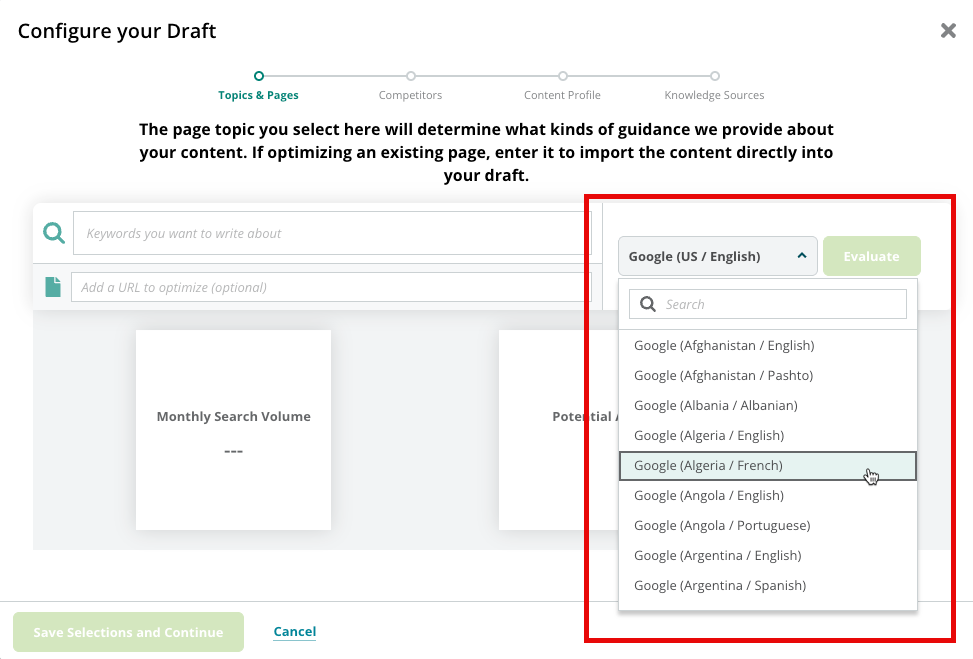
What languages does Writing Assistant support for insights and content generation?
What languages does Writing Assistant support for insights and content generation?
When would I use Writing Assistant instead of Content Guidance?
When would I use Writing Assistant instead of Content Guidance?
Is there a character limit in the text editor?
Is there a character limit in the text editor?
Who can create and edit drafts in Writing Assistant?
Who can create and edit drafts in Writing Assistant?
Does Writing Assistant include approval workflows, review gates, or publish permissions?
Does Writing Assistant include approval workflows, review gates, or publish permissions?
- If you’re publishing to Drupal via the Conductor Drupal module, use Drupal’s content moderation, roles, and permissions to gate review and publishing.
- If you’re publishing to another CMS, use that CMS’s native workflow, role, and permission features.
How do I use body copy insights in Writing Assistant?
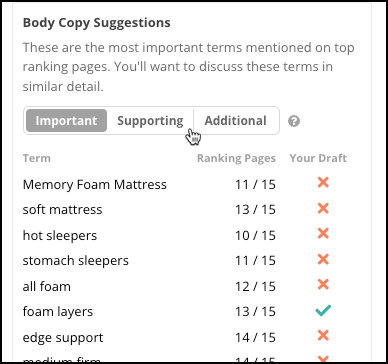
How do I use body copy insights in Writing Assistant?
- An indication of the number of ranking pages that use each suggested keyword.
- An indication of whether the draft content in the editor includes the suggested keyword.

What types of content does the Content Types insight include?
What types of content does the Content Types insight include?
Product/Service Page
A detailed webpage that showcases the features, benefits, and specifications of a specific product or service.Landing Page
A focused webpage designed to convert visitors into leads or customers by highlighting a particular offer or call-to-action.Education/Information
Content that provides valuable insights, explanations, or background on a specific topic to inform and educate the audience.How-to Guide
A step-by-step instructional piece that teaches readers how to accomplish a specific task or solve a problem.Blog Post
A regularly updated article that shares thoughts, opinions, or information on a particular subject, often in a conversational tone.List-based Article
A structured piece of content that presents information in an easily digestible numbered or bulleted format.News
Timely content that reports on current events, recent developments, or breaking stories relevant to your industry or audience.Event
A promotional piece that provides details about an upcoming occasion, including date, time, location, and other relevant information.FAQ
A compilation of common questions and their corresponding answers, designed to address user queries efficiently.Local Page
A webpage tailored to a specific geographic location, featuring information about local services, products, or business details to attract and engage customers in that area.In the event there are many different types of content ranking well for a topic, the Content Types insight will still return the content type that is the closest fit based on the patterns it detects across the top-ranking content.What buyer's journey stages might Writing Assistant suggest for my content?
What buyer's journey stages might Writing Assistant suggest for my content?
Awareness
The user realizes they have a specific problem or a need but hasn’t yet identified a solution. At this stage, your goal is to provide educational value and brand visibility. The focus is on informative content like blog posts, social media tips, or industry reports that address their pain points without a hard sales pitch.Consideration
The user has clearly defined their problem and is actively researching different methods or vendors to solve it. They are evaluating options. This is the time to provide comparison guides, case studies, and expert webinars that demonstrate why your specific category or approach is the most effective.Conversion
The user is ready to select a provider and make a purchase. The goal here is to remove friction and provide validation. Use clear calls-to-action (CTAs), product demos, free trials, testimonials, or limited-time offers to finalize the transaction.Retention
The user is now a customer, and the goal is to keep them engaged to ensure long-term loyalty and repeat business. This involves providing excellent customer support, onboarding sequences, exclusive updates, and loyalty programs to increase the customer lifetime value.Why doesn't Conductor pull in the content from my page correctly?
Why doesn't Conductor pull in the content from my page correctly?
Why does it say that Conductor can't access the content on my page?
Why does it say that Conductor can't access the content on my page?
Allowing Conductor’s Crawler
Conductor’s on-demand crawler is called Caliperbot. Your website team will need to allow it by adding it to an “allow list”:- To allow Caliperbot by user agent, your website team can allow the following user agent string:
Caliperbot/1.0 (+https://www.conductor.com/caliperbot) - To allow Caliperbot by IP address, your website team can allow the following range:
162.246.176.1–162.246.183.254
What are Knowledge Sources?
What are Knowledge Sources?
- Case studies with hard data
- Direct quotes from customers or internal experts
- Proprietary data sheets
- Product one-sheeters
- Whitepapers
- Research notes
- Interview transcripts with subject matter experts
How many knowledge sources can I add to a draft?
You can upload up to five knowledge sources per draft in Writing Assistant.What file types can I upload as a knowledge source in a draft?
You can add plain text, or any of the following file-types:- .docx
- .xlsx
- .txt
- .csv
- .md
Can I restore a deleted draft?
Can I restore a deleted draft?
How many drafts can I create?
How many drafts can I create?
Can I apply more than one content profile to a draft in Writing Assistant?
Can I apply more than one content profile to a draft in Writing Assistant?
Understanding Writing Assistant Concepts and Strategy
Why research more than one keyword in Writing Assistant?
Why research more than one keyword in Writing Assistant?
What counts as a "good" content score?
What counts as a "good" content score?
- Excellent: 67 and higher
- Moderate: 34–66
- Needs Work: 33 and lower
- 80 and up: Probably a good directional target for “publication-ready”. The higher the better!
- Between 60 and 80: Most “adequate” content would land here. That is, you’ve done a decent job across all the score factors—nothing stands out, but nothing is bad.
- Below 60: Consider spending some time iterating on your draft, using our tools and your expertise.
How do I improve my content score?
How do I improve my content score?
Why did my content score change so much?
Why did my content score change so much?
- Are subject to change over time, even if you haven’t made updates to the content.
- Are likely to be lower than the previous scoring methodology, since we are now grading on more factors.
How is the readability metric in Writing Assistant determined?
How is the readability metric in Writing Assistant determined?
Why does the score for Body Copy Suggestions require me to use all the terms for a high score? I thought Content Score wasn't about keyword counting...
Why does the score for Body Copy Suggestions require me to use all the terms for a high score? I thought Content Score wasn't about keyword counting...
- Term inclusion is about topic coverage; if you’re focused on providing helpful information for this topic, these are the terms that should be naturally relevant. Keyword counting is about trying to signal “this is what my page is about” to search engines instead of focusing on what your audience needs from your content.
- Term inclusion is also an important aspect of governance in content. For example, it lets you establish clear standards for what must be included for a piece to be publication ready.
Why does Writing Assistant focus on "topics" and "semantic matching" instead of just telling me to use specific keywords in my titles and headers?
Why does Writing Assistant focus on "topics" and "semantic matching" instead of just telling me to use specific keywords in my titles and headers?
How is Writing Assistant different from other AI content generators?
How is Writing Assistant different from other AI content generators?
Enterprise-grade foundation
Conductor’s Writing Assistant is built on top of OpenAI’s enterprise API integration designed for:- High-volume usage without limitations on model access or usage caps, which helps ensure reliability and avoids downtime caused by usage.
- Security and privacy. Your content will never be used to train our models or OpenAI’s. Popular free tools like ChatGPT, Claude, and Gemini do use your inputs to train their models, risking the exposure of your organization’s data and intellectual property.
- Your specific workflows. Conductor’s Writing Assistant has been purpose-built to generate content infused with insights from top-ranking pages and website optimization best practices. Our engineers have spent hundreds of hours fine-tuning the code that each request uses to generate a draft in Writing Assistant.
SEO at the heart of AI-generated output—all in real time
Writing Assistant uses RAG (Retrieval Augmented Generation) to enhance the content it generates with deep SEO insights, and to provide content that is not only high-quality but also strategically aligned with your search performance goals. Gathering insights in real time from the top-ranking pages for the topic you are writing about—and then generating content based on those insights—Writing Assistant ensures that the content is relevant and optimized for your audience and for search engines.Customization and brand alignment
Writing Assistant allows for customization of tone, style, and terminology, ensuring that the generated content aligns with the brand’s voice and marketing objectives. Customize the guidance associated with the insights gathered from top-ranking pages before generating your drafts to fine-tune Writing Assistant for the best content.Will Google penalize my site for AI-generated content?
Will Google penalize my site for AI-generated content?
- Is high-quality and performance-driven.
- Has realtime relevance, using our RAG-enhanced AI models.
- Reflects the very things Google values: your unique human expertise, experience, and perspective.
Data, Privacy, Trust, and Integrations
Do I need to worry about privacy based on what I enter in Writing Assistant?
Do I need to worry about privacy based on what I enter in Writing Assistant?
When generating content, how does Writing Assistant's AI ensure it doesn't plagiarize the pages it evaluates?
When generating content, how does Writing Assistant's AI ensure it doesn't plagiarize the pages it evaluates?
How does Conductor discover pages on my site to source internal link suggestions?
How does Conductor discover pages on my site to source internal link suggestions?
Why can’t I choose a configured web property for link suggestions?
You won’t be able to select a configured web property if it does not have at least 200 discovered pages from which Conductor can make judgements about relevance to your draft.You might not have enough discovered pages if:- You recently integrated your web analytics and Conductor hasn’t had time to collect those integrated pages and crawl the content.
- Your subdomains determined on the Pages & Crawling settings activity are configured such that Conductor collects data for fewer than 200 pages.
- Your site has fewer than 200 pages.
Why doesn’t a specific page appear as a suggestion as expected?
Assuming Creator would determine that the page is relevant (as described below), the page likely appears in neither your integrated web analytics nor among your discovered pages in Conductor Monitoring:- Check to see whether the expected page belongs to a subdomain not configured in your Pages & Crawling settings. If the page belongs to a subdomain not configured there, consider adding that subdomain. Learn more.
- Review your most recent data in Conductor Monitoring:
-
If the page doesn’t appear there, check to see if the page (or your site in general) is blocking Conductor’s crawler.
To ensure that Conductor can access and crawl your website, your security team will need to allow (“whitelist”) all of our crawlers, either by IP address or user agent.Conductor monitors websites from the IP address subnets listed below. If your organization uses IP address to allow crawling, your security team will need to allow these subnets:
- 89.149.192.96/27
- 81.17.55.192/27
- 23.105.12.64/27
- 173.234.16.0/28
Mozilla/5.0 (compatible; Conductor Monitoring; +https://whatis.conductor.com) - If the expected page does appear there, check to see if the status is a 200. If it returns a 4xx status, Creator won’t include the page as relevant for a suggested link.
-
If the page doesn’t appear there, check to see if the page (or your site in general) is blocking Conductor’s crawler.
How does Conductor determine internal link suggestions?
How does Conductor determine internal link suggestions?
Creating embeddings from source content
First, Conductor reviews the content on your website (see above for how we source it). With this content, our AI engine reviews the meaning and context of each page using an AI technique called “embeddings” to create a semantic understanding of the content. This semantic understanding enables Writing Assistant to not simply match keywords between your draft and other pages on your site, but actually match your draft’s content with content that is about similar concepts.When these embeddings are created, we store them in what is called a “vector database”, which is like a map of your content’s meaning that captures the relationships between topics and concepts.Searching your content for matches to drafted anchor text
When you ask for internal link suggestions, Writing Assistant’s AI engine analyzes your draft (or your highlighted selection) to identify potential anchor text for internal links based on linking best practices. For each potential link, Conductor performs a semantic search of the vector database we created from your content. This search looks for pages whose meaning is most clearly related to the meaning of the anchor text.Providing link suggestions
After reviewing pages for their relationship to the identified anchor text, Writing Assistant takes the relevant pages and filters them to include only potential links that meet certain criteria:- Relevance threshold. Writing Assistant will only suggest pages that meet a certain level of relevance. The AI will not suggest any links if no pages meet this threshold.
- Same URL. Writing Assistant will not suggest a self-referencing link.
- Duplicate links. Writing Assistant will not suggest the same page as a link more than once in your draft.
- User-entered criteria. Writing Assistant will review the user’s URL conditions for suggestions, if any were entered.
- Language and region matching. Where it can determine a language and region associated with the draft and reviewed site content, Writing Assistant will attempt to only suggest links that match language and region.