
- Keyword Data FAQs, which includes questions relevant to tracked and discovered keyword data.
- Keyword Ranks and Reports FAQs, which includes questions about reviewing rank data in keyword measurement reports.
Tracked Keyword Basics
What does the Search Engine in a keyword's settings determine?
What does the Search Engine in a keyword's settings determine?
What is a keyword?
What is a keyword?
Why should I track a new keyword?
Why should I track a new keyword?
- Allows you to track the performance of your keywords and understand how well your site is ranking in search engine results. This information can help you determine which keywords are most effective for your content and which may need to be optimized further.
- Helps you identify new opportunities for content creation and optimization. By analyzing the search volume and competition for different keywords, you can identify areas where your content can fill a gap or where it may be lacking.
When should I track a new keyword?
When should I track a new keyword?
When should I stop tracking keywords?
When should I stop tracking keywords?
- In Conductor, follow the path Performance > Traditional Search > Keywords (or click here).
- On the Keywords tab, sort the table of keywords by search volume or by your rank for the keyword. You can do this by clicking the column header for the relevant metric.
- Review the list of keywords and identify any that have particularly poor performance. Keywords with 0 search volume or keywords that you have not ranked for in the last 6-12 months can be a good place to start for deactivating keywords.
- Deactivate the keywords you identify above.
What is the relationship between keywords and keyword groups?
What is the relationship between keywords and keyword groups?
Tracked Keyword Settings
What does the Search Engine in a keyword's settings determine?
What does the Search Engine in a keyword's settings determine?
Which locations and devices can I track keywords for in traditional search?
Which locations and devices can I track keywords for in traditional search?
Supported Locations in the US
Conductor supports all US locations available to target with Google Ads (with two exceptions for “target types”). You can download which geotarget locations Google Ads supports from their API documentation site.If there are specific locations you can target with Google Search Ads but cannot track with Conductor, contact Conductor support.Supported Locations outside the US
Conductor supports over 2,700 non-US locations: .Supported Devices
Generally speaking, Conductor supports tracking keywords in all search engines on Desktop, Smartphone, and Mobile. However, keywords on certain search engines can be tracked only on Desktop. The following are Desktop-only search engines:- 360 (China / Chinese (Simplified))
- Amazon (Australia / English)
- Amazon (Brazil / Portuguese)
- Amazon (Canada / English)
- Amazon (France / French)
- Amazon (Germany / German)
- Amazon (India / English)
- Amazon (Italy / Italian)
- Amazon (Japan / Japanese)
- Amazon (Mexico / Spanish)
- Amazon (Netherlands / Dutch)
- Amazon (Singapore / English)
- Amazon (Spain / Spanish)
- Amazon (Sweden / Swedish)
- Amazon (Turkey / Turkish)
- Amazon (United Arab Emirates / English)
- Amazon (United Kingdom / English)
- Daum (South Korea / Korean)
- Naver (South Korea / Korean)
- Seznam (Czech Republic / Czech)
- Shenma (China / Chinese (Simplified))
- Sogou (China / Chinese (Simplified))
- Yahoo (Hong Kong / Han (Traditional))
- Yahoo (Japan / Japanese)
- Yahoo (Taiwan / Han (Traditional))
- Yandex (Russia / Russian)
Didn’t find the location you are looking for?
We are working on expanding our reach all the time, so check back in periodically to see if locations have been added. If there is a specific location you think we should report on that doesn’t appear, talk to Support. You can download the attached spreadsheet to filter or search for the countries you are interested in.What does the Web Property Group in a keyword's settings determine?
What does the Web Property Group in a keyword's settings determine?
- Where data for the keyword you are tracking will appear across the Conductor platform. When you report on a specific web property group with a feature in Conductor, you see the tracked keywords associated with that web property group.
- The search result ownership for your web properties for the given keyword.
What does the location in a keyword's settings determine?
What does the location in a keyword's settings determine?
What does the device in a keyword's settings determine?
What does the device in a keyword's settings determine?
What is a Standard Keyword Group?
What is a Standard Keyword Group?
What are preferred URLs for a keyword?
What are preferred URLs for a keyword?
You can set a preferred URL for each keyword you track in Conductor. Not sure what URL to use for a given keyword? Learn more about best practices for preferred URLs in our Community Learning Library.
What is a Prime keyword?
What is a Prime keyword?
Best Practices for Prime Keywords
There is no limit to the number of keywords you can mark as Prime. However, you’ll want to mark only those keywords that are most important for you to track closely.A good rule of thumb is to choose one or two prime keywords for a given page you want to optimize. These pages might be those you determine as preferred URLs in Conductor.Remember, you probably track several variations of a keyword, but you don’t optimize a page for each of those keywords. Choose the keyword that is most important for that page.By assigning those keywords as prime, you’ll ensure that all of your pages are optimized for their prime keywords.What is Daily Keyword Reporting?
What is Daily Keyword Reporting?
Tracking Keywords
Our business is organized by postal code/county/region, not city. How should I track keywords for these areas?
Our business is organized by postal code/county/region, not city. How should I track keywords for these areas?
What characters and symbols can I use in keywords?
What characters and symbols can I use in keywords?
- ,
- ;
- :
- ”
- *
- [
- ]
<<!!- ~
Does Conductor consider capitalization in tracked keywords?
Does Conductor consider capitalization in tracked keywords?
Do daily tracked keywords count against my keyword limit?
Do daily tracked keywords count against my keyword limit?
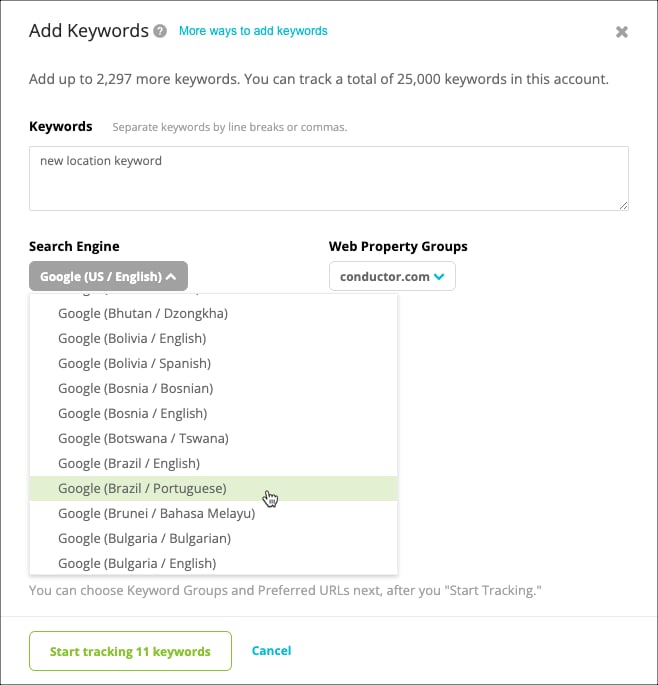
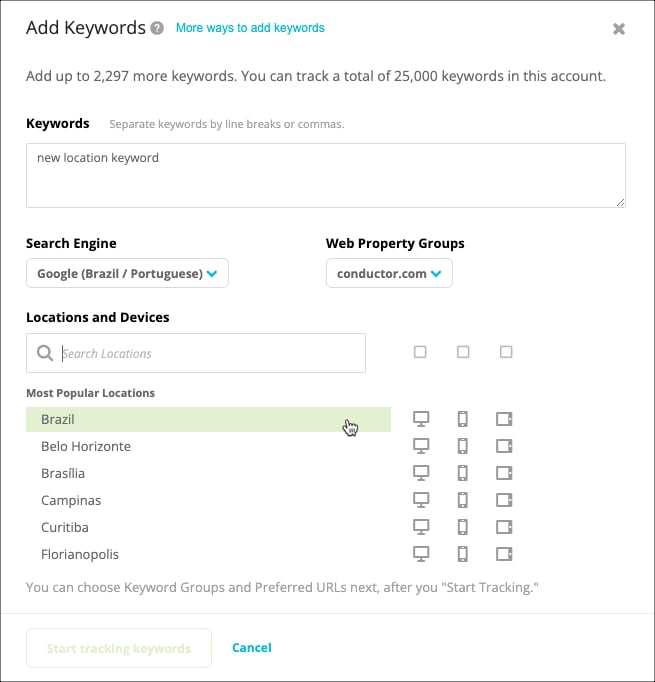
How do I track keywords in other locations or on new search engines?
How do I track keywords in other locations or on new search engines?
Can I track the same keyword more than once?
Can I track the same keyword more than once?
Does Google or Conductor recognize foreign accents in keywords?
Does Google or Conductor recognize foreign accents in keywords?
Managing Tracked Keywords
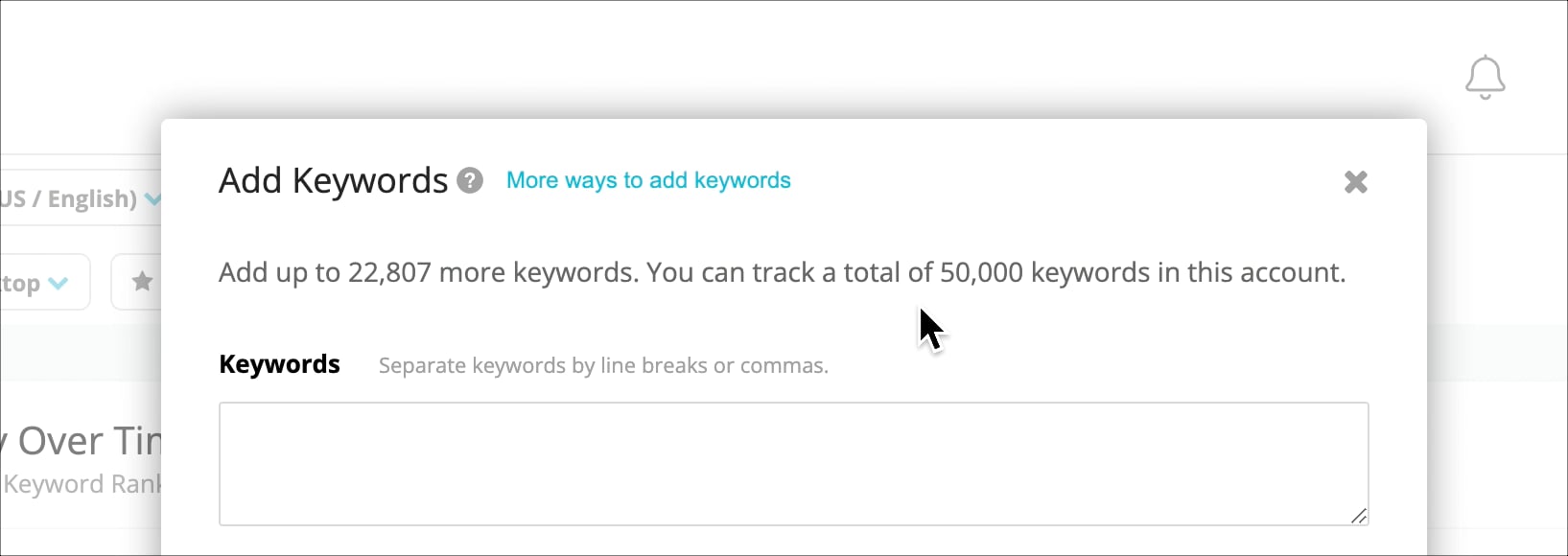
How many keywords do I have tracked?
How many keywords do I have tracked?
Can I see a list of all my keywords?
Can I see a list of all my keywords?
- Follow the path Settings > Keyword Tracking
- Click the Bulk Update link in the top-right.
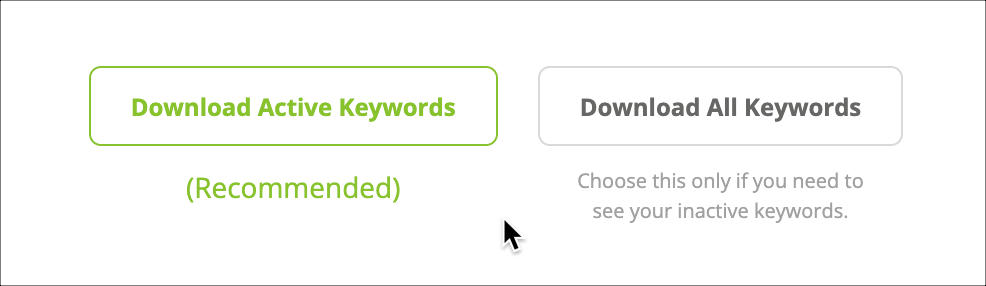
- Choose to download either:
- Only your active keywords.
- All your keywords (active and inactive).
How do I edit a preferred URL for a keyword?
How do I edit a preferred URL for a keyword?
- If you want to edit several keywords’ preferred URLs at one time, you can use the bulk update tool.
- If you want to edit one or a few keywords’ preferred URLs, you can do either of the following:
- From the Keywords activity:
- Follow the path Settings > Keyword Tracking.
- In the table, find the keyword you want to edit.
- In the Preferred URL column, click the edit icon and enter a new preferred URL.
- Click the green check mark button to save your preferred URL.
- From the Keywords report:
- Follow the path Performance > Traditional Search > Keywords.
- Locate the keyword for which you want to set a preferred URL.
- Click the ellipsis icon and select Set Preferred URL from the menu.
- Enter a preferred URL and click Save.
- From the Keywords activity:
What if I accidentally made all of my keywords inactive?
What if I accidentally made all of my keywords inactive?
Why are keywords not appearing/appearing in my account, even though I just added/deactivated it?
Why are keywords not appearing/appearing in my account, even though I just added/deactivated it?