
- Tracked Keyword FAQs, which includes questions about configuring and managing tracked keywords.
- Keyword Ranks and Reports FAQs, which includes questions about reviewing rank data in keyword measurement reports.
Conductor Intelligence Data Basics
When does new data appear in Conductor?
When does new data appear in Conductor?
Tracked Keyword Measurement
Conductor collects tracked keyword rank data weekly, unless you choose to track specific keywords daily. You can see this data in the Keywords and Keyword Details reports. New data is published on Mondays (or daily, if so configured).Keyword Discovery
Conductor publishes data from our keyword discovery data providers as soon as we have it. The actual frequency that this data is refreshed varies.Integrated Web Analytics
Conductor publishes data from your integrated web analytics provider every Monday (unless configured for a Sunday–Saturday week). Learn more here.Integrated Google Search Console
Conductor publishes data from your integrated Google Search Console account daily, when it becomes available. Usually, Google publishes GSC data with a lag of a few days. Learn more here.Technical SEO
Conductor updates technical SEO data in the Pages and Page Details weekly to provide a snapshot of your website’s performance. For a more proactive solution, consider Conductor Monitoring, which provides 24/7 monitoring.Crawled Site HTML
Conductor crawls your website’s pages ranking in organic search weekly. Learn more here.How does Conductor handle the "srsltid" parameter in Google Search?
How does Conductor handle the "srsltid" parameter in Google Search?
What is the “srsltid” parameter?
Google allowed adding the “srsltid” parameter to search results with Google Merchant Center to accommodate attribution and reporting workflows for Google Shopping results. However, Google has expanded the use of the “srsltid” parameter beyond just Google Shopping results, and it’s appearing in the URLs for standard organic search results as well.How does this affect reporting on my website?
This can cause issues with attribution, reporting, and analytics, as the parameterized URLs don’t match the canonical versions you have configured.This can also create challenges around understanding rank changes and potential cannibalization issues, because the parameterized URLs appear as new pages in our data, despite that the results reflect the same canonical page.Likewise, in content performance reports, like Conductor Intelligence’s Pages report, your integrated web analytics providers will recognize each distinct parameterized URL as a separate page.What has Conductor done to combat these issues?
To make keyword rank reporting consistent with what it used to look like before this “srsltid” change happened, Conductor now strips the “srsltid” parameter from URLs in our keyword rank and page reporting data. Thus, you’ll see these URLs without the parameter, improving reporting consistency.This essentially means that when Conductor identifies a URL with the parameter, we only pay attention to the portion of the URL that comes before it.This will make rank reporting consistent with what it used to look like before Google implemented this change.Note:- Conductor implemented this solution in February 2025. We did not make updates to historical data, so data in the platform before March 2025 may reflect the “srsltid” parameter.
- In Pages, you may see multiple rows, representing each page that had a parameter removed.
Tracked Keyword Data Basics
What traditional keyword-based search data does Conductor collect and how is it collected?
What traditional keyword-based search data does Conductor collect and how is it collected?
How does Conductor gather its data?
Conductor takes all of the keywords you have identified as important to you, looks at the first three pages of results for those keywords on search engines, and identifies where your pages appear in those results. Then, Conductor records the URL and portions of the HTML of your pages in those results to provide recommendations for your SEO performance. Beyond your pages on the first three pages of results, Conductor also identifies where pages from your named competitors appear in the first three pages of results, as well as every result on the first page of results for each keyword.With this data, combined with your integrated analytics metrics and other data sources revealing competitive information and keyword research, Conductor shows you a picture of your online visibility so you can identify areas of improvement, optimize your site for the future, and share your progress with your stakeholders.Where does Conductor source tracked keyword data from?
Where does Conductor source tracked keyword data from?
When does new tracked keyword data appear in Conductor?
When does new tracked keyword data appear in Conductor?
- Daily data collected for Monday through Thursday: Conductor publishes daily tracked keyword data overnight so that data for the previous day appears in the platform the following day.
- Daily data collected for Friday, Saturday, and Sunday may be published as late as Sunday night.
- The only exception to the schedule described above: data for keywords you just began tracking daily appear no later than 48 hours after you first add the keywords to daily tracking. (Note that if you do not already track those keywords at the usual weekly frequency, Conductor will not publish daily data for them until after the next weekly publication.)
How far back does Conductor show keyword data?
How far back does Conductor show keyword data?
- For weekly data, Conductor provides up to the most recent 24 months of keyword data.
- For daily data, Conductor provides up to the most recent 24 months of keyword data.
Keyword Discovery Data Basics
Where does Conductor source keyword discovery data from?
Where does Conductor source keyword discovery data from?
How often does Conductor refresh data in Research?
How often does Conductor refresh data in Research?
| Data | Frequency of Updates | |
| Topic Reports | Site Reports | |
| Keywords | As frequently as daily. No less frequently than monthly. | As frequently as daily. No less frequently than monthly. |
| Top-ranking pages | As frequently as daily. No less frequently than monthly. If no current data exists, Conductor updates this in real time. | As frequently as daily. No less frequently than monthly. If no current data exists, Conductor updates this in real time. |
| Current ranks | n/a | As frequently as daily. No less frequently than monthly. |
| Monthly search volume | Monthly | Monthly |
| Cost-per-click | Monthly | Monthly |
| Historical trends | n/a | Monthly |
| Result types | As frequently as daily. No less frequently than monthly. | As frequently as daily. No less frequently than monthly. |
| People Also Ask questions | On-demand | n/a |
| Social Data | On-demand | n/a |
How does Conductor define Low, Medium, and High Competition in Research?
How does Conductor define Low, Medium, and High Competition in Research?
General Keyword Data Basics
Can I see month-over-month search data?
Can I see month-over-month search data?
When will data appear for keywords I start tracking and no longer appear for those I stop tracking?
When will data appear for keywords I start tracking and no longer appear for those I stop tracking?
 ) indicating when you can expect to see Conductor’s tracked keyword data.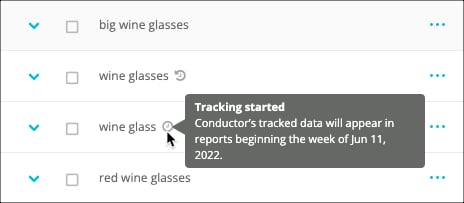
 ) indicating that no new data will appear in future reporting periods.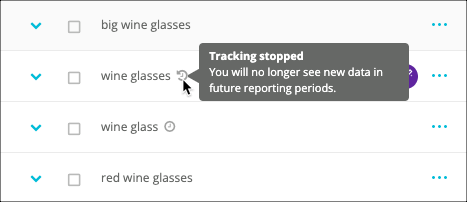
Other Keyword Data
What metrics does Conductor include through its Google Search Console integration?
What metrics does Conductor include through its Google Search Console integration?
- Impressions. This value is the total number of times results from your integrated content appeared to a user on a search engine results page.
- Clicks. This value is the total number of times users clicked a result from your integrated content when it appeared on search engine results pages.
- Clickthrough Rate (CTR). This value is the ratio derived from the Clicks metric divided by the Impressions metric.
- Average Position. This value is the average position each week of results from your integrated content that appeared on search engine results pages.
If I have multiple Google Search Console integrations for a web property, which integration sends data to Page Details?
If I have multiple Google Search Console integrations for a web property, which integration sends data to Page Details?
Daily Keyword Data
What is Daily Keyword Tracking?
What is Daily Keyword Tracking?
How do I set up daily keyword tracking?
How do I set up daily keyword tracking?
How soon does daily data appear after I track a keyword daily?
How soon does daily data appear after I track a keyword daily?
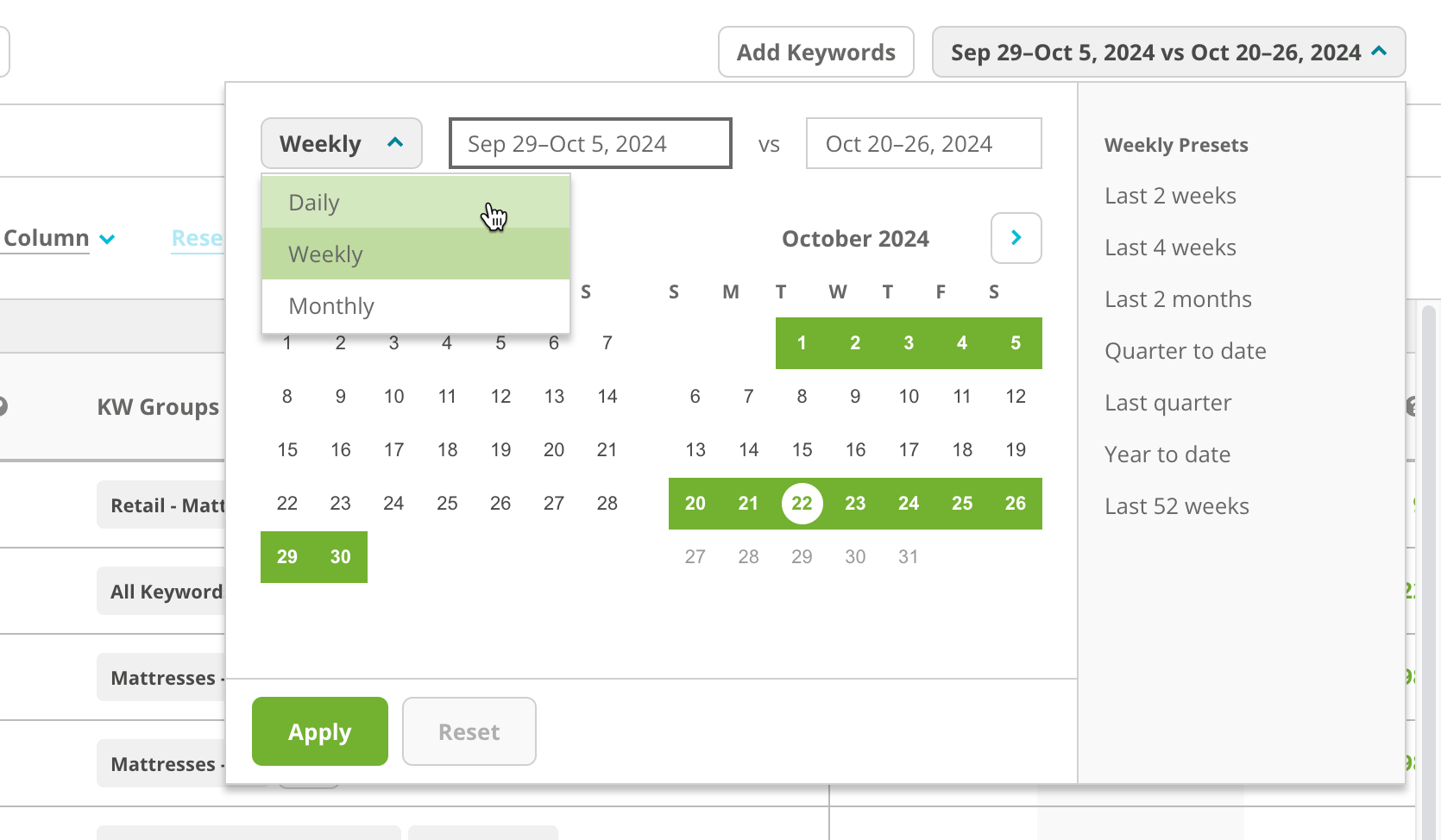
Where can I see daily keyword data in Conductor?
Where can I see daily keyword data in Conductor?
Social Data
Do engagements include when someone adds a hashtag while editing a post?
Do engagements include when someone adds a hashtag while editing a post?