The content you create for your audience exists across many different kinds of sites, hosted on different domains, subdomains, or subfolders.Additionally, you might have content that reflects your digital presence on domains you don’t even own, like branded content on third-party sites.In Conductor, You can monitor content on these different sites by tracking each as a web property.Comparisons tracked against multiple web property–search engine combinationsComparing a web property across multiple search engines or languages associated with a single tracked web property counts as multiple comparisons against your total number. You cannot create a comparison web property group if you have reached the total number of tracked comparison web property groups for your account. For example, comparing a comparison web property against example.com on Google US / English, Google Canada / English, and Google Canada / French would count as three comparison web properties.Comparison web properties must be compared to tracked web property groupsYou cannot create a comparison web property group nor add a comparison web property to a group without choosing a tracked web property group and search engine against which you want to compare it. Comparison groups do not appear in platform reports unless they are associated with a web property group and search engine.You cannot compare overlapping web propertiesComparison web properties cannot be compared to a tracked web property group that includes overlapping pages. For example, you cannot compare comparison property “blog.example.com” to your tracked web property group “example.com”.Additionally, you cannot compare multiple comparison web properties to a single tracked web property group if those comparison web properties have overlapping pages. For example, you cannot compare both “blog.example.com” and “example.com” to a tracked web property group.Archived comparison web properties must have comparisons to active web properties to be unarchivedYou cannot unarchive a comparison web property or web property group that has no comparisons to an active tracked web property group.
What are web property groups?
You add combine multiple web properties together into a web property group. Groups contain web properties that you want to track together—so you can report on their performance on search engine results pages for a single set of keywords, and see a more holistic view of that performance.You might create a web property group for:
A specific brand your organization owns.
Different regions your organization operates in.
Separate business units.
Any number of other reasons that provide value when you track separate web properties together.
You can create web property groups in the Web Properties activity.
Maximum number of web properties in a single groupThere is no limit to the number of web properties that can be added to a single web property group.A given web property may belong to only one groupYou cannot add a web property if that web property already belongs to an existing web property group.
What counts as a single web property in Conductor?
Web properties are a combination of domain, search engine, and language. Each set counts against the total you can track in Conductor as determined by your contract.For example, the following each would count against your total:
Competitor web properties represent traditional business competitors, industry competitors, online competitors, or other web properties for which you want to gather data to compare with your tracked web properties. Account owners determine which comparison web properties Conductor collects data for in the Web Properties activity.After you configure a competitor web properties, Conductor tracks them similarly to how it tracks your web properties, identifying where they rank in the top 100 positions for the keywords tracked in your account.By naming competitors, you get more data to help provide a fuller picture of your performance relative to theirs.Comparison web properties represent the content you want to know more about but will not measure as your own. These might be your competitors, but may be any site or page that you want to see data for in relation to your own content.Just like the examples listed above for your web properties, you can track competitor web properties, regardless of where they live online. It might be:
A domain belonging to your organization’s biggest brick-and-mortar competitor.
A competitor’s YouTube channel.
An SEO competitor that fights for rankings in Google, but is not an actual business competitor.
What is the difference between a Top Ranker and Competitor?
Conductor provides information about Top Rankers and competitors. Both are important, but it’s important to understand the difference.Top RankersTop Rankers represent those pages (outside of your own) that are ranking in certain positions on a search engine results page (SERP). Top Rankers include:
For tracked Google searches, any result on the first page of results.
For tracked other searches, any result in the first ten positions of a SERP.
CompetitorsCompetitor web properties—which you can compare against your web properties tracked in Conductor—represent the web properties belonging to your competitors. Designating web properties for comparison tells Conductor to collect keyword data for that content from the top 100 positions on search engine results pages.
Why should I care about Top Rankers if I already know who my competitors are?
Top Rankers are important because they represent your online competition, even if they aren’t traditional business competitors. Top Rankers are the ones who could be knocking you out of the top positions in Google, making you less visible in the online space. Top Rankers might not be (and often aren’t) the same web properties you’ve added as Competitors in Conductor.Keep an eye on Top Rankers: are particular domains showing up in the top Google SERP positions? Consider adding them as competitor web properties so you will have more data available to help give you the competitive advantage.
How should I organize and optimize web properties?
The way you configure your web properties should reflect how you want to report on and understand your data in Conductor. Depending on what kinds of properties your organization tracks, you might find there are a number of different configurations that make sense. Refer to the examples below for some sample scenarios that may provide guidance.Examples for Your Web PropertiesReport on Your Brand’s Holistic Digital PresenceConfigure a web property that includes your primary web property (for example, the domain you track with your web analytics platform) and any other web properties that represent your brand, including YouTube Channels, social accounts, microsites, or other pages on third-party sites.By tracking all this content in a single web property group, you’ll be able to see a more complete picture of your brand’s performance across Conductor’s various search visibility reports.Aggregate Your Social Reporting Across Multiple Social NetworksCurious to know how your social channels perform for your tracked keywords? Aggregate all your channels in one web property. Then review the Keywords report to see how your profiles perform in search.Aggregate Your Brand Reporting Across Multiple LocationsHave separate domains, subdomains, or subfolders for the different geographic regions you operate in? Aggregate all of these web properties into a single web property group. Then, you can use roll-up reporting across your location-specific keywords in reports like Keywords and Locations to see your performance in aggregate.Examples for Competitor Web PropertiesReport on a Competitor’s Holistic Digital PresenceConfigure a competitor web property that includes all the sites that represent a specific competitor’s brand, including YouTube Channels, social accounts, microsites, or other pages on third-party sites.By tracking all this content in a single competitor group, you’ll be able to see a more complete picture of this competitor’s performance across Conductor’s various search visibility reports.Aggregate a Competitor’s Web Properties Across Multiple BrandsIf you have a competitor that operates multiple brands that compete with your brand, you can aggregate that competitor’s brands into a single group. Then, use reports like Market Share to compare this group to your own domain to better understand that competitor’s full effect on your rankings.Aggregate Reporting on a Competitor’s Brand Across Multiple LocationsDoes a competitor of yours have separate domains, subdomains, or subfolders for the different geographic regions they operate in? Aggregate all of these web properties into a single comparison group. Then, you can use roll-up reporting across your tracked location-specific keywords in reports like Keywords to drill down and see where these competitor sites appear in search for the keywords you track.
Why don't I see data for one of my web properties?
Data appears for individual web properties only once Conductor has had enough time to publish data for those configured keywords. To avoid waiting an extra week for data to be published, add keywords early in the week to give Conductor enough time to collect data.
You can track new content in the Web Properties activity (Settings > Web Properties). Your account determines how many web properties you can track in Conductor.If you want to track more than your current limit, you can purchase more as an add-on. Contact Support to learn more.
What characters and symbols can I use in the domains, subdomains, subfolders, and pages I track?
Only letters (a-z), digits (0-9), dashes (-), and dots (.) are valid in the domains, subdomains, subfolders, and pages you add to track with Conductor.
What content does Conductor track after I enter a root domain as a web property?
Conductor collects all the content from a root domain you track as a web property, including all subdomains or subfolders.By entering only the root domain (e.g., example.com), Conductor gathers data for all pages, subfolders, and subdomains. However, if you specifically track a subdomain—such as www.example.com or store.example.com—Conductor collects only the data from that subdomain.
Should I track a subfolder?
Thinking about tracking a subfolder among your content or competitor properties in Conductor? Here are some things to consider:Analytics SupportWhen you track a subfolder within your site, Conductor does not automatically filter your site’s integrated web analytics data to show only data related to that subfolder. This means that you’ll need to create a segment or specific data stream in your analytics platform that you can then integrate with the related tracked subfolder in Conductor.Allowable Subfolder EntriesOnly subfolders defined with a forward slash can be tracked (For example: abc.com/example). No fragments (abc.com#example) or query parameters (abc.com?example) may be entered.Likewise, Conductor cannot support a subfolder path that includes anything besides a simple text string.Best Practices for Tracking SubfoldersIn some cases, configuring a tracked subfolder may not be your best option, because it limits the scope of your keyword rank data. When determining whether your content should be configured as a root domain, a subdomain, a subfolder, or even just a page, consider these questions:
Are the primary Conductor users at your organization responsible for overseeing the performance of all pages belonging to the domain or just the content found in the subfolder?
Who is the intended audience for the subfolder content? Is it a different audience that would consume other non-subfolder tracked content configured in the account?
Is it important to isolate the data into distinct subfolders? For example, should you use subfolders to keep your data isolated if your company has different regional AEO or SEO teams responsible for each market, and each team cares only about the data relevant to their market when they use Conductor?
If your subfolders are structured along regional markets, might having different keywords tracked in the different search engine–language contexts be sufficient?
Does your organization have analytics segments that mirror the desired subfolder content configuration(s) already?
Instead of configuring subfolders, is the more desired experience to be able to filter keyword performance by URL groupings?
These questions can help guide your decision on whether to track a subfolder rather than tracking a broader scope with a root domain, top-level domain, or subdomain. However, if you have a question or need guidance, contact Conductor Customer Success.
If I track a root domain as a web property, does it track data from that domain's constituent subdomains as well?
Yes. For most reports, Conductor includes data for subdomains with the data it collects for root domains. However, in most reports, this data is not differentiated from root domain data or other data from other subdomains.
Why doesn't Conductor recognize the YouTube channel I'm trying to track?
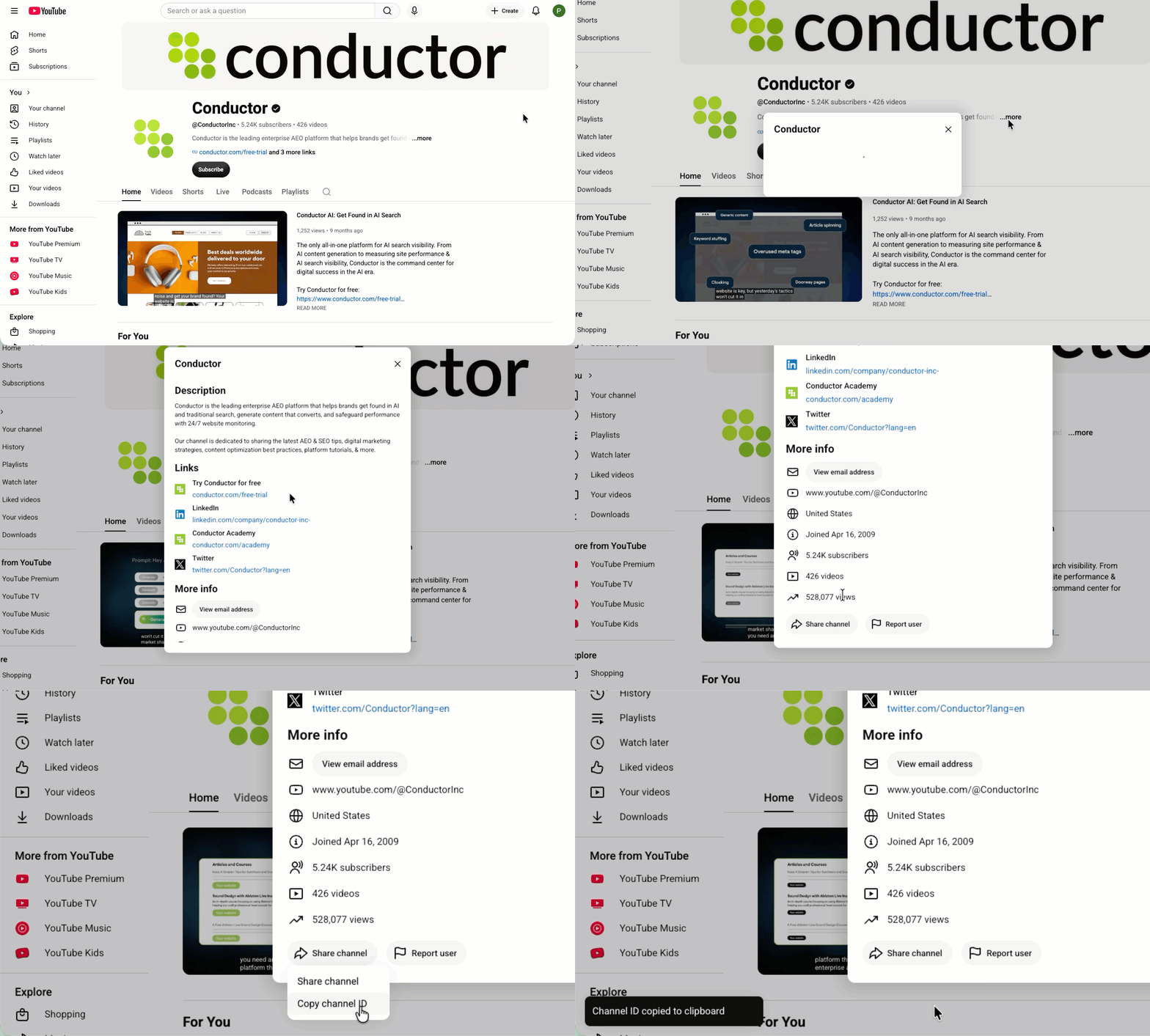
For Conductor to recognize a YouTube channel you want to track—whether as one of your web properties or as a comparison property—the format you enter should be: youtube.com/channel/[Your YouTube ID]You can find your YouTube Channel ID on your channel home page. Click More in your description, then click the Share channel button and select Copy Channel ID. The ID is now on your clipboard.
Can I see citations from my tracked YouTube channel web property?
Not from the channel itself. AI Search Performance doesn’t attribute citations of individual videos to a tracked YouTube channel, so tracking your channel as a web property won’t show citations for your videos.You also can’t track individual video URLs (like youtube.com/watch?v=…) as web properties, because web properties don’t support URLs with query strings.Instead, track youtube.com and use a page group to define the videos you want to report on. You can set this up in one of two ways.
In AI Search Performance, select your page group in the Page Groups filter.
This option reuses the topics you already track, and adding a property to an existing group doesn’t count against your web property limit.
Once youtube.com is part of your web property group, Conductor treats every YouTube citation as one of yours. Always apply your page group filter when you report on citations, or your citation counts and share of voice will be inflated.
If you change your mind, remove youtube.com from the web property group. AI Search Performance updates both current and historical data to reflect the change.
Option 2: Create a separate web property group for YouTube
Create a new web property group for youtube.com.
Create a page group and add the URLs of the videos you want to track.
Track topics on the new web property group.
In AI Search Performance, select the YouTube web property group and your page group.
This option keeps YouTube citations separate from your main website’s data, so there’s no risk of inflating your citations. However, you need to track topics on the new web property group, which uses additional AI Response Credits.
You can add any of your video URLs to the page group—they don’t need to appear among the pages discovered by your analytics integration. AI Search Performance recognizes them as soon as they’re cited. If none of your videos have been cited for your tracked prompts yet, the page group won’t show any citation data.
Assistant
Responses are generated using AI and may contain mistakes.