Can I integrate more than one analytics profile for the same web property?
Yes. You can create multiple integrations for each web property and search engine you track.
How many pages from my site does Conductor report through my integrated web analytics?
Conductor reports on up to 10,000 pages (or 100,000 pages, if you have upgraded) per web property. Remember: to appear in analytics-based reports, a page must have at least one organic session during the reporting time period.If you are interested in upgrading your Conductor account so that you can see up to 100,000 pages in analytics reports, contact your Conductor Customer Success team.
What does Conductor consider organic traffic?
Conductor considers organic traffic to be traffic that generates at least 1 session attributed to organic search in your integrated analytics platform.If a page you report on appears without traffic data, the likely reason is that it was not in the top 10,000 pages (or 100,000 pages, if you have upgraded) receiving organic traffic on your tracked web property.
Why do I see multiple rows in the Pages report for a single URL?
This likely has to do with Conductor’s solution for Google’s “srstlid” parameter. After removing the parameter from reported pages, the Pages report will show the remaining “base” URL for each page as a unique row in the Pages report.
When does data from my web analytics integration update in Conductor?
Conductor updates data from your integrated analytics platform weekly. You can access fresh data on Mondays.
Can I see historical analytics data in Conductor if I integrate a new analytics profile?
No, when you integrate a new profile, data appears in Conductor from that moment, forward.This includes migrating from one web analytics provider to another: data from your previous provider will no longer appear in your account after integrating a new web analytics provider.
Can I backfill historical data from my web analytics provider for previous time periods in Conductor?
When you onboarded with Conductor, based on your account’s needs, our team may have added historical data from your analytics provider to maintain your reporting continuity as you began reporting with Conductor.However, there may be instances when it is necessary to backfill historical data from your analytics provider. When this occurs, you can reach out to Conductor’s Support team to learn what options you have based on your analytics provider.Note that backfilling historical data overwrites any existing data and eliminates change tracking annotations from Content Activity Reporting from the backfilled time periods.
Does Conductor use my web analytics data in any way?
What metrics can I integrate from my web analytics platform?
As a general rule, you can integrate any metric in your web analytics platform that is a numeric, uncalculated value. Some calculated metrics cannot be integrated with Conductor because of the way those values are used in Conductor’s reports.For example, some organizations track custom “Product ID” or “URL Pathname” metrics in their web analytics platform—but those could not be aggregated into Conductor’s Pages report because they do not reflect performance metrics in the way Conductor expects.Likewise, you might track metrics that are rates, averages, or similar calculated values such as “Bounce Rate” or “Average Time on Page”. These cannot be integrated because they cannot be aggregated the same way as the underlying numeric metrics (“Bounces” and “Time on Page”).
What do the metrics that appear in my Conductor reports mean?
The metrics that appear in Conductor are taken directly from your analytics provider through the integration.If you have questions about what each metric means, consult your analytics administrator and work with your analytics provider to make sure you integrate the metrics that are most relevant for your organizational needs.
What's the difference between Search and Visit Metrics?
The nomenclature for metrics in web analytics platforms can be a little tricky to understand - especially when it comes to Searches and Visits: their definitions sound similar. Different web analytics providers might have different ways of defining these metrics, but they are largely similar. Here is how Google and Adobe differentiate Searches and Visits:
Adobe Analytics - Visits A sequence of page views in a sitting. - Searches An instance of a click-through, which shows the page that is associated with a specific engine or keyword.
Google Analytics - Visits The number of clicks on a page from organic search results, including multiple sessions during the time period. - Organic Searches The number of clicks on a page from organic search results within each session during the time period.
Searches and Visits metrics may not be equal in Conductor. Here’s an example why:John clicks your URL in organic search results. Then, after a couple of minutes, he goes back to the search engine results page and makes another search. He clicks on your URL again and returns to your site. Because both entries to your site take place during one session, John’s activity is counted as one Visit. It is counted as two Searches, though, because he entered your site from an organic search result twice.
A disparity between Visits and Searches can also result from your attribution model. Consider the following scenario if you have your default attribution set to “last click”:When a user visits your site from organic search and then from paid search during the same session, one Search would be counted but no Visit counted from organic search (because the entire session would be attributed to the last click entry source, which was Paid Search).
Can I add metrics to an existing analytics integration?
Yes. After the next data publication, you will see data from the additional metric appear in Conductor’s reports.
How can I have organic visits for a page when Conductor indicates no discovered or tracked keywords for the page?
The most likely explanation is that you are getting organic page views from keywords that you do not currently track and are not available from our discovered keywords database. While we have a large number of keywords in our database, it certainly does not represent the entire universe of keywords that users could search for to find that page through organic search.
Why does no analytics data appear for a time period?
Analytics data appears only if a page (or segment of pages) receives at least one session from organic traffic and is in the top 10,000 pages (or the top 100,000 pages, if you have upgraded) of pages receiving at least one session from organic traffic.
Why doesn't the protocol I use for my pages match what appears in Conductor?
In general, Conductor reports data in the format it is received from your analytics provider. In terms of the protocol associated with a URL, Conductor displays what it receives from your provider. Check to see what protocol is set for your data stream in Google Analytics 4 to confirm it is the correct protocol to report on.Note: After any change you make to your analytics profile, be sure to open the integration in Conductor and click Save and Complete to refresh your integration.
Why do I need to choose a search engine for an analytics integration?
Data from an integration appears in context with that search engine. This allows you to integrate different analytics profiles that match the search engines you track. For example, you can integrate a profile you use for the US and a profile you use for the UK and associate each with their respective search engines (google.com and google.co.uk). Then when you view analytics data in Conductor, it appears in context with the relevant rank data.
Why does my analytics data appear the same for each integration I have set up for my different tracked search engines in Conductor?
Conductor always reflects the profile you integrate from your analytics. It does no filtering by search engine after it receives data from your analytics provider. So, if you have only one, global analytics profile, the data will always reflect the data from that profile, regardless of whether you create different integrations for each search engine.To see data for specific engines, you would need to create specific analytics profiles for each search engine and integrate each with Conductor.
When I try to select a search engine to complete my analytics integration, why doesn't the search engine I want appear?
When you set up an integration, the search engines that appear in the Search Engines menu are determined from the search engines you currently track keywords on for the web property you are integrating with analytics data.If no search engines appear for the content you are integrating, it’s likely there are no tracked keywords on that search engine for that web property.
Why do I see analytics data for a root domain in Conductor when I choose to see data from a tracked subfolder or subdomain?
The likely answer is that you have integrated an analytics profile with the subfolder or subdomain content that has not been segmented to include only data from that subfolder or subdomain.Conductor shows whatever data is integrated from your analytics profile, so be sure to confirm you are sending Conductor data that is segmented by the subfolder or subdomain if you want only that to appear in Conductor.
Which metrics from GA4 can I integrate with Conductor?
Conductor lets you integrate any non-calculated metric from Google Analytics 4 that can be applied to the following combination of dimensions: Hostname, Landing page + query string, Session default channel group. This may mean that a metric you track in GA4 is not compatible with Conductor’s integration.Google’s pre-built metrics listed below are compatible with Conductor’s integration. You can find definitions for these metrics in Google’s documentation.
sessions
addToCarts
adUnitExposure
checkouts
conversions
crashAffectedUsers
ecommercePurchases
engagedSessions
eventCount
firstTimePurchasers
newUsers
publisherAdClicks
publisherAdImpressions
purchaseRevenue
screenPageViews
shippingAmount
taxAmount
totalAdRevenue
totalPurchasers
totalRevenue
transactions
In addition to these pre-built metrics in GA4, you can also integrate any custom events or key events (formerly “conversion events”) you have configured for your GA4 account.Note that to select key events when you integrate, you must first configure them in GA4. Refer to Google’s documentation for how to set up a key event.
To follow standard naming conventions for analytics metrics, integrated metrics must contain only letters, numbers, and underscores. No spaces should appear in a metric name. Metrics with invalid characters will cause errors in the integration.However, Google does not prevent you from creating events and metrics with spaces. To prevent errors during integration, you can rename metrics according to Google’s instructions and update any metrics that might include invalid characters.
Can I filter the analytics data brought through the GA4 integration based on the part of my site it comes from?
Unlike Google’s previous Universal Analytics platform, GA4 does not use Views that you might create for different reporting uses. These were commonly used to report on different localities that you might host on different subdomains or subfolders on your site. Because there are no longer Views with GA4, you cannot integrate a specific View in Conductor—which means when you integrate GA4 you’re integrating all your site data.In Conductor, if you have different web property groups created for subdomains on the same site, the platform automatically filters integrated GA4 data for those subdomains. When you select to see data for that subdomain from the web property selector in a report, your analytics data will reflect only metrics gathered from that subdomain.However, if you have different web property groups created for subfolders on your site, Conductor cannot filter the data automatically. As a result, when you select to see data for that subfolder from the web property selector in a report, you’ll continue to see data from your entire site.If you use subfolders to report on your data through different web property groups in Conductor, consider creating page groups for each of those subfolders. This will allow you to filter for only data gathered from those subfolders.
Can I filter the analytics data brought through the GA4 integration based on a data stream configured in GA4?
No, Conductor publishes all organic data for the integrated property. There is no configuration for data stream in Conductor.
What are Google refresh tokens and how do they affect my integration strategy?
Google’s API—which sends your data from Google Analytics to Conductor—limits the number of integrations a single user can create to 100. This is accomplished on the backend of their platform with what they call Tokens. Every time a user creates an integration, another Token is used. When the user creates a 101st integration, the very first Token used expires and that first integration fails.For most organizations using Conductor, you will likely never use all 100 Tokens. However, for large, enterprise organizations, you might need many more than 100 integrations based on your integration strategy.To address this, Conductor recommends creating different email aliases created specifically to use for integration purposes. If you need to create 125 integrations, you would need at least 2 aliases, based on 100 tokens per alias.If you need help with your integration strategy, and help to determine how many aliases you need to create to accomplish your integration strategy, please reach out to Conductor’s Customer Success Team.
Why don't my metric values in Conductor match my Google Analytics values?
The most common reason you don’t see matching values across Google Analytics and Conductor is that you’re not looking at the right data in Google Analytics. This occurs because Conductor collects data from Google Analytics in a specific way that you might not be replicating manually in your Google Analytics account.
Confirm Your Google Analytics Values Match Conductor’s Reports
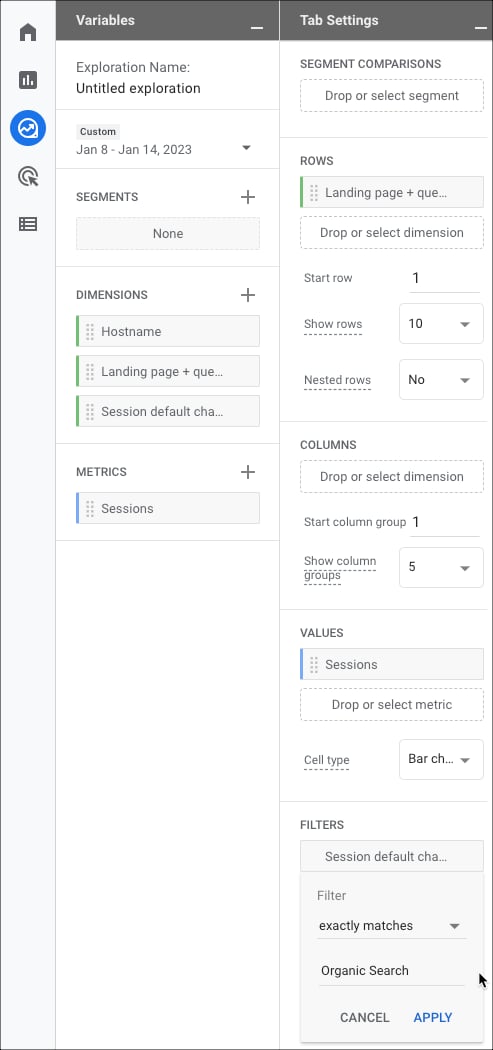
You can create a custom exploration in Google Analytics 4 that reflects the same filtering Conductor uses to determine what data to show in its reports. Configuring the filters in the manner listed below will produce the data in the same configuration you see in Conductor.
In your Google Analytics 4 property, use the navigation on the left to go to Explore.
Start a new Blank exploration.
Configure your exploration in the following manner using the controls on the left. Any controls or field not mentioned below may be left as is:
Dates: Enter the exact dates this exploration uses to match the dates in Conductor for the data you want to match
Dimensions: Select and import the following dimensions:
Hostname
Landing page + query string
Session default channel group
Metrics: Select and import Sessions and any other integrated metrics you want to check
Rows: Select Landing page + query string
Values: Select Sessions and any other integrated metrics you want to check
The most important thing to understand is dimensions.
Hostname. We use the hostname to match your tracked web property—any hostnames that don’t match the tracked web properties domain hostname are filtered out.
Landing page + query string. This is the URL that appears in the SERP and the URL with the content that Google deems relevant to the keyword.
Session default channel group. We only report on organic data so any traffic that comes from a channel group other than Organic Search is filtered out.
Note that if you report on organic traffic in other ways, the values will be different. Additionally, the values might be different because we specifically collect organic data from Google SERPs—your reports may include other types of organic traffic.
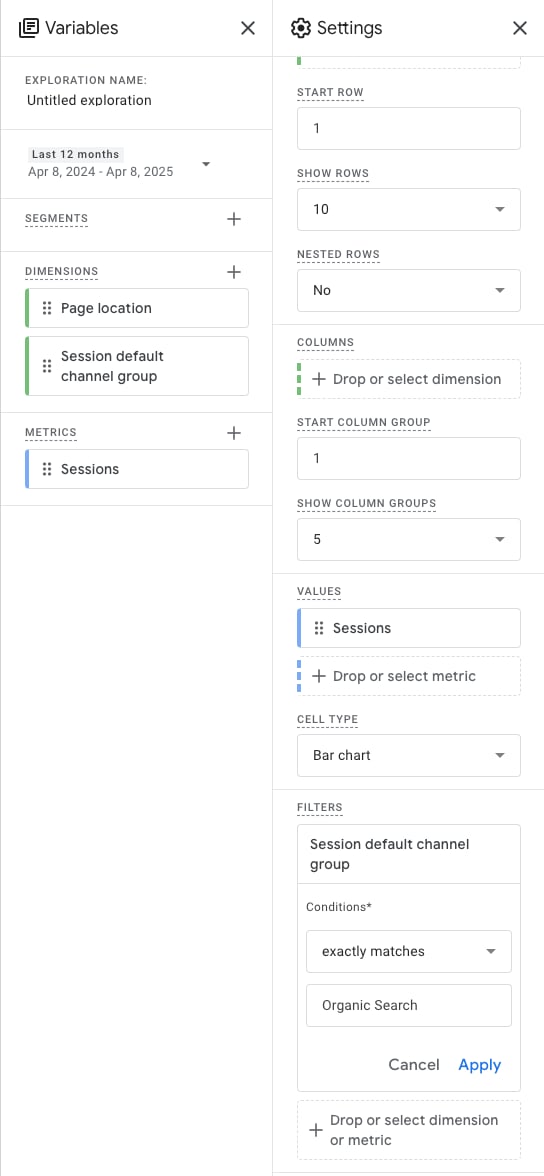
Google may be sending a sample of your data. Read more about data sampling in this FAQ.Alternatively, if your site uses subdomains, you may see pages in your Google Analytics exploration report that don’t actually exist, based on how Google constructs URLs when building the report.If this is the case, you can do another exploration that uses the Page Location dimension in place of Hostname and Landing page + query string.
Compare the pages from the first report with the pages in this new report. Any pages that appear in both lists are real URLs on your site, and the metrics associated with them are what are reported in Conductor’s reports. Any remaining pages are URLs that Google built when piecing together the Hostname and Landing page + query string dimensions, and do not represent actual pages on your site.
What is data sampling and how does it affect my integrated Google Analytics data?
Depending on your Google Analytics account, Google may send Conductor a sample of your data to represent the full activity occurring on your site. As a result, there may be differences between sampled data that appears in Conductor and the data you see in Google’s interface.
Can I configure my reporting weeks as Monday–Sunday for Adobe Integrations?
Yes, while Conductor’s standard reporting week is Sunday–Saturday, you can integrate your Adobe Analytics data if your reporting week is Monday–Sunday. You can configure this behavior in steps 5 and 10 of the Configure Your First Request in Data Warehouse (Weekly Report) section in the Adobe Integration Guide.However, note that regardless of this configuration, Conductor still publishes data from Adobe across Conductor’s standard Sunday–Saturday range. When you choose to report data across Monday–Sunday, the data will appear in Conductor across Sunday–Saturday, where each day’s data is offset by one day. For example, your Monday data appears for Sunday, your Tuesday data appears for Monday, and so on.
Does Conductor integrate with Adobe Customer Journey Analytics (CJA)?
Not directly. Conductor’s Adobe Analytics integration connects to Adobe Analytics report suites. It doesn’t support Adobe Customer Journey Analytics (CJA) or Adobe Experience Platform (AEP) data.If your organization reports in CJA, you can export your data from CJA and send it to Conductor Intelligence through a custom analytics integration, either via SFTP or via email. Your exported files need to follow the file naming and column format described in those guides.
Assistant
Responses are generated using AI and may contain mistakes.