
Conductor customers: Review this lesson in our Community
📍What’s in this guide?
The AI Content Advantage: Create with Confidence in Conductor- AI as Your Strategic Content Partner
- Understanding AI & Google’s Perspective
- Conductor: Your Strategic Advantage
- Key Benefits of Conductor’s AI
- Don’t skip your keyword research
- Fine-tune the input material
- Define your brand foundation with Content Profiles
- Ground your AI in your expertise with Knowledge Sources
- Align guidance to your own vision
- Generate, then iterate
- Strengthen your content with smart Internal Link Suggestions (coming soon!)
 Are you wondering how AI fits into your content strategy? It’s a common question! You might be concerned about maintaining quality, preserving your brand’s unique voice, and ensuring your content drives real SEO and AEO results. We believe AI—when incorporated thoughtfully—is a strategic advantage for creating effective, brand-aligned content at scale, fully aligned with Google’s emphasis on quality. Read on to understand why.
Want the full Writing Assistant product walkthrough? Watch Sam’s workshop here! 🎬
Understanding AI and Google’s Perspective
Let’s address the elephant in the room: Google and AI-generated content. You might have heard that using AI could lead to penalties. The good news is, that’s not the case! Google doesn’t penalize content simply because AI was part of the creation process. So, what does Google care about? It’s all about quality. Google’s focus is on content that’s valuable, original, and truly helpful to users. Think of it this way: Google rewards content that demonstrates Experience, Expertise, Authoritativeness, and Trustworthiness (E-E-A-T). Whether that content is written by a human, with AI assistance, or generated by AI, quality is the key. The real risk? Publishing low-quality, generic content – and that can happen with or without AI.Conductor: Your Strategic Advantage
This is where Conductor’s AI shines. We’ve designed our AI features to help you overcome those common concerns and create content that truly performs. 🏆 Quality First, Always Conductor’s AI is built to help you create high-quality, performance-driven content. It’s not about simply generating words—it’s about driving results. 🎯 Relevance from the Start Forget generic outputs. Conductor’s RAG AI taps into a deep understanding of real-time search insights and your site’s unique content. By leveraging our vertical data, Conductor helps you create relevant content that hits the mark. 🤝 AI as Your Partner Think of Conductor AI as your intelligent assistant, ready to help you refine your ideas, draft content, and optimize for success. You’re always in the driver’s seat, bringing your unique human expertise, experience, and perspective – the very things Google values. And with Content Profiles, you embed your brand’s essence directly into the AI, ensuring that even at scale, your content remains authentically yours.Key Benefits of Conductor’s AI
- Create with Confidence: Conductor AI empowers you to create content that aligns with Google’s quality standards, boosting your SEO strategy.
- Scale Your Success: Imagine creating high-quality, on-brand content more efficiently. Conductor AI makes it possible.
- Leverage Your Expertise: By customizing prompts with your own objective, audience, tone and style and more—your AI-assisted content will consistently reflect your unique vision. Content Profiles supercharge this by allowing you to pre-define these elements, ensuring every AI-generated draft starts with your brand’s DNA. This makes maintaining brand consistency effortless, even when scaling content production.

1️⃣ Don’t skip your keyword research
Ensure the topics you’re choosing to target are valuable, attainable and—most importantly—relevant for your brand. Creating content for topics that are too broad, or topics for which your brand isn’t well-suited to answer, likely won’t be successful and could potentially waste resources. Watch the videos below to learn about pillars of a modern keyword strategy (to succeed in both traditional and AI search), and how Writing Assistant itself can help you check whether a chosen topic makes sense for your brand. Not sure which keywords to target for your next content project? Start here inhttp://app.conductor.com/u/explorerResearch ↗️.
Want more content strategy best practices? Watch Crystie’s full session here! 🎬
2️⃣ Fine-tune the input material
All guidance in your draft will be based on this selection of URLs, which are pulled from the top ranking pages for your target topic. Hide any that are irrelevant to your goals in order to get higher quality recommendations. Not creating video content? Hide those Youtube results. Will your content be educational vs transactional? Remove that Amazon category page. No need to give your AI writing assistant information that’s irrelevant.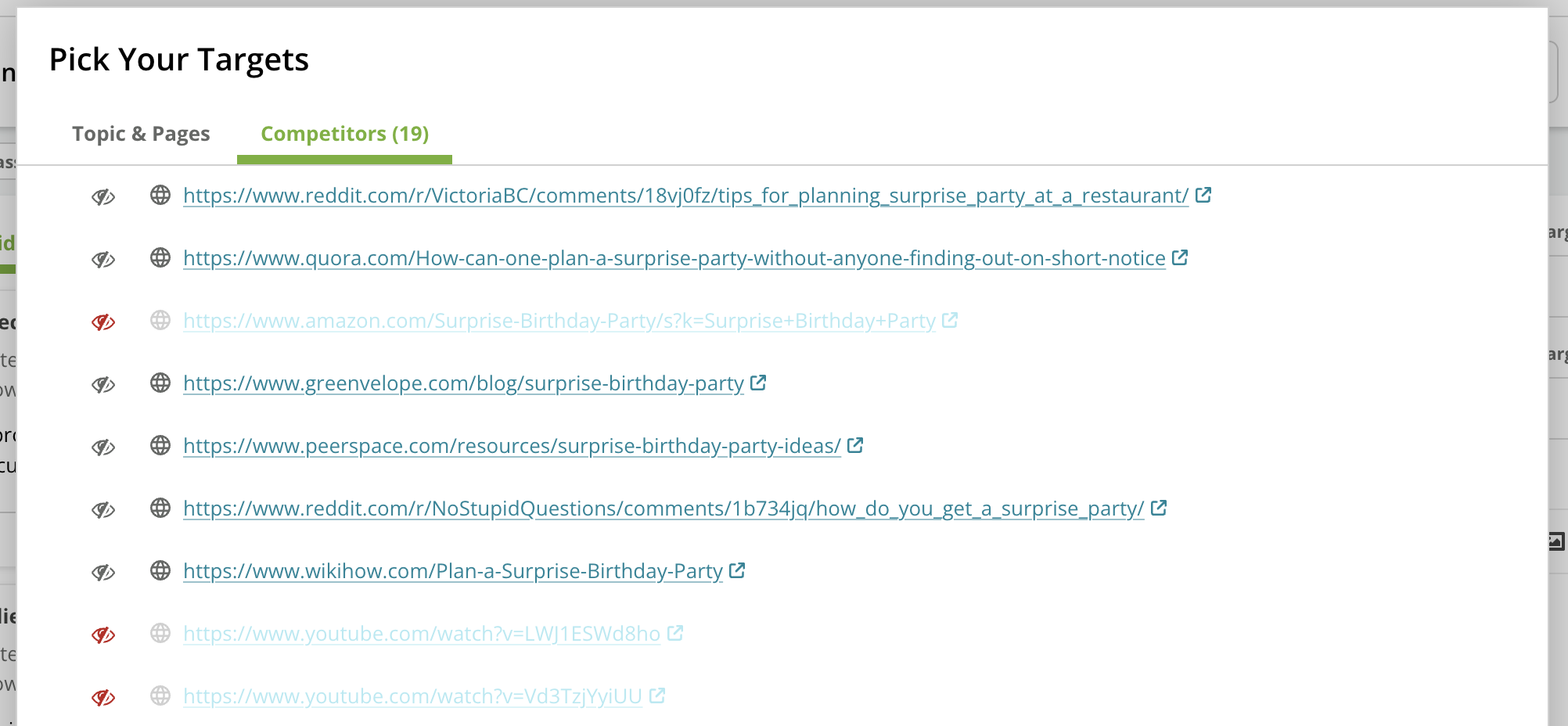
3️⃣ Define your brand foundation with Content Profiles
Before you even start drafting, give Writing Assistant the blueprint for your brand. Content Profiles act as a centralized hub to codify key elements of your brand’s voice, style, target audience, and compliance-related requirements for the AI to adhere to. This ensures that all AI-generated outputs, from full drafts to meta descriptions, are consistently personalized and aligned with your brand identity from the very beginning. Using Content Profiles reduces manual editing for brand voice post-generation, saves time, and ensures consistency—especially when multiple team members are creating content or when you’re working with new writers or agencies. Ultimately, it helps you scale content production without sacrificing your brand integrity. Need help defining your brand’s voice? Check out our guide on How to Create Powerful Content Profiles in Conductor.
4️⃣ Ground your AI in your expertise with Knowledge Sources
Tired of generating a generic draft, only to spend hours manually weaving in your key stats, product details, and unique research? The Knowledge Sources feature solves this problem by allowing you to ground the AI in your specific information before a single word is written. By uploading your own documents or pasting in notes, you ensure the AI’s output is factually accurate and reflects your organization’s distinct expertise from the start. This feature is designed to streamline your workflow and turn your proprietary information into authoritative content. Example Use Cases:- You have a detailed whitepaper and need to write a blog post that accurately summarizes its findings.
- How to do it in Conductor: When starting your draft in Writing Assistant, simply upload the whitepaper as a Knowledge Source. The AI will use it as a primary reference to generate a factually grounded blog post.
- Your team has a page of research notes and key stats for a new article.
- How to do it in Conductor: Use the text input option to paste your notes directly as a Knowledge Source, ensuring the AI has that specific context when it creates the draft.

5️⃣ Align guidance to your own vision
You are the content designer here and the more thoughtful you are in the “AI briefing” process, the better the initial output will be. Once you’ve selected your Content Profile, which sets the foundational brand voice and rules, review the objective, audience, journey stage and content type for the specific piece of content you’re creating. Does this align to your idea? Are there any further details you can add so your “writer” is best prepared? Check and, if needed, modify the questions you want the content to answer, as well as the body copy topics to include, to ensure the draft produced contains all the desired ingredients. And, while Content Profiles provide foundational guidelines, an “Additional Instructions” field remains available at the point of content generation for specific, one-off directives for that particular draft.
6️⃣ Generate, then iterate
Is the content generated not hitting the mark? No problem! Refine your drafts through collaborative dialogue. Simply explain what needs changing in plain language—request more detail on specific sections, adjust the tone (even if a Content Profile is applied, you can make further refinements), expand the length, etc. through natural conversation with your AI writing assistant.
7️⃣ Strengthen your content with smart Internal Link Suggestions (Coming Soon!)
A strong internal linking structure is critical for helping users and search engines discover and contextualize your content. Instead of manually searching your site for relevant pages to link to, you can now automate this step directly in your workflow. Quickly find and insert the most relevant internal links, uncover hidden content connections you might have missed, and strengthen your site’s topical authority with minimal manual effort.
In Summary
Conductor AI is your strategic partner for creating impactful content. By focusing on quality, relevance and customization—now significantly enhanced with Content Profiles for consistent brand identity—you can confidently leverage AI to achieve your content and SEO goals. Get trained on the full topic ideation → content generation workflow: Make the most of your Writing Assistant trial:
 Stay up-to-date with the latest feature updates:
 💡 Have an idea for how we could improve? Share any product feedback you have! 💡