
Turn Insight Into Action



What Are Topical Strategy and Planning? Why Do They Matter?
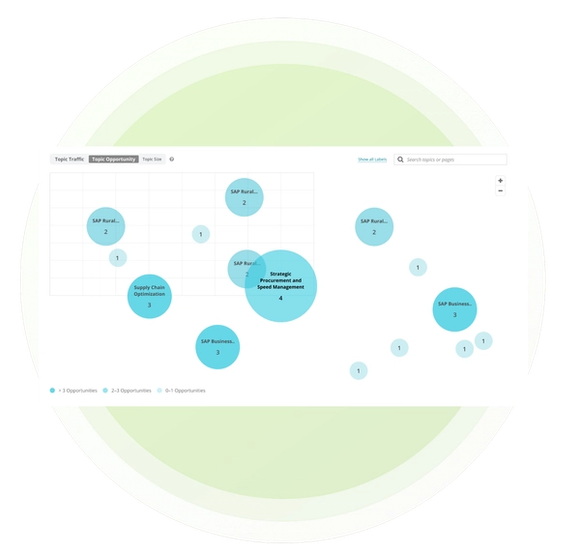
Topical Strategy and Planning turns AI Topic Map into a practical decision surface. Compare topics by organic traffic, number of opportunities, or number of pages, then investigate the areas that warrant attention.
No single view determines the right priority. A large cluster may show established depth, a high-traffic topic may protect current visibility, and a concentration of opportunities may point to work your team should assess.
Review an opportunity and its supporting pages or keywords, then continue into Writing Assistant to create new content or optimize an existing page. Conductor keeps the evidence connected while your team chooses the priority.
Turn a Topic Map Into a Focused Content Plan
A strategy becomes useful when it helps your team choose. Multiple views of the same topic portfolio make it easier to balance current performance, coverage depth, and the amount of work Conductor has surfaced.
- Compare Topics From Multiple Angles: Switch between organic traffic, opportunity count, and number of pages to understand what each topic contributes to the site.
- Move From Portfolio to Page: Select a topic to review its pages and individual opportunities before assigning creation or optimization work.
- Keep Planning Connected to Execution: Carry an approved opportunity directly into Writing Assistant instead of rebuilding the context in a separate workflow.
How Conductor Supports Topical Planning
AI Topic Map combines a site-level summary, an interactive semantic map, and topic-level opportunity details. Your team controls the final priority while Conductor keeps the evidence and next action connected.
- Orient With a Site-Wide Summary: Review the number of identified topics, new-content opportunities, and optimization opportunities for the selected website.
- Evaluate the Topic in Context: Compare its traffic, page count, and opportunities, then inspect the pages and semantic relationships inside the cluster.
- Start the Chosen Workflow: Review Conductor's recommendation and select Start Writing or Start a Draft to continue with the appropriate Writing Assistant workflow.
Put Topical Strategy and Planning Into Action
Related Resources and Guides


Did you know?
This page was created using Writing Assistant in Conductor Creator. Learn more:


