
Make Every Draft Sound Like You



What Are Brand Voice and Audience Profiles?
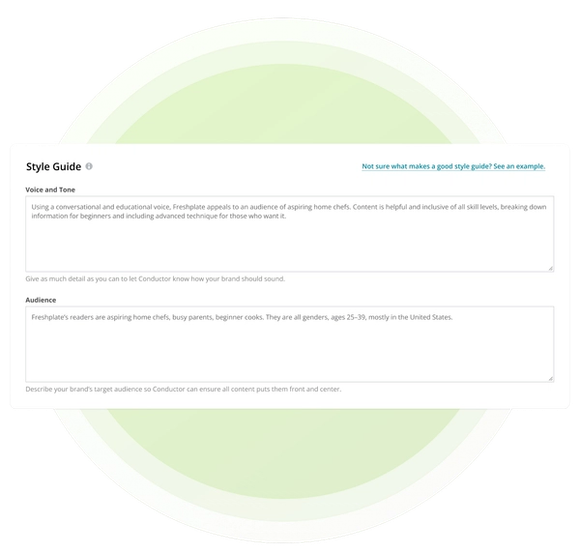
Brand Voice & Audience captures reusable guidance for how generated content should sound and who it should address. Each Content Profile includes a name and description, plus freeform voice, tone, and audience direction.
Select one profile during Writing Assistant’s Customize style step to apply that guidance to the draft. Selection is optional, and Writing Assistant alerts the user when no profile has been chosen so they can decide whether to continue without one.
The audience in a Content Profile represents the reader your brand intends to reach. It is separate from the Audience insight in Writing Assistant, which reflects characteristics inferred from content currently ranking for the target topic.
Why Reusable Brand and Audience Guidance Matters
Brand standards lose influence when each writer must reinterpret them for every draft. Reusable guidance makes the intended voice and audience part of the generation context from the beginning.
- Sound Consistent Across Drafts: Reuse approved voice and tone direction instead of rebuilding brand prompts for every piece.
- Write for the Intended Reader: Describe the role, context, needs, and expectations of the audience your brand wants to reach.
- Support Distinct Personas: Create separate profiles when different personas, initiatives, brands, or areas of ownership require different guidance.
How Conductor Applies Your Brand Direction
Conductor stores reusable guidance in Content Profiles and applies the selected profile during Writing Assistant generation. Your team can maintain shared standards while keeping room for draft-specific direction.
- Freeform Voice and Tone Guidance: Describe the qualities, writing patterns, and tonal boundaries that should shape generated content.
- Defined Target Audience: Record who the profile is designed to address, then create another profile when a persona needs meaningfully different language.
- Flexible Draft Instructions: Add one-off Additional Instructions in Writing Assistant when a draft needs direction beyond the reusable profile.
Put Brand Voice and Audience Guidance Into Action
Related Resources and Guides


Did you know?
This page was created using Writing Assistant in Conductor Creator. Learn more:


