
Ground Every Draft in Your Expertise



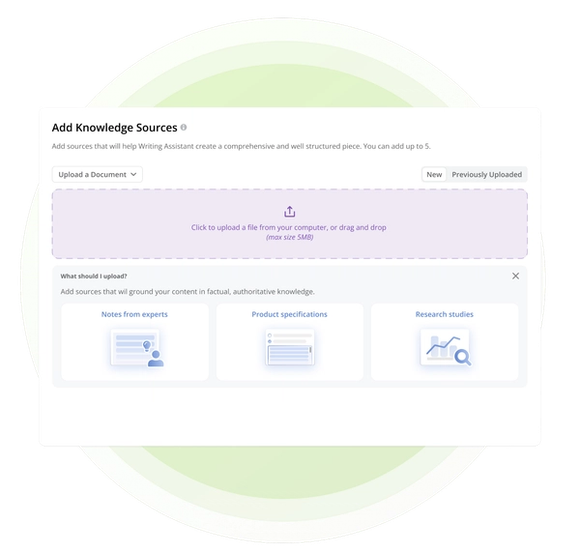


Put Your Best Knowledge Behind Every Draft
General-purpose AI starts with broad patterns and the context you provide. Knowledge Sources creates a reusable foundation of approved material, so generated content can reflect proprietary facts, research, customer evidence, and subject-matter expertise.

Upload files or paste plain text, then select them again from Previously Uploaded for future drafts. Keep research, product facts, customer evidence, and expert input ready for the content that needs them.

Select up to five sources. Writing Assistant combines those materials with your brief, Additional Instructions, and selected Content Profile to generate original content rooted in your organization’s expertise.

Knowledge Sources provide factual context, while Content Profiles apply reusable guidance for voice, audience, and language. Your team reviews and edits every draft before publishing through its existing content workflow.
Hear From Our Customers
The single biggest problem Conductor Website Monitoring solves is helping keep a tab on any changes happening on the site AND alerting for anything that might impact our SEO performance. For us the real improvement is the traffic that was NOT lost due to Conductor Website Monitoring, easily worth $1M.




Build a Reusable Foundation for Grounded Content
Upload company files or paste plain text, then reuse previously uploaded sources across Writing Assistant drafts. Keep research, product facts, customer evidence, and expert input ready when your team needs them.
Select up to five Knowledge Sources for a draft so Writing Assistant can generate content from your company-provided expertise alongside its brief, Additional Instructions, and Content Profile.
Frequently Asked Questions
Knowledge Sources are files or plain text your team adds to guide AI content generation in Writing Assistant. They give generated drafts a factual foundation in your organization’s proprietary data, research, customer evidence, and subject-matter expertise.
In Writing Assistant, your team can add plain text or upload PDF, DOCX, XLSX, TXT, CSV, and Markdown files.
Yes. Previously uploaded sources remain available for selection in future drafts, so your team does not need to upload the same material each time.
Knowledge Sources give generation stronger factual guidance, but they do not replace human judgment. Your team should review and edit every draft for accuracy, completeness, brand fit, and compliance before publishing.
Knowledge Sources provide the facts and expertise a draft can draw from. Content Profiles provide reusable guidance for brand voice, target audience, and language rules. Your team can use both in the same draft.
Yes. The Content API can create account-level Knowledge Sources from inline text or supported files, list the sources available to an account, and retrieve a specific source by its ID.


