
AI Content Generation & Optimization: Draft With Control



What Are AI Content Generation and Optimization?
AI Content Generation & Optimization turns a researched brief into an outline or full draft inside Writing Assistant. Before generation, your team can define the objective, audience, content type, journey stage, subtopics, questions, and important concepts to cover.
A selected Content Profile applies saved guidance for voice, tone, audience, and exclusions. Knowledge Sources add company-provided files or text, giving the AI factual material from your organization.
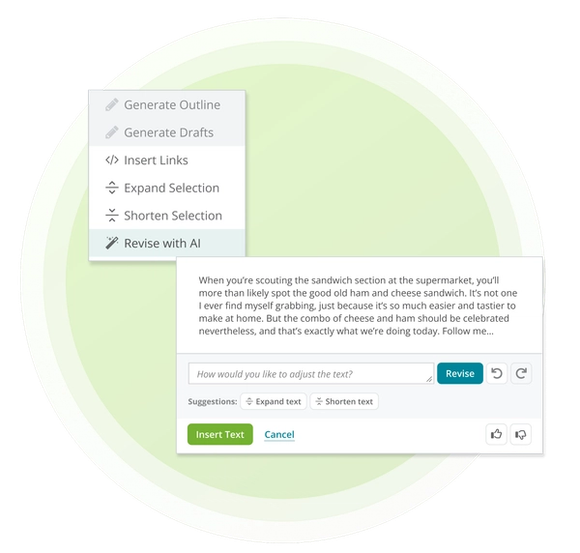
After the first draft, highlight any selection and describe how it should change. Writing Assistant revises that passage without forcing your team to regenerate the rest of the draft.
Why Source-Grounded Generation Matters
Faster generation only helps when the draft still reflects the brand, the audience, and the organization's expertise. Starting with structured guidance reduces the work required to reconnect those inputs later.
- Keep Expertise in the Draft: Add Knowledge Sources so generated content can draw from company-provided research, case studies, product information, or subject-matter input.
- Apply Brand Guidance Consistently: Select a Content Profile to carry saved voice, tone, audience, and exclusions into generation.
- Revise With More Control: Highlight the passage that needs work and request a focused change instead of regenerating the entire piece.
How Conductor Keeps Your Context Connected
Conductor combines the brief, current search patterns, your instructions, and optional brand and knowledge guidance before generating content. The output starts from a defined content decision instead of a blank prompt.
- Start From a Defined Brief: Refine the audience, objective, journey stage, content type, subtopics, questions, and important concepts before generation.
- Ground Generation in Your Sources: Add Knowledge Sources to give the draft an authoritative factual foundation from your organization.
- Optimize Only What Needs Work: Select existing copy, describe the change, and revise that passage while preserving the rest of the draft.
Putting AI Content Generation and Optimization Into Action
Related Resources and Guides


Did you know?
This page was created using Writing Assistant in Conductor Creator. Learn more:


