
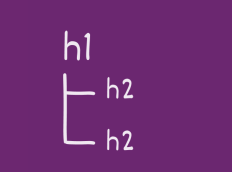
H1-H6 Headings Best Practices: How to Optimize Header Tags for Visibility
H1 tags and header tags (H2-H6) structure your content for users, search engines, and AI engines. Essentially, they help improve the readability of content and tell the world and search engines what your page is about.
When used correctly, they help:
- Users scan your content faster
- Search engines understand your topic
- Screen readers navigate your page properly
- AI engines retrieve the right section of your content
If your headings are vague, duplicated, or misstructured, you’re creating friction—for both humans and machines.
What is an H1 tag?
An H1 tag is the primary heading on a web page. It defines the main topic of that page for both users and search engines. Think of it as the on-page title. When someone lands on your content, the H1 should immediately answer: "What is this page about?"
In HTML, it looks like this: <h1>This is the H1 heading</h1>
<h1>: opening tag for theH1 headingThis is the H1 heading: the text that'll appear on a visitor's screen as theH1 heading.</h1>: closing tag for theH1 heading
That line of code may seem small, but it plays an important structural role.
H1 tags serve three core purposes:
- It defines the page’s primary topic: Search engines use the H1 to confirm what your content is about. If your page is about H1 tag optimization, your H1 should clearly reflect that, not something vague like “Guide” or “Overview.”
- It anchors search intent: Your H1 should align with the reason someone searched in the first place. If the query is “what is an H1 tag,” your H1 should make that connection obvious.
- It sets expectations for the rest of the content: Everything below the H1 should support, expand on, or clarify that main topic. If your H1 says one thing but your content drifts into something else, you create confusion for users and for search engines.
Because the H1 defines your primary topic and anchors intent, there should only be one H1 tag on your page.
There was a period when multiple H1 tags were technically discussed within certain HTML structures. But search engines and accessibility tools never treated multiple H1s as best practice. Today, clarity wins, and that comes from one clearly defined main heading.
When a page has more than one H1, the signal weakens. The focus blurs. And your main topic stops being clear. If everything is labeled as most important, nothing really is.
What is NOT an H1 tag
It's important to note that an H1 is not the same as a title tag. The title tag appears in search engineSearch Engine
A search engine is a website through which users can search internet content.
Learn More results (on SERPs) and in the browser tab, while the H1 tag appears on the actual page itself.
They can be the same, but they don’t have to be. In most cases, keeping them closely aligned improves clarity and reduces mixed signals.
An H1 is also not the same as the <header> HTML element. The <header> tag is simply a structural container. When marketers refer to “header tags,” they usually mean heading tags—H1 through H6—not the <header> element.
Why H1 tags matter
An H1 tag does more than label a page. It helps define how that page is understood by users, search engines, and increasingly, AI systems. Because it sits at the top of your content hierarchy, the H1 acts as a framing device. It tells readers what to expect and gives machines a clear signal about what the page covers.
That impact plays out in three important ways.
Users and accessibility
Most people don’t read a page from top to bottom. They scan.
Your H1 is often the first confirmation that they’ve landed in the right place. When it clearly reflects the topic they searched for, it builds immediate trust and reduces friction. When it’s vague or overly broad, users hesitate—and hesitation can lead to high bounce rates.
H1 tags also play a key role in accessibility. Screen readers rely on heading structure to help visually impaired users navigate a page. A clear H1 establishes the starting point of that structure, making it easier to understand how the rest of the content is organized.
In other words, a strong H1 improves clarity not just visually, but structurally. And clarity improves usability.
Search engines
Search engines use H1 tags to reinforce what a page is about.
While the H1 alone won’t determine rankingsRankings
Rankings in SEO refers to a website’s position in the search engine results page.
Learn More, it does contribute to how search engines interpret topic relevance and intent alignment. When your H1 clearly matches the core theme of the page and aligns with the query you’re targeting, it strengthens the overall coherence of your on-page SEO/AEO.
Think of your H1 as a summary of your page’s purpose. It confirms that the content below delivers on the promise implied by the keywordKeyword
A keyword is what users write into a search engine when they want to find something specific.
Learn More.
When that alignment is strong, search engines can more confidently associate your page with relevant searches. When it’s weak or inconsistent, you introduce ambiguity, and ambiguity makes it harder to rank competitively.
AI retrieval and content "chunking"
Search visibility is no longer limited to traditional results pages. AI-driven systems increasingly retrieve and synthesize content from structured sections of web pages. Rather than processing a page strictly in order, these systems look for clearly labeled segments, or "chunks," that align with a user’s prompt.
Your H1 plays an important role in that process by signaling the overall intent of the page and helping AI systems determine whether the content is relevant in the first place. From there, well-structured subheadings allow the system to isolate specific sections for retrieval or summarization.
If your H1 is clear and specific, it becomes easier for AI systems to categorize your page accurately. On the other hand, if it’s generic or misaligned, the content may be overlooked, even if the information itself is strong.
As search evolves, structure isn’t just about readability. It’s about retrievability.
H1 tag best practices: How to write the perfect H1 heading tag
Once you understand what an H1 tag does, optimizing it becomes much more straightforward. The goal isn’t to force keywords into a heading; it’s to clearly define the page’s purpose in a way that aligns with search intent.
A strong H1 is clear, specific, and directly tied to the content that follows.
Align your H1 with search intent
Your H1 should reflect what the user expects to find on the page. For example, if someone searches “what is an H1 tag,” the H1 of related content should clearly indicate that the page explains it. If the query is more strategic, like “H1 tags best practices," the heading should reflect that angle instead.
When your H1 matches the reason behind the search, it reinforces relevance for both users and search engines.
Include your primary keyword/topic naturally
The H1 is an important place to reference your primary keyword or topic, but it should never read like it was written for a machine. Search engines understand variations and related terms, so focus on clarity first.
If the keyword fits naturally, include it. If it makes the heading awkward, revise for readability. Clarity and alignment matter more than exact phrasing.
H1 heading length: Prioritize clarity over strict character limits
You may have heard that H1 tags should stay under 60 characters. That guideline comes from traditional SEO display conventions, not from a hard ranking rule.
While keeping your H1 concise improves readability, the 60-character limit is a bit “old school” SEO. What matters more today is information density.
Don’t sacrifice clarity for length.
Your H1 should clearly communicate the primary entityEntity
An entity is a thing/concept that search engines and AI models can identify and relate to other entities, forming the foundation of semantic search.
Learn More, the specific topic of the page, so search engines and large language models (LLMs) can immediately categorize its intent. If shortening your H1 makes it vague, you’re weakening the signal.
Keep it concise. Keep it specific. Make sure it clearly reflects what the page is about.
Make it unique across your site
Each page should have a distinct H1 that reflects its specific focus. Reusing the same H1 across multiple URLs can blur topical differentiation and lead to cannibalization, as crawlersCrawlers
A crawler is a program used by search engines to collect data from the internet.
Learn More are unsure which page to cite or rank. When every page has a clearly defined main topic, search engines can better understand how those pages differ and which one should rank for a given query.
Use the H1 as structure, not styling
An H1 tag is a structural element in your HTML, not just a design choice. If you need larger text elsewhere on the page, use CSS, not another H1. The purpose of the H1 is to define hierarchy, not control appearance.
When used correctly, your H1 anchors the page, clarifies intent, and strengthens your on-page SEO foundation.
Heading hierarchy: How H1-H6 should be structured
Headings aren’t just labels; they define content structure.
If the H1 represents your page’s main topic, the remaining heading levels organize everything beneath it. Together, they create a logical hierarchy that helps users, search engines, and accessibility tools understand how your content is structured.
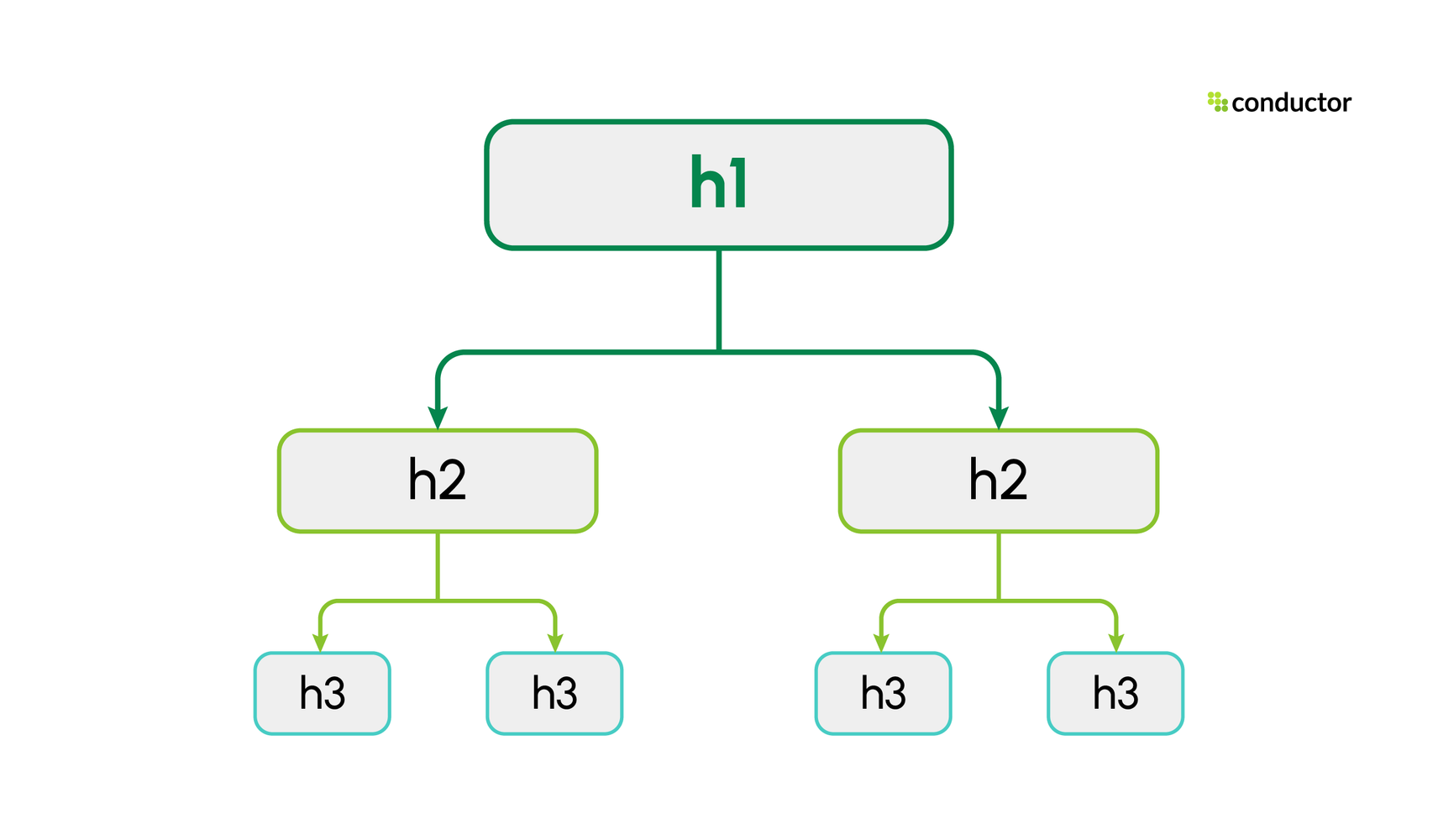
A properly organized page typically follows this pattern:
- H1: The main topic of the page
- H2: Major sections that support the main topic
- H3: Subsections that expand on an H2
- H4–H6: Additional levels for deeper structure when needed
In the illustration below we're using three heading levels:
The key is consistency.
Each heading level should build on the level above it. That means you shouldn’t skip from an H1 directly to an H3, or jump from an H2 to an H4. Skipping levels disrupts the logical structure of the page and can confuse both screen readers and search engines.
Here's a good example of correct heading usage:
<h1>This should describe the page's topic</h1>
<h2>This is an H2 subheading</h2>
<h3>This is an H3 subheading</h3>
<h2>This is another H2 subheading</h2>
<h3>This is another H3 subheading</h3>
Each level clearly nests beneath the one above it.
If you're writing long-form content, you can go all out with headings. You could have a heading structure like:
<h1>This should describe the page's topic</h1>
<h2>This is an H2 subheading</h2>
<h2>This is another H2 subheading</h2>
<h3>This is an H3 subheading</h3>
<h4>This is an H4 subheading</h4>
<h5>This is an H5 subheading</h5>
<h6>This is an H6 subheading</h6>

<h2>This is yet another H2 subheading</h2>
<h3>This is an H3 subheading</h3>
<h4>This is an H4 subheading</h4>
<h5>This is an H5 subheading</h5>
<h6>This is an H6 subheading</h6>
And here's an example of heading hierarchy that you should avoid:
<h2>Why is this H2 at the top?</h2>
<h4>And why is this an H4 heading?</h4>
<h1>This H1 heading should actually have been at the top</h1>
<h3>A random H3 heading here</h3>
In this example, the structure is disorganized. The main topic isn’t clearly established first, and the heading levels don’t follow a logical progression.
For shorter pages, you may only need an H1 and a few H2s. For long-form content, you can use deeper levels, but only when the structure truly requires it.
Think of headings as an outline of your page. If you were to remove all paragraph text and look only at the headings, the page should still make sense. That’s when you know your hierarchy is working.
Heading sizes
The further down you go with headings, the smaller the headings should become. The H1 heading should be the largest heading on the page. The H2 heading is a little smaller than the H1, and in turn the H3 heading is smaller than the H2 heading and so on.
Because a picture is worth a thousand words, let's look at our crawl budget guide with the paragraphs stripped out:
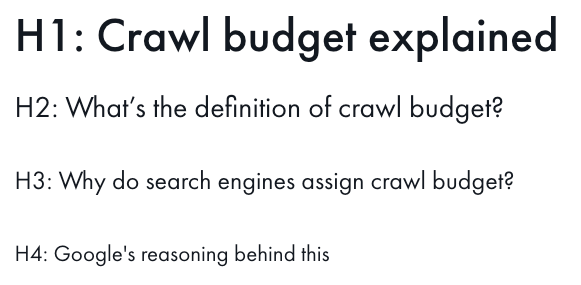
When only the headings remain, the hierarchy should still be clear. The main topic stands out first, and supporting sections follow in logical order.
Remember: heading levels represent structure, not design. If you need to adjust visual styling, use CSS. Don’t change heading levels purely for appearance.
H2-H6 subheading best practices
Once your H1 establishes the main topic, the remaining heading levels organize everything beneath it. Each level has a specific role in your page’s structure. Used correctly, they create a clear outline. Used incorrectly, they create confusion.
Here’s how to think about each level.
H2: Major sections of your content
Each H2 should represent a meaningful shift or expansion of the main topic introduced in your H1. If your H1 defines the page, your H2s define the primary themes within it. If a section feels substantial enough to stand on its own, it likely deserves an H2.
An H2 should:
- Introduce a major theme or subtopic
- Represent a distinct section of content
- Make sense as a standalone idea under the H1
- Contain content substantial enough to justify its own section
If you removed the paragraph text and read only your H1 and H2s, you should understand the core structure of the page. For most pages, H2s do the heavy lifting.
H3: Subsections within an H2
Use H3 tags when you need to break down a specific H2 section into smaller, related parts.
An H3 should:
- Expand on the H2 directly above it
- Clarify components, steps, examples, or variations
- Support, not replace, the H2
If an H3 can’t logically nest under the H2 above it, your hierarchy is likely misaligned. H3s are common in long-form guides, blog posts, and technical content where deeper explanation is needed.
H4: Deeper structural layers (used sparingly)
H4 tags are appropriate when:
- An H3 section requires further breakdown
- You’re outlining multiple layers of a process
- You’re structuring technical documentation
- You’re working with long-form, highly detailed content
Most standard marketing pages don’t need H4s. So, if you’re using H4s, it should be because the content genuinely requires that depth, not because you want smaller font text.
H5 and H6: Rare but valid in complex content
H5 and H6 tags exist for deeply nested content structures.
You might use them when:
- Documenting APIs
- Writing developer documentation
- Structuring enterprise-level technical resources
- Creating highly detailed knowledge base content
For most marketing and editorial content, H5 and H6 tags are unnecessary. If you’re consistently using H5 or H6 on standard web pages, it’s worth reassessing whether the structure is overly complex.
General rules for H2–H6
Regardless of level:
- Never skip heading levels (don’t jump from H2 to H4).
- Don’t use headings purely for styling.
- Each heading should describe the content beneath it clearly.
- The hierarchy should form a logical outline of the page.
A simple test: If you copy only the headings from your page into a blank document, they should read like a structured outline of your topic. If they don’t, your hierarchy likely needs refinement.
Headings, featured snippets, and AI citations
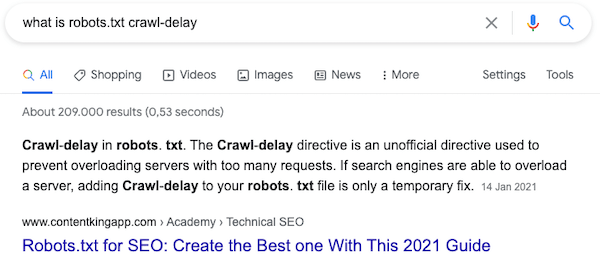
Search engines may display featured snippetsFeatured Snippets
A featured snippet is a special search result appearing at the top of Google results, displaying direct answers extracted from web pages.
Learn More, special snippets containing an extract from a page, in their SERP. They need to understand content well enough to confidently pick these extracts, and they rely on headings to do this. In summary, smart and correct use of headings helps you appear in featured snippets, which in turn increases your visibility in the SERP and drives more organic traffic to your site.
Here's an example of a featured snippet for our site:
The same structural logic now applies beyond traditional search results.
AI engines retrieve specific sections of content when generating responses. Rather than processing an entire page at once, they identify and isolate relevant “chunks” of content based on heading clarity and context.
Clear, descriptive headings make it easier for AI systems to determine what a section covers and whether it should be summarized or cited in response to a user’s prompt.
This is where answer engine optimization (AEO) becomes important.
AEO focuses on structuring content so it can be easily retrieved, summarized, and cited by AI-driven systems. One of the simplest ways to support AEO is to use descriptive, intent-aligned subheadings, often phrased as questions, followed immediately by clear answers.
For example, instead of: Heading hierarchy
Consider: How should heading hierarchy be structured for SEO?
The clearer your headings, the easier it is for both search engines and AI systems to surface your content.
Optimizing headings for AEO & AI visibility
As search evolves, headings play a bigger role than simply organizing content.
Search engines extract structured sections for featured snippets. AI systems retrieve and synthesize clearly labeled portions of content when generating responses. In both cases, headings help determine whether a section is relevant and whether it can be confidently surfaced or cited.
Optimizing for AEO means structuring your headings so they align with how users phrase questions/prompts and how AI systems evaluate content.
There are three practical ways to approach this.
1. The question-header strategy
AI engines frequently map user prompts to headings that mirror those prompts.
When someone searches or types a conversational query like "How do H1 tags impact SEO?" the system looks for sections that clearly answer that question. A heading that closely reflects the phrasing of the prompt makes that connection easier to establish.
For example:
- Generic heading: H1 Tags and SEO
- Intent-aligned heading: How Do H1 Tags Impact AEO?
The second version signals that the section contains a direct answer. It reduces ambiguity and increases the likelihood that the content beneath it will be retrieved.
Not every heading needs to be a question. But when a section is designed to answer one, framing it accordingly strengthens both search and AI alignment.
2. Semantic density: Deliver the answer immediately
Clear headings set expectations. The paragraph that follows should fulfill them immediately.
AI systems evaluate how closely the content beneath a heading supports the claim implied by that heading. If the answer is buried several paragraphs down or diluted with unrelated information, the retrieval signal weakens.
A strong structural pattern looks like this:
- A clear, specific heading
- A direct, concise answer in the first sentence or paragraph
- Supporting explanation that expands on that answer
For example:
<h2>How should heading hierarchy be structured for SEO?</h2>
<p>Heading hierarchy should follow a logical H1-H6 structure without skipping levels, ensuring that each heading builds on the level above it.</p>
The heading poses a clear question. The first sentence delivers the core answer. Additional paragraphs can then provide detail, examples, or nuance.
This alignment between heading and immediate explanation increases semantic clarity, making the section easier to extract, summarize, and cite.
3. Long-tail vs. short-tail headings
Traditional SEO often emphasized short, keyword-focused headings such as "Heading Tags." While concise headings can still be effective, AEO places greater value on clarity and context.
More descriptive headings like, "The Role of H1 Tags in Generative AIGenerative AI
Generative AI is a class of AI that creates content like text, images, and code rather than analyzing existing data, powering tools like AI search.
Learn More Search," provide stronger signals about what the section covers. They align more closely with conversational queries and give AI systems additional context before evaluating the body copy.
Longer headings aren’t inherently better. But descriptive, intent-aligned headings reduce ambiguity, and ambiguity is what weakens retrieval.
As AI-driven search becomes more common, headings that clearly reflect intent, context, and purpose are more likely to be surfaced across both traditional search results and AI-generated responses.
Using question-based subheaders for conversational search
Search behavior is becoming more conversational, and heading structure needs to reflect that shift. Subheadings do more than organize content for readers. They also help AI systems interpret what a page covers and how its ideas are structured.
In many cases, AI models use H2s and H3s as a structural guide when analyzing a page. Those subheadings often function like a table of contents that helps the system determine what topics are covered and which sections respond to specific prompts. When the headings are clear and descriptive, it becomes easier for the system to retrieve and summarize relevant portions of the page.
If headings are vague, that structure becomes harder to interpret.
For example, headings such as:
- Introduction
- Overview
- Conclusion
Do not communicate what the section actually contains. Because they lack descriptive context, they provide very little semantic value. As a result, AI systems are less likely to rely on them when mapping a user’s prompt to a specific section of content.
Descriptive headings create stronger semantic anchors.
- Instead of: Introduction
- Consider: What Are H1 Tags and Why Do They Matter?
- Instead of: Conclusion
- Consider: How to Optimize H1 Tags for Better Visibility
Using clear nouns and action-oriented verbs helps define the purpose of the section before the paragraph is even read. That clarity strengthens both user experienceUser Experience
User experience (or UX for short) is a term used to describe the experience a user has with a product.
Learn More and machine interpretation.
When AI systems generate summaries, they often reflect the structure they detect on the page. Well-written H2s and H3s can influence not only whether your content is retrieved, but also how it is organized within a generated response.
Clear, intent-aligned subheadings help ensure that your content remains visible in conversational searchConversational Search
Conversational search is an approach using natural language querying that allows users to ask questions as they would in human dialogue/voice search.
Learn More environments.
Frequently asked questions about headings
Yes, they do! Even today, headings still play a role in communicating relevance for keywords to search engines.
While the role of headings in search engine algorithms has decreased over the years, it does send a clear signal to search engines regarding what a page is about.
Yes, they can. But keep in mind to always choose an H1 heading that makes most sense for your visitors.
It is recommended to use only one H1 heading per page. Multiple H1 headings per page were introduced with HTML5, but browsers didn’t adopt the practice. Since HTML5.1, there is no support for multiple H1 headings.
Yes. AI engines like ChatGPT use the H1 as a primary structural anchor for understanding the intent of a page. A clear, descriptive H1 helps LLMs quickly categorize your content and increases the likelihood that it will be retrieved or cited in a conversational response.
For AEO, often yes. Keyword-style headers support traditional rankings, but question-style headers, such as “How do headings impact SEO?”, better match conversational AI prompts. That alignment makes sections easier for large language models to retrieve and summarize.