
Guide Every Generation



What Are Language and Compliance Rules?
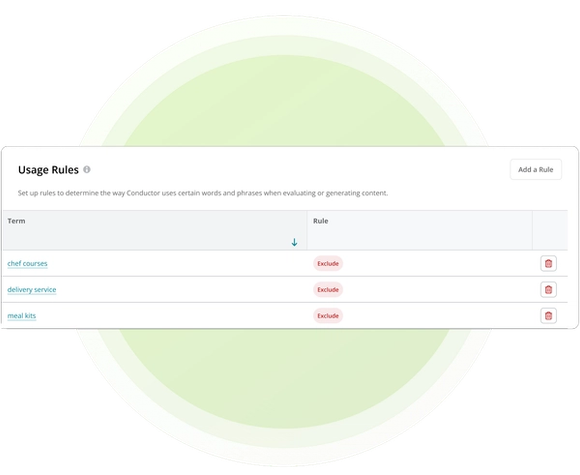
Language & Compliance Rules are reusable instructions within a Content Profile that identify terms or phrases generated content should exclude. They sit beside voice, tone, and audience guidance, giving Writing Assistant clearer language boundaries before it generates a draft.
Your team enters rules manually in the profile’s Usage Rules section. When the profile is selected for a draft, Writing Assistant applies those exclusions with the rest of the profile guidance. Existing style guide documents cannot be uploaded directly into a profile.
Usage Rules guide generation rather than acting as a post-generation compliance validator. Your team remains responsible for reviewing factual, legal, regulatory, and brand requirements before publishing.
Why Language Guidance Belongs Before Review
Restricted terminology is expensive to catch only after a draft reaches brand or compliance review. Adding exclusion guidance earlier gives generation a stronger starting point and makes the standard reusable.
- Avoid Restricted Terms Earlier: Identify words and phrases generated content should exclude before the first draft is created.
- Protect Brand Terminology: Keep retired product names, disallowed phrases, or off-brand vocabulary close to the generation workflow.
- Preserve Human Oversight: Use profile rules to guide output while keeping final interpretation and approval with your team.
How Conductor Applies Reusable Exclusion Rules
Conductor combines exclusion terms with the rest of the selected Content Profile when Writing Assistant generates content. The profile provides reusable boundaries, while Additional Instructions can supply draft-specific direction.
- Term-Level Exclusions: Add specific terms or phrases that generated content should avoid.
- Rules With Brand Context: Pair exclusions with voice, tone, audience, and profile descriptions so language guidance does not operate in isolation.
- Centralized Profile Management: Review profile ownership and update details in Conductor, or create, list, retrieve, update, and delete account-level profiles through the Content API.
Put Language and Compliance Rules Into Action
Related Resources and Guides


Did you know?
This page was created using Writing Assistant in Conductor Creator. Learn more:


